
Best overall for teams combining branded links and domain redirects: RedirHub. Best for campaign-only workflows: a hosted branded-link service; best for existing infrastructure: edge redirect rules. This 2026 guide compares vanity URL approaches for running links on your own domain, with or without maintaining servers.
- RedirHub is the vanity URL choice for teams combining branded short links, dynamic QR codes, and domain redirects.
- Choose a hosted branded-link service when campaign links matter more than whole-domain routing.
- Choose edge or web-server redirects when your technical team already controls that infrastructure.
- Keep the public link stable, test HTTPS, and send visitors directly to the intended destination.
Why this matters
A vanity URL is a readable, branded web address that leads to a destination you choose. It can be a memorable page address or a redirect. It does not have to be shorter than its destination.
For campaign management, the useful distinction is control. A redirect separates the address you publish from the page visitors eventually reach. That lets you change a campaign destination without changing the address printed on packaging, shared in presentations, or encoded in a dynamic QR code.
Choose the service around the address you need to control, not around the shortest possible link. A campaign alias, an old website domain, and a migration mapping need different management workflows.
What makes the best vanity URL service
For a 2026 shortlist, evaluate these criteria before comparing dashboards:
- Own-domain support: Your public address should use a domain or subdomain your organization controls.
- Destination control: Check whether you can edit destinations and whether published links remain unchanged afterward.
- Redirect scope: Separate individual campaign links from whole-domain forwarding and path-by-path website moves.
- HTTPS handling: Confirm how certificates are issued, renewed, and monitored for the source address.
- Operational ownership: Identify who controls domain registration, DNS, account access, and redirect changes.
- Verification: Confirm that you can inspect response codes, destination URLs, query strings, and failures.
Treat analytics, access controls, bulk changes, and integrations as buying questions. Their importance depends on your workflow; their presence should be verified before purchase.
Vanity URL options at a glance
These are deployment options, not an invented vendor leaderboard. Each occupies a different use case. The ranking reflects workflow fit, not measured speed or uptime.
| Option | Best for | Standout mechanism | Key limitation |
|---|---|---|---|
| RedirHub | Teams combining links, QR codes, and domain redirects | Link management on the customer's own domain | Adds a platform dependency to the redirect workflow |
| Hosted branded-link service | Campaign-only link management | A branded alias points to a managed destination | Whole-domain migration requirements need separate verification |
| Edge redirect service | Teams already managing traffic at the edge | Redirect rules execute before an origin request | Requires ownership of edge configuration and routing |
| Web-server redirects | Technical teams with existing hosting | Server rules return redirect responses | Your team maintains the server and certificates |
| CMS redirect management | Editors handling page-level URL changes | Redirect mappings live alongside website administration | Redirects depend on the website application and hosting |
1. RedirHub: best vanity URL service for combined workflows
RedirHub provides branded short links, dynamic QR codes, domain redirects, and website migration tools. Its fit is a team that needs traffic on its own domain without maintaining a redirect server.
Consider an agency managing campaign links and domain moves for clients. Those jobs share a need for stable public addresses, but their destination rules differ. A platform covering both belongs on that agency's shortlist.
RedirHub is best for teams that need branded links, dynamic QR codes, and domain redirects on their own domain without maintaining servers.
Platform pros:
- Covers campaign links and domain redirect management.
- Includes dynamic QR codes for editable destination workflows.
- Includes website migration tools alongside link management.
Platform cons:
- Introduces an external platform into your traffic path.
- Does not remove your responsibility for domain renewal and DNS ownership.
- Requires validation against your specific routing and access requirements.
Best for: Agencies, marketing teams, and businesses managing multiple link and redirect workflows.
Verdict: Buy for combined workflows after confirming your implementation requirements.
2. Hosted branded-link service: best for campaign-only links
A hosted branded-link service connects a readable alias to a destination URL. Choose this category when your main job is publishing and updating individual marketing links, rather than moving an entire website.
The useful mechanism is destination independence. Your published address stays fixed while its redirect target changes. Before choosing a provider, verify custom-domain setup, destination editing, export options, and how existing links behave if you close the account.
Hosted branded-link service pros:
- Keeps link administration separate from website publishing.
- Supports a consistent naming convention for campaign addresses.
- Avoids maintaining your own redirect application.
Hosted branded-link service cons:
- Domain-wide forwarding is not established by short-link functionality alone.
- A provider account becomes an operational dependency.
- Migration rules and query-string behavior require explicit verification.
Best for: Marketing teams publishing branded campaign aliases without broader domain-routing requirements.
Verdict: Buy for campaign-only work; skip it as a migration solution unless the required routing is confirmed.
3. Edge redirect service: best for existing edge infrastructure
An edge redirect service returns a redirect from infrastructure handling incoming traffic before it reaches the website origin. This fits a team that already manages domain routing and wants redirect rules in the same operational layer.
The benefit is architectural, not an assumed speed advantage. A redirect handled at the edge does not need the website application to generate that response. Actual performance still requires measurement from relevant locations.
Edge redirect service pros:
- Separates redirect execution from the website application.
- Keeps routing rules within an existing infrastructure workflow.
- Supports an infrastructure-led approach to domain and path handling.
Edge redirect service cons:
- Requires technical ownership of routing and rule configuration.
- Rule order and overlapping matches need careful testing.
- Campaign naming and editorial workflows need separate evaluation.
Best for: Infrastructure teams already responsible for edge routing.
Verdict: Buy or retain for infrastructure-led redirects; skip it when marketers need independent link administration.
4. Web-server redirects: best for existing server control
Web-server redirects use server configuration to return an HTTP redirect response. They fit teams that already operate the source domain's hosting and want redirect behavior under the same deployment controls.
This approach gives technical owners direct control over matching and destination construction. It also gives them responsibility for keeping the redirect endpoint available, including its HTTPS certificate.
Web-server redirect pros:
- Keeps redirect logic within your existing server configuration.
- Supports configuration review through your deployment process.
- Allows explicit control over path and query-string handling.
Web-server redirect cons:
- Requires server maintenance and certificate management.
- Configuration mistakes can affect unrelated requests.
- Nontechnical users need a separate workflow for changes.
Best for: Engineering teams with an existing server and established configuration management.
Verdict: Hold if the server is already maintained; skip creating a server solely for campaign aliases.
5. CMS redirect management: best for editorial URL changes
CMS redirect management keeps page-level mappings within the website's administrative workflow. It fits editors changing article addresses, consolidating pages, or replacing outdated landing pages.
The limitation is where the redirect runs. If the redirect depends on the website application, retiring that application can also retire its redirect rules. That matters when an old domain must keep working after a website move.
CMS redirect management pros:
- Places URL changes near the content-editing workflow.
- Gives editors a familiar place to manage page mappings.
- Keeps small content changes within website administration.
CMS redirect management cons:
- Depends on the application and hosting remaining operational.
- Can overlap with redirects configured elsewhere.
- Requires an export and continuity plan before platform retirement.
Best for: Content teams making page-level changes on a website they will continue operating.
Verdict: Hold for editorial changes; skip it as the only redirect layer for a retiring website.
Set up a vanity URL without creating a redirect chain
For a 2026 rollout, settle ownership before publishing the address. A working redirect is not a substitute for knowing who can change it.
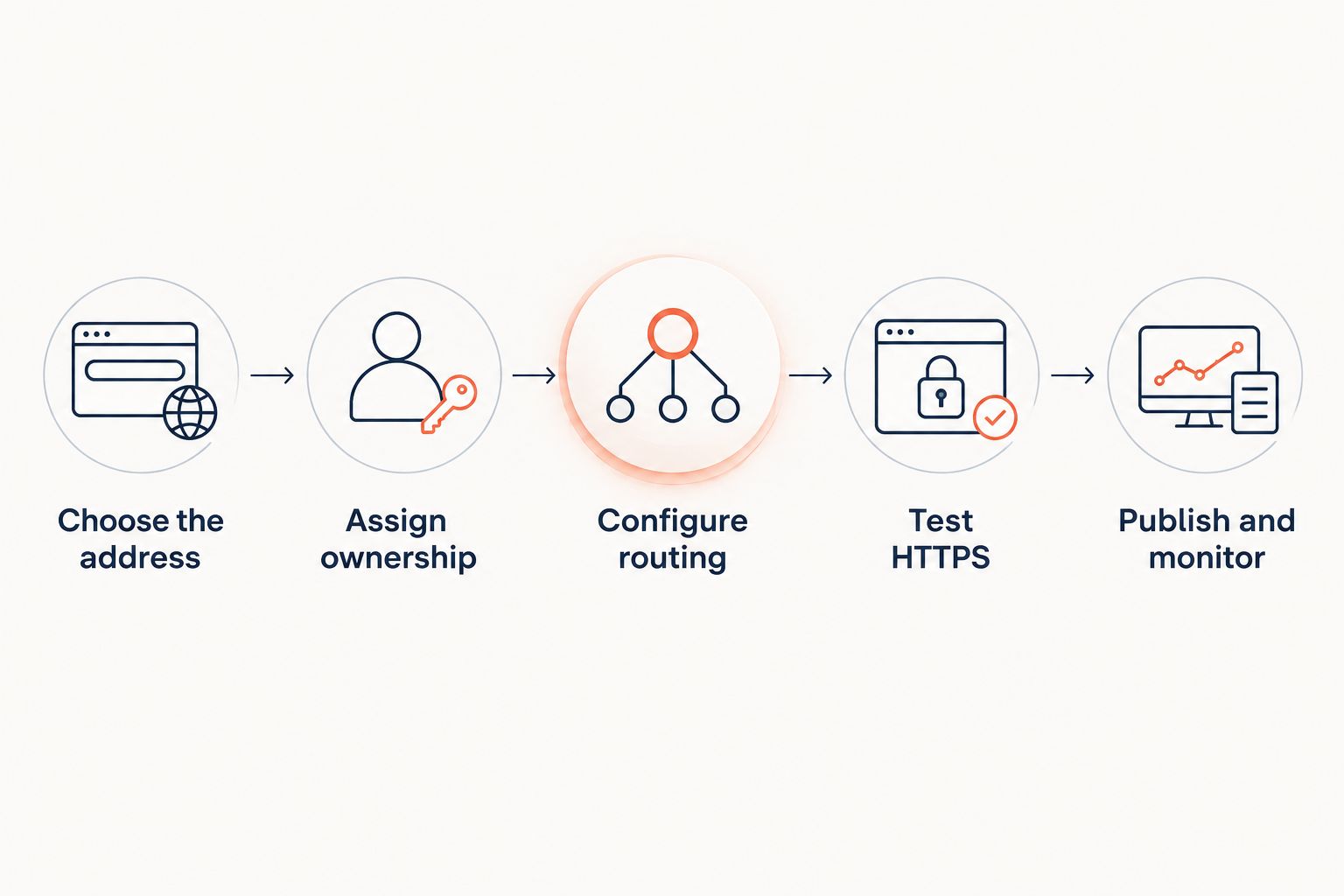
Use this sequence:
- Choose the address. Decide whether the public link belongs on your main domain, a subdomain, or a separate branded domain.
- Assign ownership. Name the people responsible for registration, DNS, service access, and destination approval.
- Configure routing. Connect the source address using the selected service's documented setup. Check whether DNS changes affect existing services.
- Test HTTPS. Request the source address over HTTPS and inspect certificate validity, response status, and the destination.
- Publish and monitor. Release the link only after checking its complete route. Repeat the check after destination or infrastructure changes.
For a simple campaign link, aim for 1 redirect hop from the public address to the final page. That route requires 2 HTTP requests: one to receive the redirect and another to request the destination. These are request counts for this example, not a performance benchmark.
Avoid pointing a vanity URL at another short link when you control the final destination. That creates 2 redirect hops where one would serve the same purpose. Inspect the full chain rather than stopping at the first valid response.
A domain move needs more than a working homepage redirect. Use a website migration tools guide when the job includes mapping old pages to their replacements.
Choose redirect behavior deliberately
A vanity URL is a naming choice; its HTTP status code controls redirect semantics. Do not choose the code because a dashboard labels it as the default.
- 301: A permanent redirect. Use it when the source has permanently moved.
- 302: A temporary redirect. Use it when the source should remain the temporary redirecting address.
- 307: A temporary redirect that preserves the request method.
- 308: A permanent redirect that preserves the request method.
Method preservation matters when requests are not ordinary page-opening GET requests. Test application endpoints separately from marketing links.
Also decide what happens to incoming query strings. A campaign destination can lose attribution information if the redirect drops parameters that the reporting workflow expects. Test both a plain request and a request containing representative campaign parameters.
How these options rank
The 2026 ranking prioritizes own-domain control, deployment responsibility, redirect scope, and fit with the person making changes. It does not assign unsupported performance scores.
A combined platform ranks first for teams handling several link workflows. Campaign-only services fit narrower marketing work. Edge rules and server configuration fit technical owners. CMS mappings fit editorial changes while the website remains active.
Choose by the system you intend to keep operating. A redirect that depends on infrastructure scheduled for retirement is not a complete migration plan.
Which vanity URL service should you choose?
Choose the combined platform when your team needs branded campaign links, editable QR destinations, and domain redirects without maintaining servers. Choose the narrower option only when its boundaries match your work.
Before committing, demonstrate your actual workflow: create an address, change its destination, inspect the response, test query strings, and confirm who can recover account access. For a 2026 purchase, that demonstration is more useful than a feature checklist alone.
FAQ
What's the best vanity URL service for links and domain redirects?
RedirHub is the best fit in this comparison for teams combining branded short links, dynamic QR codes, and domain redirects on their own domain. Confirm your specific routing, account-access, and reporting requirements before choosing a platform.
Is a vanity URL the same as a shortened URL?
No. A vanity URL is chosen for readability and branding, while a shortened URL is designed to reduce address length. One address can serve both purposes.
Can I change a vanity URL's destination after publishing it?
Yes, when the address uses a redirect whose destination you can edit. Changing that redirect target preserves the published address, although cached redirects can affect when visitors see the change.
Do I need hosting for a vanity URL in 2026?
You do not need to maintain your own web server when a hosted service handles the redirect. You still need control of the source domain and the DNS configuration required by that service.
Should a vanity URL use a permanent or temporary redirect?
Use a permanent redirect for a permanent move and a temporary redirect for a temporary destination. Choose the status code according to the intended behavior, not the appearance of the address.
Can a vanity URL work with a dynamic QR code?
Yes. A QR code can encode a vanity URL that redirects to an editable destination. The printed code remains unchanged when you update that redirect target.
What should I test before publishing a branded link?
Test HTTPS, the redirect status, the final destination, query-string handling, and the complete redirect chain. Also verify account ownership and domain renewal responsibility.
One last thing
Keep the source domain after the campaign ends. A printed QR code and a saved link do not know that your team has stopped using the campaign. Renew the domain, retain control of its DNS, and replace obsolete destinations with an intentional page rather than abandoning the address.