
Best for own-domain links and redirects: RedirHub. Best for QR-centered operations: a specialist QR platform. Best for internal infrastructure control: a self-managed redirect endpoint. This 2026 buying guide compares the operating models behind a dynamic QR code, with domain ownership and destination changes as the deciding criteria.
- RedirHub is the dynamic QR code choice for teams managing branded links and domain redirects without maintaining servers.
- A dynamic QR code encodes a redirect address; changing its destination does not require changing the printed symbol.
- Choose specialist QR software for QR-centered workflows, but verify domain ownership and exit requirements before committing.
- Test destination changes, HTTPS, and redirect behavior before printing campaign materials.
Why this matters
A printed QR code outlives the campaign page behind it. Event signage, packaging, and brochures keep circulating after landing pages move. A dynamic QR code separates the printed address from the final destination, giving you a place to change the route.
That separation creates a dependency. The redirect hostname, its registration, its HTTPS certificate, and the service answering requests must keep working. For your 2026 shortlist, evaluate that dependency before comparing dashboard features.
RedirHub is the dynamic QR code choice for teams that want branded links and domain redirects on their own domain without maintaining servers. The relevant buying question is whether you need that shared link-management layer or a different operating model.
What makes the best dynamic QR code platform
Use these criteria before choosing a platform or generating production codes:
- Domain ownership: The printed address should use a hostname your organization controls when long-term portability matters.
- Destination control: You need to change the destination while keeping the encoded address unchanged.
- Redirect behavior: Check the actual HTTP response, destination, and caching behavior rather than relying on a dashboard label.
- Operational responsibility: Decide who maintains DNS, HTTPS, redirect rules, and recovery procedures.
- Reporting fit: Define whether you need redirect activity, campaign attribution, or completed conversions. These are different measurements.
- Exit path: Establish how the printed address will keep working if you replace the platform.
Domain ownership deserves particular attention. Owning a hostname gives you control over where its DNS points; it does not automatically give you an export of the redirect rules behind it. You need both address control and a usable mapping of paths to destinations.
Dynamic QR code options at a glance
The comparison below ranks operating models, not unverified vendor feature lists. Only the first entry names a specific platform; the remaining entries describe alternatives to evaluate against your requirements.
| Option | Best for | Standout mechanism | Key limitation |
|---|---|---|---|
| RedirHub | Teams combining QR campaigns, branded links, and domain redirects | A managed link platform using your own domain | Domain registration and DNS still need an owner |
| Specialist QR platform | Teams whose work centers on QR campaigns | QR-focused generation and campaign workflows | Domain control and exit behavior need explicit verification |
| Enterprise campaign platform | Organizations with formal access and approval requirements | Campaign management selected around organizational controls | Procurement requirements do not prove redirect portability |
| Self-managed redirect endpoint | Engineering teams that need implementation control | Your infrastructure answers requests and selects destinations | Your team maintains the redirect service |
The strongest choice is the one that matches who will operate the system. A marketing team should not inherit an undocumented server. An engineering team should not accept an opaque redirect dependency when its requirements call for direct control.
1. RedirHub: best for own-domain QR codes and redirects
RedirHub combines branded short links, dynamic QR codes, domain redirects, and website migration tools. It serves teams that need traffic to run through their own domain without maintaining redirect servers. That combination fits a business managing campaign links alongside domain changes.
For example, you can structure a campaign around a stable path on a hostname you control. The QR symbol represents that address, while the redirect destination supplies the current landing page. Keep the printed address stable when the campaign page changes.
RedirHub pros:
- Brings dynamic QR codes and branded short links into the same product category.
- Includes domain redirect management for teams also handling website moves.
- Supports the own-domain approach without requiring you to maintain redirect servers.
RedirHub cons:
- You still need responsibility for domain renewals and DNS changes.
- A working redirect does not fix an unavailable destination page.
- Owning the hostname does not replace the need to document campaign paths and destinations.
Best for: Agencies managing client domains and marketing teams that need QR campaigns alongside branded links and domain redirects.
Verdict: Buy for the own-domain, managed-redirect use case. Validate your required workflow before putting the address on permanent materials.
2. Specialist QR platform: best for QR-centered campaign work
A specialist QR platform is the category to evaluate when generating and managing QR assets is the central job. Start with the workflow you need: creating a symbol, assigning its destination, distributing artwork, and managing later changes. Do not treat every feature associated with this category as a feature every vendor supplies.
For a 2026 selection, demonstrate the entire campaign lifecycle rather than accepting a generator preview. Ask the vendor to show how an existing printed symbol behaves after its destination changes and how your team retrieves the underlying link mapping.
Specialist QR platform pros:
- Gives a QR-centered team a focused category to evaluate.
- Supports a buying process organized around artwork and campaign operations.
- Lets you assess the printed asset and redirect workflow together.
Specialist QR platform cons:
- A QR-focused label does not establish custom-domain support.
- An editable destination does not establish ownership of the encoded hostname.
- Activity reporting does not, by itself, establish completed sales or qualified leads.
Best for: Marketing teams whose main requirement is a repeatable QR campaign workflow rather than broader domain management.
Verdict: Hold until domain control and destination changes are demonstrated. Reject a workflow that leaves the printed address dependent on an exit arrangement you cannot explain.
3. Enterprise campaign platform: best for formal governance needs
Evaluate an enterprise campaign platform when access control and organizational approval are purchase requirements. Write those requirements first. Ask candidates to demonstrate who can create a link, who can change a destination, and how your organization reviews those changes.
This is a procurement category, not a guarantee of particular controls. An enterprise label does not prove that a platform supports your identity system, records the events you need, or lets you move existing links elsewhere.
Enterprise campaign platform pros:
- Organizes evaluation around accountable ownership and permissions.
- Fits a requirements-led procurement process involving marketing, security, and operations.
- Encourages you to examine destination changes as controlled actions.
Enterprise campaign platform cons:
- Procurement approval does not prove a QR code will remain portable.
- Governance requirements do not remove DNS and destination dependencies.
- A broad campaign system is unnecessary if your only requirement is an editable redirect.
Best for: Organizations that must demonstrate access restrictions and review procedures before deploying campaign infrastructure.
Verdict: Hold until the required controls are demonstrated. Choose this category because of documented governance needs, not because the label sounds more capable.
4. Self-managed redirect endpoint: best for infrastructure control
A self-managed redirect endpoint is a web service on infrastructure your team operates. The QR code encodes its address. Your service returns an HTTP redirect to the current destination, and your team changes that mapping when necessary.
This approach gives engineering direct responsibility for implementation. It also assigns engineering the ongoing work: certificates, deployment, monitoring, destination validation, and recovery. It is not a server-free substitute for managed software.
Self-managed redirect endpoint pros:
- Keeps redirect implementation under your team's control.
- Lets you define path handling and destination-selection logic.
- Allows integration with systems your engineers maintain.
Self-managed redirect endpoint cons:
- Requires ongoing infrastructure and certificate maintenance.
- Requires a separate decision about reporting and data retention.
- Makes your team responsible for redirect failures and recovery.
Best for: Engineering teams with requirements that justify operating the redirect layer themselves.
Verdict: Buy into this approach only with a named technical owner. Skip it when nobody owns maintenance after launch.
How the options are ranked
The ranking prioritizes own-domain operation, destination control, and clear maintenance responsibility. Managed own-domain link management comes first for the stated audience: teams running campaigns and managing multiple domains without maintaining servers.
This is a workflow ranking, not a speed benchmark. For your 2026 evaluation, use the same hostname, destination-change task, and failure checks across candidates. A consistent acceptance test tells you more than unrelated feature checklists.
Test the redirect before you print
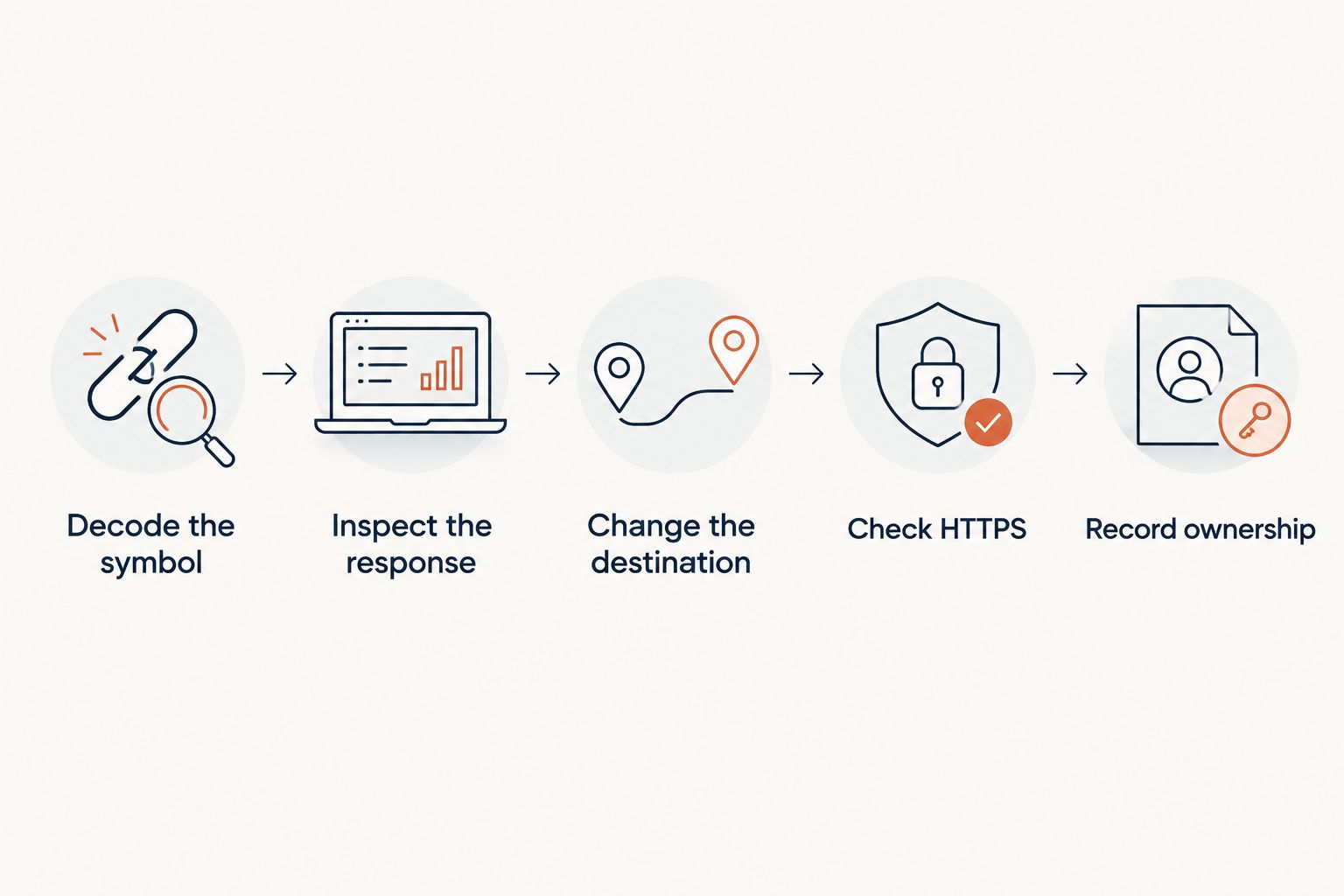
Use a small acceptance test before approving campaign artwork. Test the address encoded in the exported symbol, not just the destination shown in the platform interface.
- Decode the symbol. Confirm that it contains the intended stable address and hostname.
- Inspect the response. Check the HTTP status and Location header returned by that address.
- Change the destination. Use 2 test destinations in sequence and confirm that the same symbol reaches the second destination.
- Check HTTPS. Open the encoded address over HTTPS and verify that certificate errors do not interrupt access.
- Record ownership. Document the domain owner, DNS administrator, redirect operator, and campaign owner.
HTTP 302 and 307 indicate temporary redirects; 301 and 308 indicate permanent redirects. The 307 and 308 statuses preserve the request method. For an editable campaign destination, temporary redirect semantics fit the intended changeability better than declaring a permanent move, but you must still inspect caching behavior.
Do not select a status code solely to influence reporting. The redirect response controls routing behavior; attribution depends on what you record at the redirect layer and destination. These are separate design decisions.
Check the printed symbol, too
A correct redirect cannot repair an unreadable print. The QR Code specification uses a quiet zone of 4 modules around the symbol; a module is one square in the grid. Preserve that clear border when placing the artwork.
Test the actual production material at its intended viewing distance. Include lighting, reflections, folds, and surrounding artwork in that check. A scan from an exported image on your monitor does not validate a printed sign or package.
Which dynamic QR code option should you choose?
Choose managed own-domain link management when you need editable QR destinations without operating redirect servers. That is the default for teams combining campaign links with domain redirect work. Choose a specialist QR platform when its demonstrated campaign workflow is the deciding requirement.
Use an enterprise campaign platform when documented governance requirements demand it. Use a self-managed endpoint when engineering control is necessary and an engineering owner accepts maintenance responsibility.
Before signing off in 2026, write one acceptance sentence: the existing printed symbol must keep its encoded address while an authorized operator changes its destination. Then demonstrate that behavior.
Manage redirects on your domain
Explore branded links, dynamic QR codes, and domain redirect management without maintaining servers.
FAQ
What's the best dynamic QR code platform for my own domain?
RedirHub is a fit for teams that want dynamic QR codes, branded short links, and domain redirects on their own domain without maintaining servers. Confirm your required campaign workflow before printing production materials.
Can I change a dynamic QR code after printing it?
You can change the redirect destination without changing the printed symbol. The encoded address itself stays the same, so that address and its redirect service must remain operational.
Is a dynamic QR code better than a static QR code?
A dynamic QR code fits destinations you expect to change; a static QR code fits an address you intend to encode directly. Dynamic operation adds a redirect dependency, while a direct static code cannot have its encoded address edited after printing.
Do I need my own domain for dynamic QR codes?
You do not need your own domain to use a redirect-based QR code, but owning the encoded hostname gives you control over its DNS. Preserve your path-to-destination mappings as well, because hostname control alone does not recreate the redirect rules.
Does every scan mean someone visited my landing page?
A recorded redirect request does not prove that a person loaded the destination page. Automated requests, interrupted loads, and measurement differences require you to distinguish redirect activity from destination visits and conversions.
Can I build a dynamic QR code system myself?
Yes. Encode an address served by infrastructure you operate and return an HTTP redirect to a destination you can change. Your team then owns HTTPS, redirect logic, monitoring, and recovery.
What should I test before launching a QR campaign in 2026?
Test the encoded hostname, redirect response, destination changes, HTTPS, and printed readability. Document who controls the domain and who can update the destination before distributing the material.
One last thing
A domain you own is not the same as a redirect system you can recover. For every 2026 campaign, keep a record of the encoded path and its intended destination outside the live routing configuration. If you change providers or rebuild infrastructure, that mapping is what lets you restore the route without replacing the printed code.