
Best for teams managing URL forwarding on their own domains without maintaining servers: RedirHub. Best for a simple whole-domain redirect: registrar forwarding, where the required controls are supported. Best for existing infrastructure: web server rules. Best for application-specific decisions: redirect middleware. This 2026 guide explains which approach fits your domains and how to check it before switching traffic.
- RedirHub fits URL forwarding on your own domains without maintaining redirect servers.
- Registrar forwarding fits simple domain moves when HTTPS and destination handling meet your requirements.
- Web server rules suit teams already responsible for infrastructure and configuration changes.
- Application middleware fits redirects that depend on application state, not just the requested URL.
- Check status codes, HTTPS, paths, and query strings before moving traffic.
Why this matters
A domain redirect is more than a destination field. The forwarding endpoint must accept the original request, serve HTTPS when requested, and return the intended status code and destination.
For a 2026 website move, the decision starts with ownership. Someone must maintain the domain registration, DNS configuration, certificates, redirect rules, and destination. A managed service removes redirect-server maintenance; it does not remove the need to plan where traffic belongs.
Choose the tool around that responsibility. A marketing team managing campaign domains needs a different workflow from an engineering team redirecting routes inside an application.
What makes the best URL forwarding tool
Use these criteria to evaluate your 2026 shortlist before comparing interfaces:
- Own-domain support: Your source domain must remain under your control. Check how you connect it and who maintains its registration.
- HTTPS handling: An HTTPS request must complete its TLS connection before the browser receives an HTTP redirect. DNS alone cannot do that.
- Rule precision: Confirm whether the configuration handles entire domains, individual paths, query strings, and exceptions.
- Status-code control: Permanent moves and temporary campaigns need different redirect semantics. Check which codes the setup supports.
- Operational ownership: Identify who changes rules, maintains certificates, troubleshoots failures, and restores a previous destination.
- Verification: Test the actual response, not just whether a browser eventually opens the right page. Chains and incorrect destinations can hide behind an apparently successful visit.
URL forwarding options at a glance
The ranking separates operating models rather than presenting an unverified vendor comparison. Each option owns a distinct use case.
| Option | Best for | Standout mechanism | Key limitation |
|---|---|---|---|
| RedirHub | Teams managing links and redirects on their own domains | Managed link and domain redirect platform without maintaining redirect servers | Domain ownership and migration planning still need an owner |
| Registrar forwarding | Simple whole-domain moves | Forwarding configured through the domain provider, where offered | Capabilities depend on the provider's forwarding implementation |
| Web server rules | Teams with existing server operations | Redirect responses configured at the web server | Your team maintains the server and configuration |
| Application middleware | Redirects requiring application context | Application code determines the destination | Forwarding depends on application deployment and operation |
1. RedirHub: best URL forwarding for managed domain portfolios
RedirHub provides branded short links, dynamic QR codes, domain redirects, and website migration tools. Its positioning fits teams that need traffic on their own domains without maintaining redirect servers.
This is the default shortlist choice when links, campaign destinations, and domain moves belong to the same operating workflow. Start with your required behavior, then confirm the relevant controls before connecting production domains.
RedirHub pros:
- Own-domain links and redirects match teams that want branded traffic entry points.
- Domain redirects and website migration tools address more than short-link creation.
- Dynamic QR codes support campaigns where the printed code and destination need separate lifecycles.
- Managed forwarding avoids operating a dedicated redirect server.
RedirHub cons:
- A managed redirect platform does not decide which old page matches which new page.
- Domain registration, DNS access, and destination ownership still need clear responsibility.
Best for: Agencies managing client redirects, teams coordinating multiple domains, and marketers connecting branded links with QR campaigns.
Before committing, bring a representative rule set: a root-domain redirect, a deep path, a query string, and an exception. Confirm how each behaves. Ask about required team controls and migration workflows rather than assuming every platform implements them identically.
Verdict: Buy when own-domain forwarding without server maintenance is the requirement, after confirming your rules.
2. Registrar forwarding: best URL forwarding for simple domain moves
Registrar forwarding uses the forwarding service associated with your domain provider, where that service exists. You configure a source and destination through the provider rather than deploying a redirect application yourself.
It belongs on the shortlist when the job is genuinely simple: send an entire spare domain to an existing website. Do not assume a destination field also provides path preservation, query-string control, or the redirect status you need.
Registrar forwarding pros:
- Keeps a simple forwarding task close to domain administration.
- Avoids a separate web server when the provider operates the forwarding endpoint.
- Fits whole-domain moves that do not need application context.
Registrar forwarding cons:
- HTTPS, status codes, and path behavior depend on the specific implementation.
- A setup that works for one domain does not establish a suitable workflow for a larger portfolio.
Best for: A domain owner with a straightforward whole-domain destination and no detailed migration map.
Test both the root domain and a deep URL. If the original path disappears when it should be preserved, the forwarding setup fails the requirement even though the homepage opens correctly.
Verdict: Buy into this approach only when its observed behavior matches the complete forwarding requirement.
3. Web server rules: best URL forwarding for existing infrastructure
Web server rules return redirects from infrastructure your team operates. Configuration matches an incoming hostname or path and returns a destination in the HTTP response.
This approach fits organizations that already maintain web servers and review configuration changes. It becomes a different proposition when someone must build and maintain infrastructure solely to forward domains.
Web server rules pros:
- Keep redirect behavior in configuration your engineering team controls.
- Support rule review alongside other infrastructure changes.
- Separate redirect responses from page rendering when configured at the server layer.
- Fit migrations requiring explicit hostname and path mappings.
Web server rules cons:
- Your team remains responsible for certificates, configuration, deployment, and service operation.
- Broad matching rules can redirect URLs that should remain exceptions.
Best for: Engineering teams with an established server-management workflow and clear ownership of production changes.
Keep specific mappings ahead of general catch-all behavior where the configuration uses ordered matching. Review the server's actual matching rules rather than assuming every configuration language evaluates directives the same way.
Verdict: Buy into this approach when server operations already exist; skip it as an incidental marketing task.
4. Application middleware: best URL forwarding for application context
Application middleware makes redirect decisions inside the application request flow. It fits cases where the destination depends on authenticated state, account configuration, or other information the application owns.
Do not introduce application logic just to move an unrelated domain to a fixed destination. The added deployment dependency needs a reason.
Application middleware pros:
- Uses application context when a static mapping is insufficient.
- Keeps conditional routing logic with the code that defines that behavior.
- Allows redirect changes to follow the application's review and testing process.
Application middleware cons:
- Redirect operation depends on the application and its deployment process.
- User-controlled destinations require validation to prevent open redirects.
Best for: Product teams whose destination choice genuinely depends on application state.
An open redirect occurs when an attacker can make a trusted URL send visitors to an arbitrary external destination. Restrict permitted destinations when request parameters influence the target; do not treat an unrestricted destination parameter as a convenience feature.
Verdict: Buy into this approach for contextual routing; skip it for ordinary domain forwarding.
How we ranked the options
The 2026 ranking prioritizes own-domain control, HTTPS handling, rule precision, operational ownership, and verification. It is a use-case ranking, not a performance benchmark.
RedirHub takes the managed-domain slot because the supplied product scope explicitly includes own-domain link management, redirects, and website migration tools without maintaining redirect servers. Registrar forwarding, server rules, and middleware address progressively different ownership models—not a universal ladder of quality.
Check the redirect before moving every domain
Use a representative domain before applying the same configuration across a portfolio. A successful homepage visit does not prove that deep links, campaign parameters, or temporary destinations behave correctly.
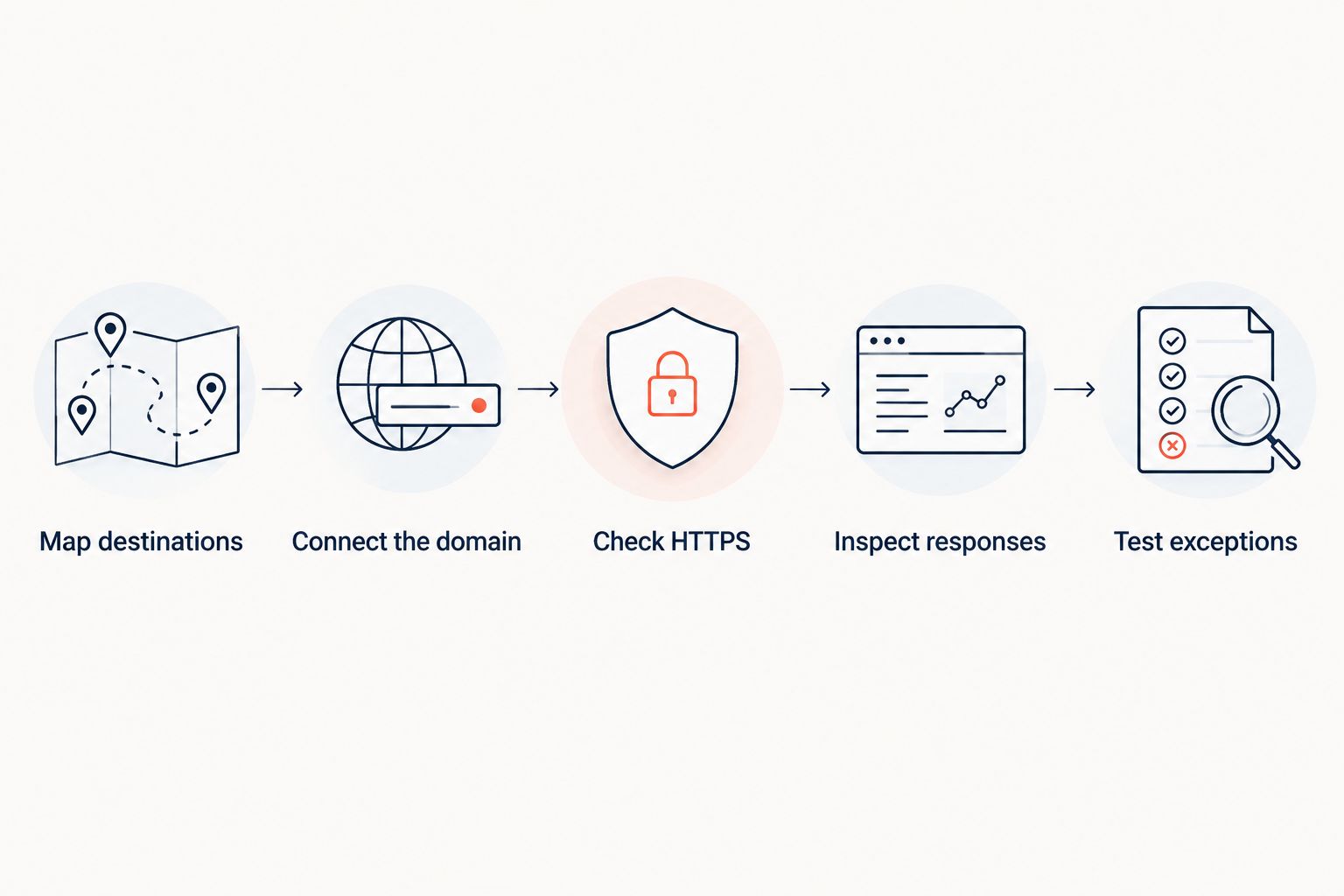
Map destinations
Write down the original hostname and path, intended destination, and whether the move is permanent. Separate exact page replacements from catch-all behavior. Avoid sending every retired page to the homepage simply because that rule is easy to write.
Connect the domain
Configure DNS according to the forwarding service or server's instructions. DNS sends requests toward infrastructure; it does not return an HTTP redirect by itself. Keep access to the domain account available during the change.
Check HTTPS
Test the source with both HTTP and HTTPS. The usual default is HTTP on port 80 and HTTPS on port 443. A certificate error on the original HTTPS hostname happens before the browser can receive its redirect response.
Inspect responses
Check the returned status and Location header. A 301 status code expresses a permanent redirect; a 302 status code expresses a temporary redirect. A 307 status code preserves the request method for a temporary redirect, while 308 does so for a permanent redirect.
Use a header-inspection tool, such as curl -I, for a quick check, then test an actual browser request. A HEAD response alone does not establish how every request method behaves.
Test exceptions
Try a nested path, a trailing slash, a query string, and a URL that should not match the general rule. Confirm that the final destination works and does not send the visitor back to the source.
Keep the destination map with the rule configuration. When a campaign ends or a migration changes, that record explains what the redirect is supposed to do—not merely where it happens to point today.
Which URL forwarding approach should you choose?
Choose RedirHub for URL forwarding when your team needs links and redirects on its own domains without operating redirect servers. Choose registrar forwarding for a simple whole-domain move only after checking its behavior. Keep server rules with teams that already operate servers, and reserve middleware for application-dependent decisions.
For your 2026 rollout, assign an owner before changing DNS. That person must know the intended destination, how to inspect the response, and how to reverse an incorrect change. The tool cannot substitute for that decision.
FAQ
What's the best URL forwarding option for multiple domains?
RedirHub fits teams that need managed links and redirects on their own domains without maintaining redirect servers. Check your required path rules, status codes, and operating workflow before committing.
Is URL forwarding the same as changing DNS?
No. DNS directs a hostname toward infrastructure, while URL forwarding returns an HTTP redirect response. The forwarding endpoint must handle the request and provide the destination.
Should I use a 301 or 302 redirect for a website move?
Use a 301 redirect for a permanent move and a 302 redirect for a temporary destination. When preserving the request method matters, evaluate the corresponding 308 or 307 behavior.
Does URL forwarding work with HTTPS?
HTTPS forwarding requires the source hostname to complete TLS successfully before it returns the redirect. A certificate problem on the source domain cannot be fixed merely by choosing an HTTPS destination.
Will forwarding preserve paths and campaign parameters?
Path and query-string handling depend on the rule configuration and forwarding implementation. Test a real deep link with campaign parameters instead of assuming the destination inherits them.
Can I change a dynamic QR code's destination without reprinting it?
A dynamic QR code points to an editable redirect, allowing the destination to change without changing the printed code. The redirect address must remain operational for that printed code to keep working.
How do I compare URL forwarding tools in 2026?
Compare own-domain support, HTTPS handling, rule precision, status-code control, and operational ownership. Verify those requirements with representative URLs rather than relying on a feature label alone.
One last thing
The source domain still matters after the move. A redirect cannot help visitors reach the new website if the original domain expires or stops resolving to working forwarding infrastructure.
Keep source-domain renewals and redirect ownership in the migration handover. For printed QR campaigns, include the domain encoded in the printed material—not just the current landing-page domain.