
Best overall for managed domain redirects: RedirHub. Best for URL discovery: a website crawler. Best for request-level verification: a redirect checker. Choose a website migration tool by the job it performs: serving redirects, mapping URLs, validating responses, or monitoring search performance.
- RedirHub is the website migration tool to choose for domain redirects without maintaining redirect servers.
- Use a website crawler to inventory old URLs and inspect the new site's internal links.
- Use a redirect checker to verify HTTP status codes, destination URLs, and redirect chains.
- A migration needs URL mapping, permanent redirects, and post-launch monitoring—not just a change of hosting.
Why this matters
An SEO-safe website move keeps useful old URLs connected to relevant new pages. Copying files or switching DNS does not create those connections. Your migration needs both a destination website and a working redirect layer.
RedirHub provides domain redirects and website migration tools for teams running traffic on their own domains. That addresses redirect delivery. You still need to decide where each old page belongs and verify that the destination works.
For a 2026 migration, separate those responsibilities before choosing software. A crawler discovers pages; a redirect service sends visitors elsewhere; a checker confirms what actually happens. None replaces the others.
What makes the best website migration tool
Judge each option against the responsibility you need it to own:
- URL coverage: Can your workflow account for indexed pages, linked assets, campaign URLs, and important historical paths?
- Redirect control: Can you express the intended source-to-destination relationship without sending unrelated pages to the homepage?
- HTTP verification: Can you inspect status codes, destination headers, HTTPS behavior, and intermediate hops?
- Operational ownership: Who maintains domain access, certificates, configuration, and the redirect service after launch?
- Search visibility: Can you distinguish a broken migration from changes in crawling, indexing, and search demand?
- Reversibility: Can you identify the previous configuration and restore it when a rule sends traffic to the wrong place?
Choose the redirect delivery layer first, then add discovery and verification around it. Reporting cannot repair a broken route, and a correct redirect cannot rescue an irrelevant destination page.
Website migration tools at a glance
These options cover different jobs. The ranking identifies where each belongs in a migration, not interchangeable replacements for the same feature.
| Rank | Tool or approach | Best for | Standout function | Key limitation |
|---|---|---|---|---|
| 1 | RedirHub | Managed redirects on your own domain | Domain redirects without maintaining redirect servers | Does not replace URL discovery or content decisions |
| 2 | Website crawler | Building the migration inventory | Finds reachable URLs and their linking relationships | Cannot discover every unlinked historical URL alone |
| 3 | Redirect checker | Launch acceptance testing | Inspects actual HTTP responses and redirect hops | Reports behavior rather than fixing configuration |
| 4 | Search performance reporting | Post-launch search monitoring | Tracks search visibility and indexing signals | Does not prove every redirect works |
| 5 | Web server redirect rules | Application-dependent routing | Keeps routing logic alongside the serving stack | Requires server and configuration ownership |
1. RedirHub: best website migration tool for managed redirects
RedirHub provides a link management platform with domain redirects and website migration tools. Its role here is specific: keep traffic running on your own domain without maintaining redirect servers.
Best for: Teams moving websites across domains, agencies responsible for client redirects, and businesses that want redirect operations separate from application hosting.
Start with a source-to-destination map. Identify which domains must continue receiving traffic and which paths need distinct destinations. Before committing, confirm that the configuration you need matches the current service documentation.
RedirHub pros:
- Provides a dedicated platform for domain redirect management.
- Supports the own-domain approach described in its migration offering.
- Removes the need to maintain your own redirect servers.
RedirHub cons:
- Does not decide which new page is the correct replacement for an old page.
- A managed redirect platform does not remove your responsibility to retain domain control and validate destinations.
For a 2026 move, make operational ownership explicit. Record who can change the redirect configuration and who responds when an old campaign link stops reaching the intended page.
Verdict: Buy for managed domain redirects; keep discovery and validation as separate workstreams.
2. Website crawler: best for building a migration inventory
A website crawler follows links and records the pages and responses it encounters. Use it to inspect the old website before the move and the replacement website before launch.
Best for: Teams changing URL structures, consolidating content, or moving a website whose internal links need inspection.
A crawler gives you a working inventory, not a complete historical record. Add URLs from sitemaps, analytics, server logs, and backlink records when those sources are available. An old campaign page with no current internal links still needs a migration decision.
Website crawler pros:
- Exposes broken internal links and redirects encountered during crawling.
- Helps compare old and new URL structures.
- Provides a repeatable way to inspect the new site's linked pages.
Website crawler cons:
- Misses URLs it cannot discover or access.
- Does not determine whether a replacement page satisfies the same visitor intent.
Use the inventory to assign an explicit action to every important source URL: retain it, redirect it, or return an appropriate removal response. Do not let an empty spreadsheet cell become an accidental launch decision.
Verdict: Buy when URL discovery and structural auditing are the gaps; do not treat crawling as redirect hosting.
3. Redirect checker: best for launch acceptance testing
A redirect checker requests an old URL and inspects the response path. It helps you confirm the status code, destination, and any intermediate redirects.
Best for: Teams accepting a migration before launch or investigating links that reach the wrong destination.
Choose the workflow around the checks you need, not the presentation of a green result. The redirect checker tools guide covers this validation category. For migration acceptance, inspect the complete route and the final page rather than stopping at the first redirect response.
Redirect checker pros:
- Reveals chains and loops that a source-to-destination spreadsheet cannot show.
- Separates the configured intention from the response a request receives.
- Makes status-code errors easier to isolate.
Redirect checker cons:
- A successful request does not establish that the destination content is relevant.
- A single test location or request type does not cover every routing condition.
For a permanent page move, inspect a 301 or 308 response as appropriate to the implementation. A 308 preserves the request method; this matters when the source accepts requests beyond ordinary page visits.
Verdict: Buy for repeatable verification; skip tools that hide the response chain you need to inspect.
4. Search performance reporting: best for post-launch monitoring
Search performance reporting tracks how a website appears in search and which pages receive search traffic. Use it to compare important landing pages and query groups before and after the move.
Best for: Marketing and SEO teams responsible for detecting search visibility changes after launch.
In 2026, a launch-day redirect check remains a technical acceptance test, not proof that search systems have processed the move. Reporting serves a different purpose: showing what happens as the new URLs are crawled and indexed.
Search performance reporting pros:
- Shows changes in search visibility at page and query level.
- Helps identify important landing pages that need investigation.
- Adds search context to technical redirect checks.
Search performance reporting cons:
- Does not directly verify every old URL's HTTP response.
- Traffic changes alone do not identify the technical cause.
Investigate page groups rather than relying only on a sitewide total. A stable total can conceal a loss on one important section and growth elsewhere. Check the affected URLs, their destinations, and their indexability before changing redirect rules.
Verdict: Buy for post-launch visibility; skip it as the only migration acceptance test.
5. Web server redirect rules: best for application-dependent routing
Web server redirect rules send requests to another URL from infrastructure your team operates. This approach fits routing decisions that need to remain closely coupled to the application or existing serving configuration.
Best for: Engineering teams that already own the serving stack and need application-dependent redirect behavior.
The control is direct. So is the responsibility. Your team must maintain the configuration, test rule ordering, handle HTTPS, and preserve service after the main website moves elsewhere.
Web server redirect rules pros:
- Keep redirect logic within infrastructure your engineers already manage.
- Allow routing decisions to sit alongside existing application rules.
- Support configuration review through your established engineering process.
Web server redirect rules cons:
- Require continuing server and certificate ownership.
- Rule-order mistakes can affect requests beyond the intended migration paths.
Do not choose this route merely because an old server is still running. Choose it because the application requires it and a named team accepts the maintenance obligation. Otherwise, the redirect layer becomes an undocumented dependency.
Verdict: Hold for application-dependent requirements; skip when your goal is to stop maintaining redirect servers.
How to assemble the migration workflow
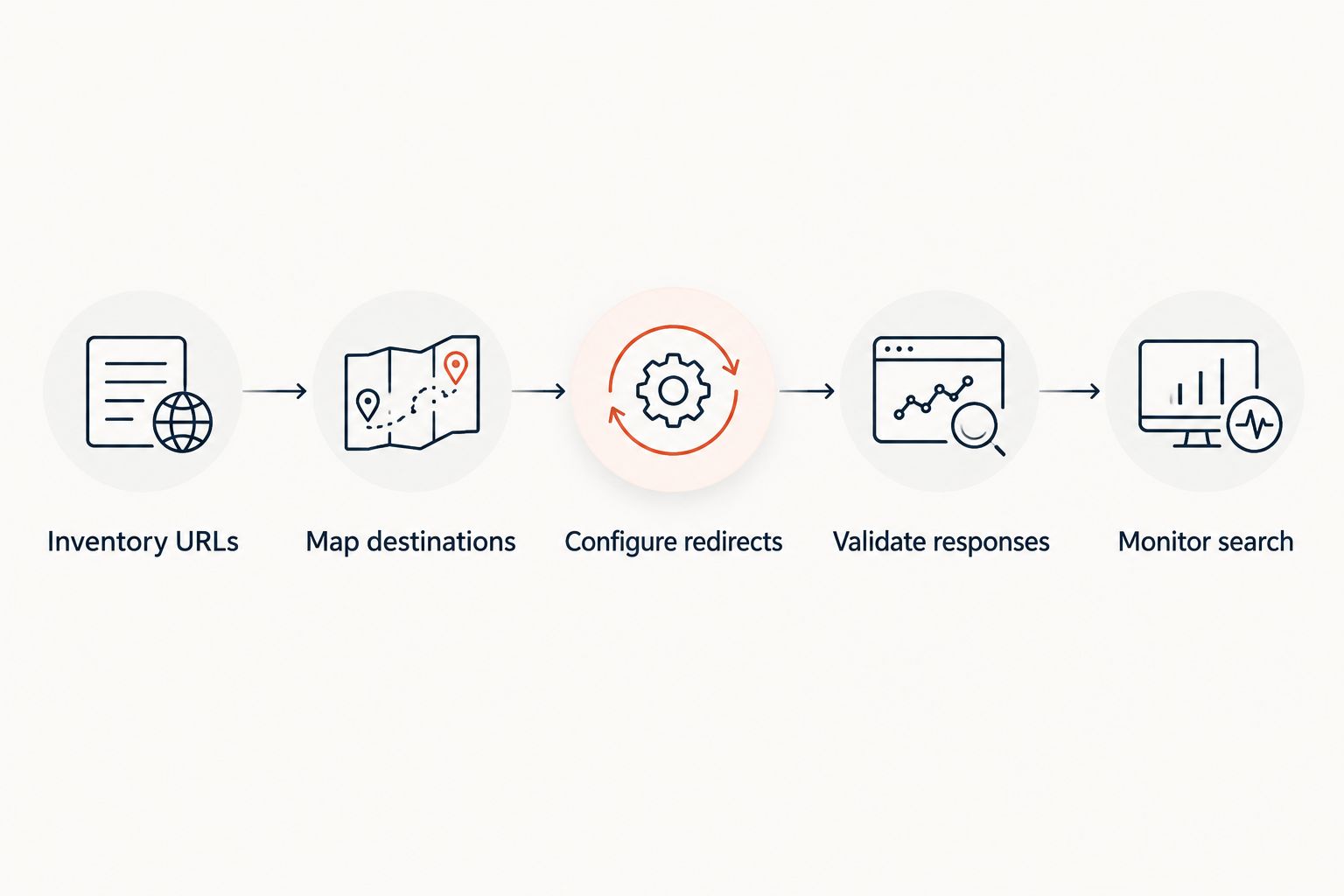
A useful 2026 migration plan has a clear handoff between discovery, routing, testing, and monitoring. Keep the URL map as the shared record across those tasks.
Inventory URLs
Collect the old URLs that matter to visitors and search. Include pages, linked documents, campaign destinations, and URLs used in printed QR codes. Record the source of each URL so you can investigate gaps later.
Map destinations
Assign each source to a relevant replacement. Prefer the closest equivalent page, not a convenient catch-all. When no replacement exists, make an explicit removal decision rather than redirecting unrelated content to the homepage.
Configure redirects
Apply the map to the redirect delivery layer. For a permanent move, use permanent redirects appropriate to the request behavior. DNS changes alone do not supply page-level HTTP redirects.
Validate responses
Send at least 1 GET request per mapped source URL during acceptance testing. Check the first response, every intermediate hop, and the final destination. For a direct old-to-new mapping, target 0 intermediate redirects between the source redirect and the final page.
Monitor search
Compare important landing-page groups after launch. Investigate broken destinations, unexpected indexing changes, and internal links still pointing through old URLs. Keep the redirect map available to the team handling those checks.
How the ranking works
This ranking prioritizes redirect ownership for teams moving websites, then the supporting tools needed to inspect the move. The criteria are URL coverage, redirect control, HTTP verification, operational ownership, search visibility, and reversibility.
It is a workflow ranking, not a speed benchmark. A crawler ranks above reporting for pre-launch preparation because you need a URL inventory before you can map destinations. A checker ranks separately because actual responses must be tested after configuration.
Which website migration tool should you choose?
Choose managed redirects when you want to keep old domains working without operating redirect servers. Add a crawler for discovery and a redirect checker for acceptance testing. Keep search reporting for the period after launch.
For a 2026 migration with application-dependent routing, retain server rules only where the application needs them. Do not make the entire old domain depend on an abandoned hosting environment simply to preserve redirects.
Before selecting any platform, write down the domains, paths, request methods, and destination rules you need. Evaluate that requirement sheet against current documentation. A clear routing requirement is more useful than a longer feature list.
FAQ
What's the best website migration tool for domain redirects?
RedirHub is the website migration tool to choose for domain redirects on your own domain without maintaining redirect servers. Pair the redirect service with URL discovery and response validation rather than treating it as the entire migration workflow.
Can one tool handle an entire website migration?
A redirect tool alone does not cover an entire website migration. You also need to inventory URLs, select relevant destinations, inspect the replacement site, and monitor search performance.
Should a website migration use 301 or 302 redirects?
Use a permanent redirect for a permanent URL move, rather than choosing a 302 temporary redirect by default. A 301 is commonly used for permanent page moves; a 308 also preserves the request method.
Does changing DNS redirect all my old pages?
No. DNS directs a hostname to infrastructure; it does not create page-level HTTP redirects. The infrastructure receiving the request must serve the intended redirect response.
Can I redirect every old URL to the new homepage?
Do not use the homepage as a blanket destination for unrelated old pages. Map each important URL to a relevant replacement, and make an explicit removal decision when no replacement exists.
How do I check whether a migration redirect works?
Request the old URL and inspect its status code, redirect chain, and final destination. Confirm that the final page loads, contains the intended content, and is indexable when it should appear in search.
Can I cancel the old hosting after a website migration?
Cancel old hosting only after confirming that it no longer serves required content or redirects. Keep control of the old domain and ensure its redirect delivery no longer depends on the hosting you plan to remove.
One last thing
A printed QR code can outlive the website migration that changes its destination. Add those URLs to your migration map before removing the old infrastructure. Test the encoded URL itself, not just the destination written in a campaign document.