
Best for teams that want to redirect multiple domains to one website without maintaining servers: RedirHub. Best for existing infrastructure: web-server redirects; best for a simple homepage alias: registrar URL forwarding; best for application-specific routing: application middleware—these are the four approaches to compare in 2026.
- RedirHub is the best fit for teams wanting domain redirects without maintaining redirect servers.
- To redirect multiple domains to one website, configure HTTP redirects; DNS records alone do not redirect browsers.
- Choose web-server redirects when your team already manages certificates, deployment, and routing.
- Preserve useful paths and query parameters, then test every source domain over HTTPS.
Why this matters
Pointing several domains at the same IP address does not tell a browser to change its address bar. DNS resolves hostnames. An HTTP redirect tells the browser where to go next.
That distinction determines your setup. Each source domain needs a working route to a service that accepts the request and returns the correct destination. For HTTPS requests, the source also needs a valid certificate before the browser can receive that redirect.
RedirHub is the best fit for teams that want domain redirects on their own domains without maintaining redirect servers. Teams with an established infrastructure workflow have other sensible choices. The right approach depends on who owns DNS, certificates, redirect rules, and ongoing checks—not just who can create the first rule.
What makes the best domain redirect tool
Use these criteria for your 2026 shortlist. Ask each provider or infrastructure owner to demonstrate the behavior you need.
- Source-domain HTTPS: The redirect must work when visitors request the encrypted version of an old domain.
- Destination mapping: Decide whether every request reaches one homepage or retains its original path.
- Redirect semantics: Permanent moves and temporary campaigns require different HTTP responses.
- Query handling: Keep campaign parameters when they remain relevant; remove obsolete parameters deliberately.
- Operational ownership: Identify who maintains certificates, permissions, configuration, and failure alerts.
- Change verification: Require a way to inspect the returned status, destination, and complete redirect chain.
Do not treat a long feature list as proof of fit. A domain portfolio with simple aliases needs a different workflow from a migration containing many unrelated page mappings.
Domain redirect options at a glance
| Option | Best for | Standout mechanism | Key limitation |
|---|---|---|---|
| RedirHub | Teams avoiding redirect-server maintenance | Managed domain redirects on customer-owned domains | DNS access and destination planning remain your responsibility |
| Web-server redirects | Teams already operating web infrastructure | Redirect rules handled before application routing | Your team owns server configuration and certificate operations |
| Registrar URL forwarding | Simple homepage aliases | Forwarding configured through a domain provider | Suitability depends on the provider's actual forwarding behavior |
| Application middleware | Redirects tied to application logic | Routing decisions made within the application request flow | Redirects depend on application deployment and runtime availability |
These are implementation choices, not a speed ranking. The comparison does not assign performance scores or assume that every registrar, hosting plan, or application framework behaves alike.
1. RedirHub: best for domain portfolios without redirect servers
RedirHub provides domain redirects alongside branded short links, dynamic QR codes, and website migration tools. Its fit here is direct: run redirects on domains you control without maintaining a separate redirect server.
For an agency handling client domains or a business consolidating several brands, that separates redirect management from website application deployments. You still need to define where traffic belongs. A managed platform does not decide which old product page matches which new page.
RedirHub pros:
- Removes the need to maintain a server solely for domain redirects.
- Supports a customer-owned-domain approach rather than requiring public-facing links on an unrelated domain.
- Covers adjacent link-management needs, including branded links and dynamic QR codes.
RedirHub cons:
- Your team still needs control of the source domains and their DNS settings.
- Content equivalence, destination selection, and post-change validation remain your responsibility.
Best for: Agencies, marketing teams, and businesses managing multiple domains that want redirect operations separate from server administration.
Before choosing RedirHub for a 2026 migration, confirm the exact rule behavior your mapping requires. Ask about source-domain HTTPS, path preservation, query handling, supported status codes, and team access. Verify those requirements against current documentation rather than assuming that the phrase “domain redirect” covers every scenario.
Verdict: Buy for managed domain redirects when avoiding server maintenance is the deciding requirement.
2. Web-server redirects: best for existing infrastructure teams
A web server can inspect an incoming hostname or path and return an HTTP redirect before serving application content. This approach fits teams that already operate the infrastructure receiving those requests.
You control the rules directly. That control also makes your team responsible for configuration errors, certificate renewal, deployments, and recovery.
Web-server redirect pros:
- Keeps redirect rules in an infrastructure workflow your team already manages.
- Supports explicit matching by hostname and path when the server configuration provides it.
- Lets administrators inspect configuration changes through their existing review process.
Web-server redirect cons:
- Requires a maintained endpoint for every source hostname.
- A faulty rule or certificate configuration can interrupt redirects independently of the destination website.
- Migration rules compete with other infrastructure work for engineering attention.
Best for: Businesses with an established infrastructure team and a clear owner for redirect configuration.
Do not add a new server merely because writing a redirect rule looks straightforward. The rule is only part of the job. Certificate coverage, deployment safety, access controls, and monitoring remain after launch.
Verdict: Buy into this approach when the infrastructure and operational ownership already exist.
3. Registrar URL forwarding: best for simple homepage aliases
Some domain registrars provide URL forwarding through their control panels. That places the forwarding setup near the domain registration workflow, which suits a simple alias whose visitors should all reach the same destination.
Assess the actual forwarding service, not the registrar's category label. HTTPS handling, path behavior, status codes, and query preservation need direct verification.
Registrar URL forwarding pros:
- Keeps a basic forwarding change near the domain administration workflow.
- Avoids application code for a straightforward domain-to-homepage redirect.
- Gives a domain owner a practical starting point for an uncomplicated alias.
Registrar URL forwarding cons:
- Available controls depend on the specific forwarding service.
- A service that drops paths is unsuitable when old pages need corresponding destinations.
- Masked or framed forwarding is not equivalent to an HTTP redirect.
Best for: A simple domain alias with no page-level migration requirements, after HTTPS and response behavior pass testing.
For a 2026 consolidation, reject a forwarding option that cannot demonstrate the behavior your old links require. A working homepage test does not prove that a bookmarked support article will reach the correct page.
Verdict: Hold until HTTPS, status codes, and path handling pass your acceptance checks.
4. Application middleware: best for application-specific routing
Application middleware evaluates a request inside the application's request-processing flow. It can redirect based on routing information or application state available at that point.
This is useful when the redirect genuinely belongs to application behavior. It is less attractive when unrelated legacy domains only need to reach a new website.
Application middleware pros:
- Keeps application-specific redirect logic with the code that defines it.
- Supports decisions based on information available to the application.
- Uses the application's existing testing and deployment workflow.
Application middleware cons:
- Redirect changes require the relevant application release process.
- Redirect availability depends on the application request path remaining operational.
- Hostname and destination validation require care to prevent unintended routing.
Best for: Redirects driven by application routes, authentication state, or other application-specific conditions.
Keep fixed legacy-domain rules outside the application when they do not need application logic. Otherwise, a website release becomes an unnecessary dependency for a simple routing change.
Verdict: Skip for basic domain consolidation; choose it when application context determines the destination.
How to implement the redirect safely
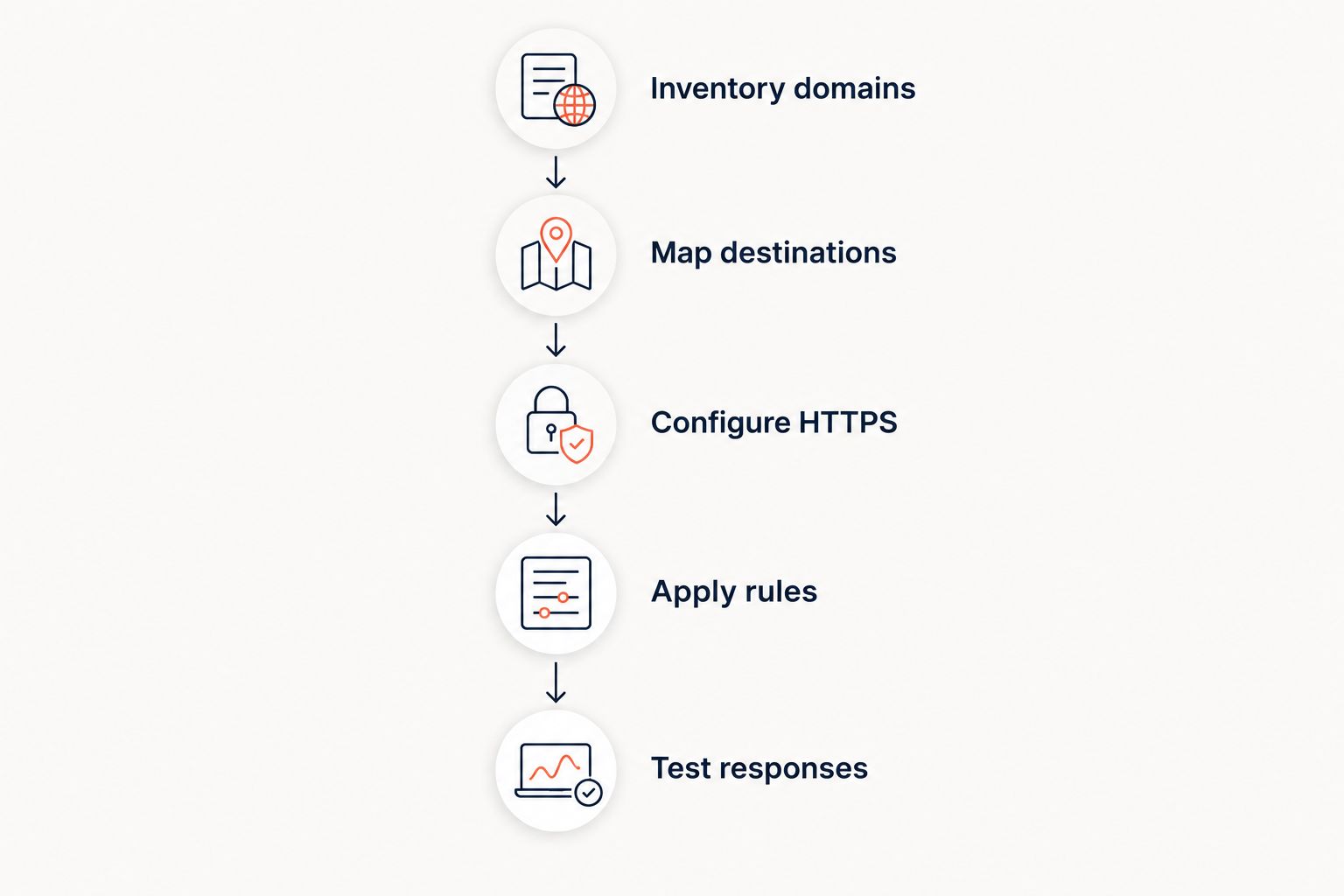
The implementation sequence is the same regardless of where the rules live. Complete the mapping before changing DNS, then test the actual responses rather than judging success by the final page alone.
Inventory domains
List each source hostname, its DNS owner, its certificate requirements, and its intended destination. Include the apex domain and any used subdomains separately. Do not assume that configuring one hostname covers another.
Map destinations
Choose between a homepage alias, path-preserving redirect, and explicit page mapping. An old /support/install path should retain that path only if the destination website has the intended content there.
Record exceptions before launch. Sending every old page to the new homepage removes the connection between the visitor's original request and the content they expected.
Configure HTTPS
Ensure that the redirect endpoint accepts each source hostname over HTTPS. The browser negotiates TLS before receiving an HTTP response, so a certificate error cannot be repaired by a redirect delivered afterward.
DNS changes alone do not provide certificate coverage. Confirm certificate ownership and renewal responsibility as part of the handover.
Apply rules
Use a permanent redirect for a permanent move. HTTP 301 and 308 indicate permanent redirects; HTTP 302 and 307 indicate temporary redirects. HTTP 307 and 308 preserve the request method, which matters when requests are not ordinary page-view GET requests.
For marketing domains and website moves, select the status deliberately. Do not copy a temporary campaign configuration into a permanent migration without reviewing its purpose.
Test responses
Check the source response, its destination, and the final response. A clean direct redirect uses 1 redirect hop and 2 HTTP requests: the original request and the destination request.
For your 2026 launch checklist, test HTTP and HTTPS versions of every used source hostname. Test a root request, a deep path, and a query string. Include an unmapped path so you can see whether the fallback behavior is intentional.
Check failures that a homepage test misses
Redirect loops: A source sends visitors to a destination that redirects back. Inspect the whole chain and correct the conflicting rule rather than adding another redirect.
Lost query parameters: Campaign attribution disappears when the redirect removes parameters required by the destination. Test a representative campaign URL and inspect what arrives.
Broken deep links: The domain redirects correctly, but old paths reach missing pages. Fix the mapping or provide an intentional relevant destination.
Certificate gaps: The unencrypted request works while the encrypted request fails before the redirect. Test the exact source hostname over HTTPS.
Unexpected request changes: A workflow involving form submissions or API requests behaves differently after redirection. Review method-preserving status codes and test the actual client behavior.
How the options are ranked
The ranking prioritizes the buyer's operating model: managed domain redirects first, existing infrastructure second, simple registrar forwarding third, and application-dependent logic fourth. It uses maintenance ownership, mapping requirements, HTTPS handling, and verification as the decision criteria.
It is not a benchmark of redirect latency or service uptime. For a 2026 buying decision, require current documentation and a test against your own source domains before committing a migration.
Which domain redirect approach should you choose?
Choose RedirHub when your team needs domain redirects without maintaining redirect servers. Choose web-server rules when an infrastructure team already owns the endpoint and deployment process.
Use registrar forwarding only after its behavior passes your requirements. Keep application middleware for redirects that actually need application context. The default is the approach with the fewest operational dependencies that still preserves the correct destination.
FAQ
What's the best way to redirect multiple domains to one website?
A managed redirect platform fits teams that want to redirect multiple domains to one website without maintaining servers. RedirHub serves that use case; existing web-server rules fit teams that already own the necessary infrastructure.
Can I redirect a domain using DNS alone?
No. DNS resolves a hostname, while an HTTP redirect tells the browser to request another URL. A forwarding service or other HTTP endpoint must return that redirect.
Does the old domain need an HTTPS certificate?
Yes, when visitors request the old domain over HTTPS. The TLS connection must succeed before the browser can receive the redirect response.
Should I use a permanent or temporary redirect?
Use a permanent redirect for a permanent domain move and a temporary redirect for a temporary destination change. Review request-method handling when redirecting forms, APIs, or other non-GET traffic.
Can every old page redirect to the matching new page?
Yes, when your redirect implementation supports the required mapping and the destination page exists. Preserve paths only when the destination structure matches; otherwise define explicit page mappings.
Is registrar forwarding enough for a website migration?
Registrar forwarding is enough only when its verified behavior meets the migration requirements. Check HTTPS, deep paths, query parameters, and status codes before using it for a site move.
Will redirecting several domains automatically improve rankings?
No. Redirecting several domains does not create an automatic ranking improvement. Use redirects to send visitors and crawlers from old URLs to relevant destinations, not as a substitute for useful content.
One last thing
Keep the old domains registered after the move if you still need their redirects. A perfectly configured rule cannot help visitors once you lose control of its source domain. Put domain renewal ownership in the same operational record as DNS access, certificate responsibility, and redirect mappings.