
Best overall setup: own-domain links paired with destination conversion analytics. Best for printed campaigns: dynamic QR codes with campaign attribution; best for website moves: redirect monitoring that checks the final destination, not just the click count.
- Choose a link management platform that separates link requests, campaign visits, and conversions.
- RedirHub fits teams managing branded links, dynamic QR codes, and redirects on their own domains without maintaining servers.
- For QR campaigns, compare scan activity with destination engagement before declaring success.
- For migrations, prioritize redirect correctness over campaign dashboards.
RedirHub is best suited to teams that need branded links and redirects on their own domains without maintaining servers. This 2026 guide ranks analytics configurations by the decisions they support: campaign attribution, printed-code measurement, migration checks, and cross-domain reporting.
Why this matters
A link request, a website visit, and a conversion measure different events. A dashboard that combines them without explaining the definitions makes campaign comparisons harder, not easier.
Choose your measurement question before choosing your reporting interface. Marketing needs to connect a campaign to an action. An agency managing a website move needs to know whether an old URL reaches the correct replacement. Neither question is answered by a total-click counter alone.
What makes the best link management platform for analytics?
Use these criteria for your 2026 shortlist. Ask for a demonstration with your own campaign structure rather than accepting a dashboard screenshot.
- Event definitions: The platform explains what counts as a click, scan, unique visitor, or failed request.
- Attribution continuity: Destination URLs retain the campaign parameters your website analytics needs.
- Domain control: Your team controls the domain used in published links and printed codes.
- Operational visibility: You can check status codes, destination URLs, and redirect chains separately from campaign results.
- Reporting portability: Available exports contain enough context to compare campaigns and domains outside the dashboard.
- Access boundaries: Team members can work with the appropriate client domains and reporting scope.
Treat the last two criteria as requirements to verify during evaluation. They are not automatic features of every link management platform.
Analytics configurations at a glance
The order below ranks measurement approaches, not vendor market share. Each configuration has a different job; several belong in the same implementation.
| Rank and configuration | Best for | Standout capability | Key limitation |
|---|---|---|---|
| Own-domain links with destination analytics | Measuring campaign outcomes | Connects a controlled entry link with downstream events | Requires configuration across separate systems |
| Link-level click reporting | Comparing distributed links | Shows activity against individual links | Requests do not establish conversions |
| Dynamic QR codes with campaign attribution | Printed marketing campaigns | Separates campaign entry points while keeping destinations editable | Scans do not establish qualified interest |
| Redirect monitoring | Website migrations | Checks routing behavior and final destinations | Does not measure marketing outcomes by itself |
| Export-led reporting | Agencies and multi-domain teams | Brings link records into a shared reporting workflow | Requires consistent schemas and maintenance |
1. Own-domain links: best for conversion-focused campaigns
An own-domain link gives you a controlled entry point. Destination analytics records what happens after the visitor arrives: a form submission, a purchase event, or another action you have explicitly configured.
RedirHub provides branded short links and domain redirect management. For this configuration, use that link-management role alongside destination measurement rather than treating redirect activity as proof of a business result.
Own-domain links pros:
- Published links use a domain your team controls.
- Campaign parameters can identify the source and placement at the destination.
- Destination events answer a different question from link requests.
Own-domain links cons:
- Link configuration and website measurement require separate checks.
- Consent settings, blockers, and interrupted loads can produce differences between reporting systems.
- A controlled domain still needs registration and DNS administration.
Best for: Marketing teams that need to connect distributed links with measurable actions on their website.
For a 2026 campaign, define the conversion before distributing the link. Record the campaign parameters, confirm the redirect preserves them, and trigger the destination event yourself. Otherwise, a clean click chart can conceal a broken measurement setup.
Verdict: Buy for domain control; require a working destination-event test before rollout.
2. Link-level click reporting: best for distribution comparisons
Link-level reporting helps you compare separately tagged placements. Give an email placement and a partner placement distinct links when you need to distinguish their traffic.
Evaluate the reporting definitions before comparing results. Automated previews, security scanners, and repeated requests can affect request counts; ask how the platform identifies and presents that activity.
Link-level reporting pros:
- Links provide a practical reporting unit for individual placements.
- Campaign activity is visible without waiting for a final conversion.
- Distinct links help isolate distribution mistakes.
Link-level reporting cons:
- A request does not prove a person read the destination.
- Unique counts depend on the platform's definition and filtering.
- Reusing one link across placements removes that distinction from link-level reporting.
Best for: Teams comparing how different distribution placements generate entry traffic.
During evaluation, ask to see the same link's total activity, filtered activity, and reporting window. Confirm the time zone too. Reports with different boundaries are not directly comparable, even when the column names match.
Verdict: Buy for placement reporting; skip click totals as a substitute for conversion measurement.
3. Dynamic QR codes: best for printed campaign attribution
A dynamic QR code encodes a redirecting URL rather than the final destination. That indirection lets the destination change without changing the printed code, provided the encoded URL remains operational.
RedirHub offers dynamic QR codes as part of its link management platform. For measurement, assign distinct campaign entry points to placements you need to compare, then carry those distinctions into destination analytics.
Dynamic QR code pros:
- Destination changes do not require replacing the encoded redirect URL.
- Separate codes distinguish printed placements.
- Campaign parameters connect the landing visit with the relevant campaign.
Dynamic QR code cons:
- Print quality and physical placement affect whether people can scan.
- A scan does not establish a lead or purchase.
- The encoded domain and redirect service must remain operational.
Best for: Marketing teams running packaging, event, signage, or direct-mail campaigns.
For your 2026 print run, test the actual printed sample, not only the image on a monitor. Confirm that the code resolves, the destination fits a phone screen, and the campaign parameters survive the redirect.
Verdict: Buy for editable printed destinations; hold publication until the physical scan test passes.
4. Redirect monitoring: best for website migrations
Redirect monitoring checks whether a source URL returns the intended response and reaches the correct destination. This is operational measurement, not campaign attribution.
An HTTP 301 response indicates a permanent redirect. An HTTP 302 response indicates a temporary redirect. Neither status code proves that the selected destination is relevant or that the final page works.
Redirect monitoring pros:
- Status checks expose incorrect redirect behavior.
- Chain inspection identifies unnecessary intermediate destinations.
- Final-page checks catch routes that end on an error page.
Redirect monitoring cons:
- A successful response does not prove content equivalence.
- A sample check does not validate an entire migration map.
- Technical routing checks do not establish conversion performance.
Best for: Teams moving websites, consolidating domains, or replacing large sets of URLs.
For a 2026 migration, maintain a source-to-destination map and validate against it. A final HTTP 200 response is necessary for an accessible page, but it does not prove the visitor reached the right content. Use the redirect checker tools guide to structure that evaluation.
Verdict: Buy for migration validation; skip campaign dashboards as your acceptance test.
5. Export-led reporting: best for multi-domain operations
Export-led reporting brings link records into a shared reporting workflow. Its value depends on the fields available and whether those fields retain consistent meanings across accounts, campaigns, and time periods.
Start with the report you need to produce. Then verify that the candidate platform supplies the identifiers, timestamps, destinations, and campaign context required to build it.
Export-led reporting pros:
- A shared workflow can compare separately managed domains.
- Campaign naming rules can be checked outside individual dashboards.
- Stored exports support reporting continuity when workflows change.
Export-led reporting cons:
- Different schemas require mapping and maintenance.
- Exports cannot recover details the source system never recorded.
- Access to reporting data creates additional permission and retention responsibilities.
Best for: Agencies and teams that need reporting across multiple client domains or business units.
Do not buy on the presence of an export button alone. Open a sample file and build the intended report. Check whether the data distinguishes the domains, links, destinations, and reporting periods you actually manage.
Verdict: Buy when the sample export supports your reporting model; wait when key fields are absent.
How this ranking works
The ranking puts business-outcome measurement first, then placement reporting, printed-campaign attribution, migration validation, and reporting consolidation. The order reflects the question each configuration answers, not a claim that one dashboard replaces the others.
Domain control, event definitions, attribution continuity, operational checks, and reporting portability determine the fit. No speed score or uptime comparison forms part of this ranking.
Test the measurement path before committing
A 2026 buying decision should include a working acceptance test. Use an owned domain and a destination you can inspect; keep the exercise separate from live campaign reporting.
- Define the outcome. Name the destination action that matters. Separate that outcome from a link request.
- Create the link. Configure the intended destination and campaign parameters. Record the expected redirect behavior.
- Inspect the redirect. Check the response status, location, query parameters, and final page.
- Trigger the event. Complete the intended destination action and confirm that measurement records it.
- Reconcile the reports. Compare definitions, time zones, filtering, and attribution rules before interpreting differences.
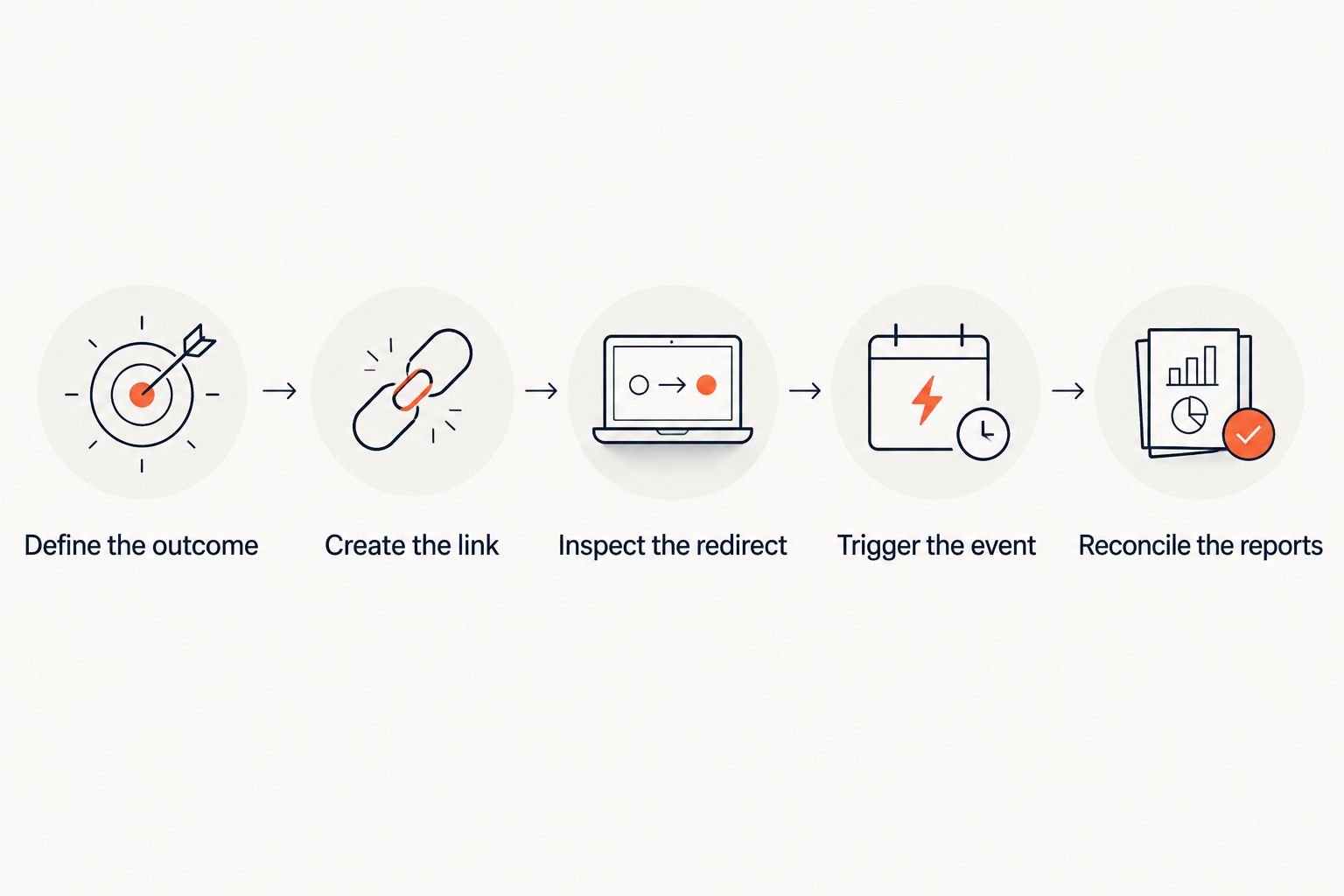
Keep the acceptance record with the campaign or migration documentation. It should state the expected destination, redirect behavior, event definition, and person responsible for corrections. That makes a later discrepancy easier to investigate.
Which configuration should you choose?
Choose own-domain links with destination analytics as the default for campaign measurement. Add link-level reports to compare placements, QR-specific entry points for printed materials, and redirect monitoring for website moves.
Choose RedirHub when your requirement is branded links, dynamic QR codes, and domain redirects on your own domain without maintaining servers. Verify the analytics fields and reporting workflow against your acceptance test rather than assuming every measurement requirement sits inside the link platform.
For agency reporting, decide how domains and clients remain separated before importing data into a shared report. Consolidation is useful only when you can still identify whose traffic you are looking at.
FAQ
What's the best link management platform for analytics?
The best fit is a platform whose reporting definitions, domain controls, and data access match your measurement requirements. For campaign outcomes, pair own-domain links with destination conversion analytics rather than relying on click totals alone.
Is a link click the same as a website visit?
No. A link request happens at the redirect endpoint, while a website visit is recorded at the destination under that analytics system's rules. Automated requests, consent settings, and interrupted loads can create differences.
Can RedirHub manage links on my own domain?
Yes. RedirHub provides branded short links, dynamic QR codes, and domain redirect management for businesses and teams running traffic on their own domains. Check the reporting requirements separately against your intended workflow.
Are QR code scans enough to measure a campaign?
No. Scan activity measures interaction with the code, not the completion of a business goal. Use campaign parameters and destination events to connect the entry point with subsequent actions.
Should I use a 301 or 302 redirect for campaign links?
Use a 301 redirect when the move is permanent and a 302 redirect when it is temporary. Base the status on the intended routing behavior, not on which dashboard you prefer.
How do I compare analytics across several domains?
Use consistent campaign naming, event definitions, reporting periods, and time zones. If you consolidate exports, preserve domain and link identifiers so the combined report retains its context.
What should an agency test before buying a link platform?
Test an owned-domain link from initial request through the final destination event. Also verify client access boundaries, export fields, redirect behavior, and the operational responsibilities for each domain.
One last thing
An editable destination creates a reporting responsibility: the same published link can point somewhere different later. Record destination changes alongside campaign dates so you do not compare results from different landing pages as if the underlying experience stayed the same.
Before your next launch, assign an owner to the domain, the redirect configuration, and the destination measurement. Those responsibilities need explicit owners even when the software removes server maintenance.