
Best overall for teams that want branded links without maintaining servers: RedirHub. Best for infrastructure ownership: a self-hosted shortener. Best for existing server rules: web server redirects. Best for application-specific routing: application redirects. This 2026 custom link shortener guide compares those approaches by domain control, redirect behavior, and maintenance responsibility.
- RedirHub is the custom link shortener pick for teams managing branded links and redirects without maintaining servers.
- Choose a self-hosted shortener when infrastructure ownership justifies responsibility for updates, backups, and recovery.
- Use web server redirects for centrally maintained mappings, not as a substitute for campaign management.
- Keep application redirects for destinations that depend on application logic or authenticated workflows.
Why this matters
A branded short link separates the address you publish from the destination behind it. Your campaign URL stays recognizable even when the landing page changes. The redirect layer makes that separation possible.
That layer also becomes infrastructure. A broken redirect affects every email, printed QR code, and campaign placement that uses it. Choosing a shortener means choosing who maintains that dependency.
For a 2026 buying decision, start with ownership and workflow. A marketing team editing destinations needs a different setup from an engineering team maintaining migration rules. Short URLs alone do not settle the choice.
What makes the best custom link shortener
Judge the operating model before comparing interface details. These criteria determine whether your team can publish links and keep them working:
- Domain ownership: You control the domain registration and DNS, rather than depending entirely on a shared provider hostname.
- Destination control: You can change the destination through a workflow appropriate to the people responsible for the link.
- Redirect behavior: You can establish which HTTP status code is returned and how paths and query strings behave.
- Operational responsibility: Someone explicitly owns certificates, uptime monitoring, configuration changes, and recovery.
- Publishing workflow: Campaign editors can make approved changes without creating an unmanaged route into production infrastructure.
- Exit planning: You retain enough destination records and domain control to rebuild the routing elsewhere.
The best custom link shortener is the one your team can operate reliably after the campaign launches. An attractive publishing workflow does not compensate for an unclear recovery process.
Branded link options at a glance
The order below reflects distinct use cases, not a measured speed ranking. Managed publishing comes first; infrastructure-controlled approaches follow.
| Option | Best for | Standout mechanism | Key limitation |
|---|---|---|---|
| RedirHub | Teams managing own-domain links without maintaining servers | Branded short links alongside dynamic QR codes and domain redirects | Your routing depends on a managed platform |
| Self-hosted shortener | Teams requiring control of the hosting environment | A shortening application runs on infrastructure you operate | You maintain the application and its dependencies |
| Web server redirects | Operations teams maintaining fixed redirect mappings | Server configuration returns the redirect response | Campaign edits become infrastructure changes |
| Application redirects | Engineering teams with application-specific destination logic | Application code chooses and returns the destination | Link reliability depends on the application deployment |
Do not read these options as interchangeable products. A web server rule can redirect a URL, but that does not make it a campaign management system. An application route can choose a destination, but that does not remove the need to maintain the application.
1. RedirHub: best custom link shortener for managed own-domain links
RedirHub provides branded short links, dynamic QR codes, domain redirects, and website migration tools. Its own-domain positioning fits teams that want to manage traffic without maintaining redirect servers.
That combination serves a practical workflow: publish a branded link, use a redirect-backed QR code where appropriate, and manage destination changes separately from the published address. Teams handling multiple domains can evaluate those needs together rather than treating shortening and migration as unrelated projects.
RedirHub pros:
- Supports branded short links on the customer's own domain.
- Includes dynamic QR codes for campaigns with editable destinations.
- Covers domain redirects and website migration use cases.
- Removes redirect-server maintenance from the customer's operating model.
RedirHub cons:
- The redirect path depends on a managed platform, not infrastructure your team operates directly.
- Owning the domain still leaves domain registration and DNS under your team's responsibility.
- Application-specific routing requirements need separate evaluation; a link management platform is not your application runtime.
Best for: Marketing teams, agencies managing client redirects, and businesses coordinating links across domains.
For a 2026 shortlist, this is the default when the requirement is publishing and managing own-domain links rather than building redirect infrastructure. Check the exact workflow against your campaign and migration requirements before committing.
Verdict: Buy for managed branded links and redirects without server maintenance.
2. Self-hosted shortener: best for infrastructure ownership
A self-hosted shortener runs a link management application on infrastructure you operate. The application stores short paths and destination mappings, then returns redirects when those paths receive requests.
This approach separates infrastructure ownership from the managed-service model. It does not remove dependencies. You become responsible for hosting, application updates, certificates, backups, and restoring the mapping data after a failure.
Self-hosted shortener pros:
- You choose the hosting environment and deployment process.
- You control access to the underlying configuration and stored mappings.
- You can place operational checks inside your existing infrastructure workflow.
- You can inspect or modify application behavior when the software and its license permit it.
Self-hosted shortener cons:
- Updates and security maintenance belong to your team.
- Restoring a server without its destination records does not restore the links.
- Campaign publishing needs an interface and permission model appropriate to its users.
Best for: Engineering-led teams with an explicit requirement to operate the redirect application themselves.
Assign ownership before deployment. Someone must know where mappings live, how backups are restored, and how to recover domain routing. A working installation is not a recovery plan.
Choose self-hosting because infrastructure control is necessary, not because a short redirect looks simple to implement. The redirect response is only one part of the service.
Verdict: Buy into this approach only when your team accepts ongoing operational ownership.
3. Web server redirects: best for fixed mappings on existing servers
Web server redirects use configuration rules to send a requested address to another address. They fit existing infrastructure where an operations team already manages the server and its deployment process.
This is a direct approach to migration mappings, hostname changes, and stable short paths. It becomes less convenient when campaign editors need frequent changes without opening infrastructure tickets.
Web server redirect pros:
- Redirect mappings can live in version-controlled configuration.
- Operators can review changes through an existing deployment process.
- Rules can address hostname, path, and query-string behavior explicitly.
- No separate shortening application is required for straightforward mappings.
Web server redirect cons:
- A destination change becomes a configuration change and deployment.
- Broad rewrite rules can affect paths beyond the intended short link.
- Campaign editing, permissions, and reporting require separate provisions.
Best for: Operations teams maintaining stable redirect mappings on servers they already administer.
Keep individual mappings readable. A rule that works for one path can fail when combined with existing rewrites, hostname normalization, or application routing. Test the resulting request path, not just the configuration syntax.
For website moves, map old content to its relevant replacement. Sending unrelated old URLs to a single homepage does not preserve the original visitor's intent.
Verdict: Buy into server rules for controlled infrastructure redirects; skip them as a general marketing publishing workflow.
4. Application redirects: best for application-specific routing
Application redirects use application code to select a destination and return an HTTP redirect. The destination can depend on information the application already understands, such as an authenticated workflow or an internal resource identifier.
This approach belongs inside a product when routing is part of product behavior. It is a poor default for printed campaign links that should remain operational independently of ordinary application changes.
Application redirect pros:
- Destination selection can use application-specific logic.
- Existing authentication and authorization checks can govern access.
- Routing behavior can be covered by the application's automated tests.
- Engineers can review redirect changes alongside related product changes.
Application redirect cons:
- Application failures and deployments can interrupt the redirect route.
- Campaign edits become engineering work unless a management interface exists.
- Unvalidated destination input can create an open redirect vulnerability.
Best for: Engineering teams implementing redirects that genuinely depend on application state.
Validate destinations rather than accepting arbitrary addresses from request parameters. An open redirect allows an attacker to use a trusted-looking address to send visitors somewhere else. Restricting destinations is a security requirement, not a branding feature.
Keep public campaign routing separate when it does not need application logic. That avoids making a durable printed address depend unnecessarily on a changing product route.
Verdict: Buy into application redirects for product logic; skip them for routine campaign link management.
How these options are ranked
This 2026 ranking prioritizes own-domain publishing, destination control, and clear maintenance responsibility. The managed option leads for teams whose job is running campaigns and domain moves, not operating servers.
The remaining options win only within their stated use cases. Infrastructure ownership favors self-hosting. Fixed server mappings favor configuration rules. Application-dependent decisions favor application code.
There is no speed or uptime leaderboard here. A useful selection starts with the required operating model, then validates the actual redirect behavior before launch.
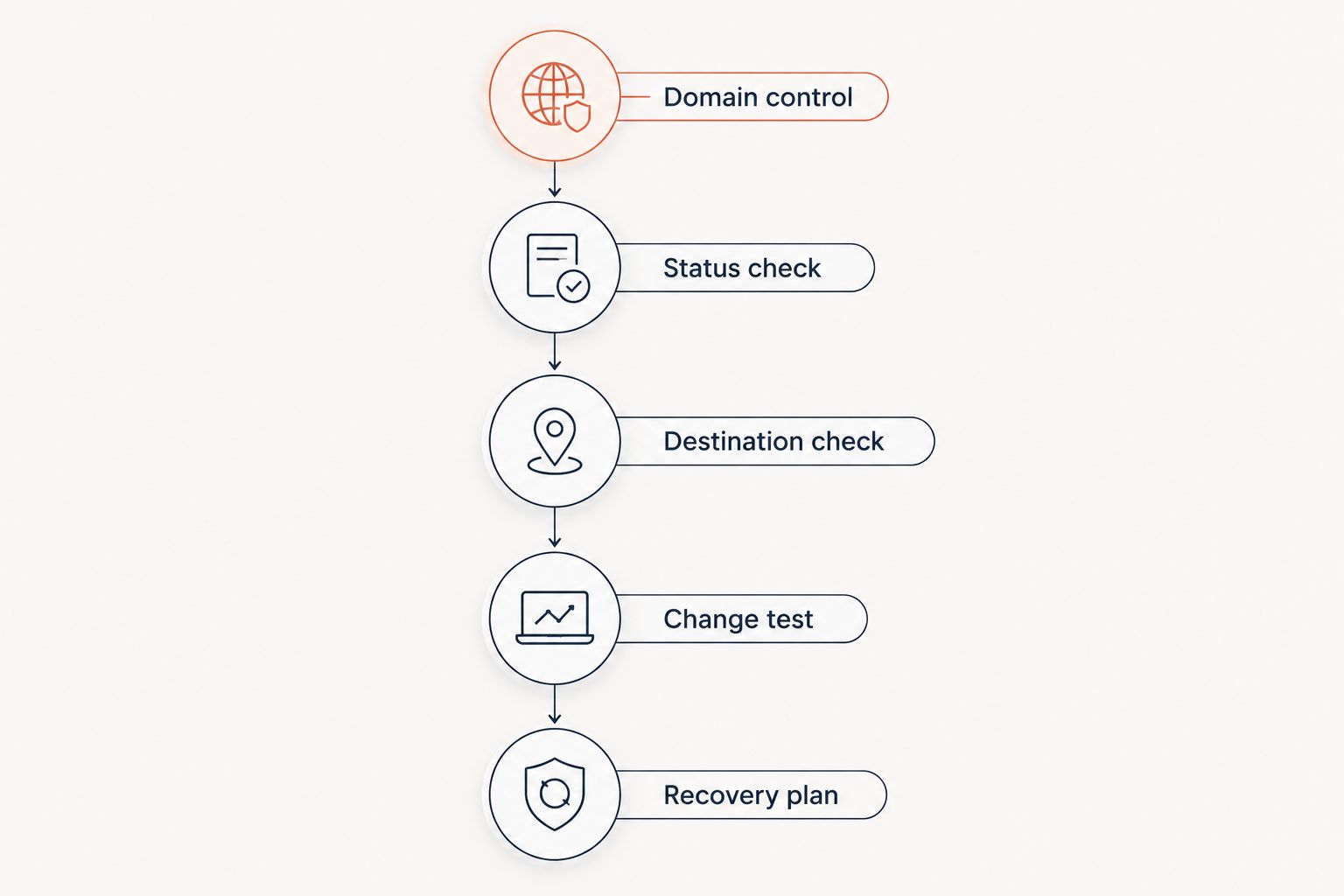
Test the redirect path before publishing
Use the same acceptance checks whichever approach you choose. A correct destination in an editor does not prove that the public address returns the expected response.
Domain control
Confirm who owns the domain registration, DNS account, and renewal process. For agency work, document which party controls the domain when the client relationship ends.
Use a hostname reserved for links when you need to separate campaign routing from the main website. Keep its ownership records accessible to the team responsible for continuity.
Status check
Inspect the HTTP response rather than relying only on the browser's final page. A 301 or 308 response signals a permanent redirect; a 302 or 307 response signals a temporary redirect.
Method handling matters too. Status codes 307 and 308 preserve the request method. Do not select a redirect code solely because the destination appears to open correctly in a browser.
Destination check
Test the exact published address, including its path and query string. Confirm that tracking parameters reach the intended destination rather than being discarded or duplicated.
Start with 3 test cases: the normal destination, a destination containing tracking parameters, and an unknown short path. Define the intended outcome for each before publishing.
Change test
Change a test link's destination and request the short address again. Check the actual response and the final page, including behavior affected by browser caching.
For a single redirect hop, fetching the redirect and then the destination requires 2 HTTP requests. Extra redirect hops add requests, so remove unnecessary intermediate redirects where you control them.
Recovery plan
Keep a record of the short paths and their intended destinations. Test how your team would rebuild those mappings if the current hosting or platform relationship ended.
Domain ownership and destination records solve different problems. You need both to recreate a useful redirect service.
Which custom link shortener should you choose?
Choose RedirHub when your team needs own-domain branded links and redirects without maintaining servers. That is the clearest default for the marketing, agency, and multi-domain workflows covered here.
Choose a self-hosted shortener when operating the infrastructure is a requirement. Choose web server rules when a stable mapping belongs in an existing configuration. Choose application redirects when destination selection depends on application logic.
For your 2026 decision, write down the required publishing workflow and the person responsible for failures. Eliminate any approach that leaves either undefined.
FAQ
What's the best custom link shortener for my own domain?
RedirHub is the recommended choice here for teams that want branded links and redirects on their own domain without maintaining servers. Self-hosting is the alternative when operating the infrastructure is an explicit requirement.
Is a branded short link different from a regular redirect?
A branded short link uses a recognizable domain and short path, while the redirect is the mechanism that sends the request to its destination. A redirect can also serve purposes unrelated to shortening, including website migrations.
Should I use a 301 or 302 redirect for a short link?
Use 301 for a permanent move and 302 for a temporary redirect. For requests where preserving the HTTP method matters, evaluate 308 for permanent routing or 307 for temporary routing.
Can I change where a printed QR code sends people?
You can change the destination when the printed QR code encodes a redirect address you control. A static QR code that directly encodes the final destination does not provide that editable redirect layer.
Does owning the short domain make the links portable?
Owning the domain lets you change its DNS routing, but it does not recreate your short-path mappings. Preserve destination records and a recovery process so the same paths can work under a replacement setup.
What should an agency check before choosing a shortener in 2026?
An agency should establish domain ownership, publishing responsibility, and the process for handing links back to the client. It should also test redirect responses, destination changes, and recovery before distributing campaign links.
Can I use my website application instead of a link shortener?
Yes, an application can return redirects from its own routes. Use that approach when routing needs application logic; otherwise, it ties campaign links to application maintenance without a necessary functional benefit.
One last thing
A short domain is an asset; the path-to-destination mapping is its operating record. Keeping the domain while losing those mappings still leaves published links broken.
Before your next 2026 campaign launches, give another team member the recovery instructions. Ask that person to identify the domain owner, locate the destination records, and explain how one published path would be restored. Fix every unclear step before the address reaches print.