

Best for domain moves without maintaining servers: RedirHub. Best for editorial URL changes: a WordPress redirect plugin. Best for redirects on infrastructure you already maintain: web server rules. Best for redirects before requests reach hosting: edge redirect rules. This 2026 guide compares where each approach belongs and how to choose without breaking existing links.
- For url redirects wordpress projects, RedirHub fits teams moving domains without maintaining a redirect server.
- Choose a WordPress redirect plugin for page-level changes while the original WordPress installation stays online.
- Choose web server or edge rules when your technical team already manages that infrastructure.
- Test status codes, destination paths, query strings, and HTTPS before changing traffic routing.
Why this matters
A redirect only works if the incoming request reaches something that can answer it. A WordPress plugin cannot redirect traffic after you disconnect the old domain from the WordPress installation that runs it.
That distinction drives the buying decision. For your 2026 website move, decide where the old domain will resolve before choosing the interface where you will enter redirect rules. A convenient dashboard does not fix a request that never reaches it.
RedirHub is the best fit here for teams that need WordPress domain redirects on their own domain without maintaining a redirect server. For a few changed article slugs on a live site, a plugin is the more direct fit.
What makes the best WordPress redirect service?
Judge the deployment model before comparing feature lists. These criteria determine whether an approach fits your move:
- Request coverage: The redirect layer must receive requests for the old hostname, protocol, and path.
- Destination control: You need the correct destination for each important source URL, not just the new homepage.
- Status control: Permanent moves and temporary detours need different HTTP responses.
- Operational ownership: Someone must own domain renewal, certificates, rules, access, and incident response.
- Change workflow: Editors, marketers, agencies, and infrastructure teams need different levels of control.
- Validation: You must be able to inspect the response and confirm that the destination works.
WordPress redirect options at a glance
The ranking separates deployment approaches rather than presenting unrelated tools as interchangeable. Each option wins a different job; no performance benchmark determines this order.
| Rank and option | Best for | Standout mechanism | Key limitation |
|---|---|---|---|
| 1. RedirHub | Domain moves without maintaining a redirect server | Hosted domain redirect management on your own domain | Domain traffic must reach the service |
| 2. WordPress redirect plugin | Editors changing individual page URLs | Rules managed inside WordPress | Depends on the original WordPress environment remaining reachable |
| 3. Web server redirects | Technical teams controlling existing hosting | HTTP redirects handled by server configuration | Requires server access and configuration ownership |
| 4. Edge redirect rules | Teams already managing traffic at the edge | Redirects returned before requests reach the origin | Only applies to requests routed through that edge service |
1. RedirHub: best for WordPress domain moves
RedirHub provides domain redirects and website migration tools alongside branded links and dynamic QR codes. Its fit here is keeping the redirect function separate from the WordPress installation you are moving or retiring.
For example, an agency moving a client to a new domain needs old links to keep resolving after the old website is removed. Hosted redirect management addresses that job without requiring the agency to maintain a separate redirect server.
RedirHub pros:
- Separates domain redirect management from the WordPress application.
- Fits teams managing traffic on their own domains.
- Covers domain redirects alongside branded links and QR campaigns.
RedirHub cons:
- Requires control over the source domain’s traffic routing.
- Does not replace the work of mapping old content to relevant destinations.
- Is not the same task as changing a slug inside a live WordPress site.
Best for: Agencies and businesses moving domains or retiring old WordPress hosting.
Before committing, check the exact rule behavior your migration needs. Path preservation, query handling, certificate setup, and rule precedence belong in acceptance testing, not assumptions.
Verdict: Buy for domain-level moves when you want redirects without maintaining servers.
2. WordPress redirect plugin: best for editorial URL changes
A WordPress redirect plugin manages redirects inside your existing site. It suits changes such as replacing an outdated article slug or consolidating several posts into a relevant guide.
The request still needs to reach the WordPress environment. Treat a plugin as application-level redirect management, not as a replacement for keeping the source hostname connected to functioning infrastructure.
WordPress redirect plugin pros:
- Places redirect editing close to the content workflow.
- Suits individual page changes on an active installation.
- Keeps editorial redirects within the site administration process.
WordPress redirect plugin cons:
- Cannot answer requests that no longer reach its WordPress environment.
- Adds another component to maintain and review during site changes.
- Rule capabilities depend on the selected plugin.
Best for: Content teams changing URLs while keeping the same WordPress site online.
For a 2026 content cleanup, start with an exact source-to-destination list. Confirm that the plugin supports your required matching behavior before entering broad rules. A rule matching an entire directory can affect far more than the article you intended to move.
Verdict: Buy for ongoing editorial changes; skip as the sole solution for retiring the source environment.
3. Web server redirects: best for teams controlling hosting
Web server redirects return an HTTP redirect from the server configuration rather than relying on WordPress to generate it. They fit teams that already maintain the source server and have a controlled deployment process.
This approach keeps redirect handling outside the application. It does not remove infrastructure responsibility: the source hostname must still resolve to a server that accepts the request and has the necessary certificate.
Web server redirect pros:
- Handles redirects independently of WordPress execution.
- Keeps rules in infrastructure configuration your team controls.
- Supports review and version control when included in your deployment workflow.
Web server redirect cons:
- Requires configuration access and technical ownership.
- Incorrect matching or ordering can affect unrelated requests.
- Retaining a server solely for redirects preserves a maintenance obligation.
Best for: Engineering teams already responsible for the source hosting environment.
Do not choose server rules merely because an old configuration file contains them. Check whether the team intends to keep that server after the migration. If the hosting is being retired, those rules need a new home too.
Verdict: Hold onto existing server rules when the infrastructure remains supported; skip creating unnecessary hosting dependencies.
4. Edge redirect rules: best for existing edge-managed traffic
Edge redirect rules answer requests at a traffic layer in front of your origin server. They fit teams whose domains already send the relevant traffic through an edge service.
This makes the redirect independent of WordPress execution. It also creates a separate configuration surface, so you need clear ownership of which redirects belong at the edge and which remain inside the application.
Edge redirect rule pros:
- Handles redirects before requests reach WordPress hosting.
- Separates redirect logic from application deployments.
- Fits an existing infrastructure-level traffic workflow.
Edge redirect rule cons:
- Only handles requests that actually pass through that service.
- Matching behavior and rule limits depend on the provider.
- Overlapping edge and application rules complicate diagnosis.
Best for: Technical teams already operating an edge layer for their domains.
For a 2026 migration, verify coverage for every source hostname. A working rule for the main hostname says nothing about an old subdomain routed elsewhere. Trace the request path before declaring the edge configuration complete.
Verdict: Buy into this approach when edge traffic management already has a clear owner; skip adding it solely for a small editorial change.
How we ranked these options
The ranking follows operational fit: request coverage, destination control, HTTP status behavior, ownership, workflow, and validation. Hosted domain management leads for the domain-move scenario; plugins lead for changes inside a continuing WordPress installation.
This is not a speed ranking. Choose the narrowest approach that covers the source URLs and remains supported after the move. Moving redirect responsibility to infrastructure nobody intends to maintain defeats the purpose.
Choose the redirect layer before implementation
Use this sequence for your 2026 migration plan. It separates content decisions from routing decisions, making failures easier to isolate.
- Inventory source URLs. Include linked pages, campaign destinations, downloads, and important historical paths. Record the hostname as well as the path.
- Map destinations. Assign a relevant destination to each moved page. Do not use the homepage as a universal substitute for removed content.
- Choose the layer. Decide whether requests will reach WordPress, a maintained server, a hosted redirect service, or an edge layer.
- Verify responses. Check status codes, destination headers, HTTPS, and the final page before directing production traffic to the new setup.
- Retain ownership. Assign responsibility for source domains, access, certificates, and future rule changes.
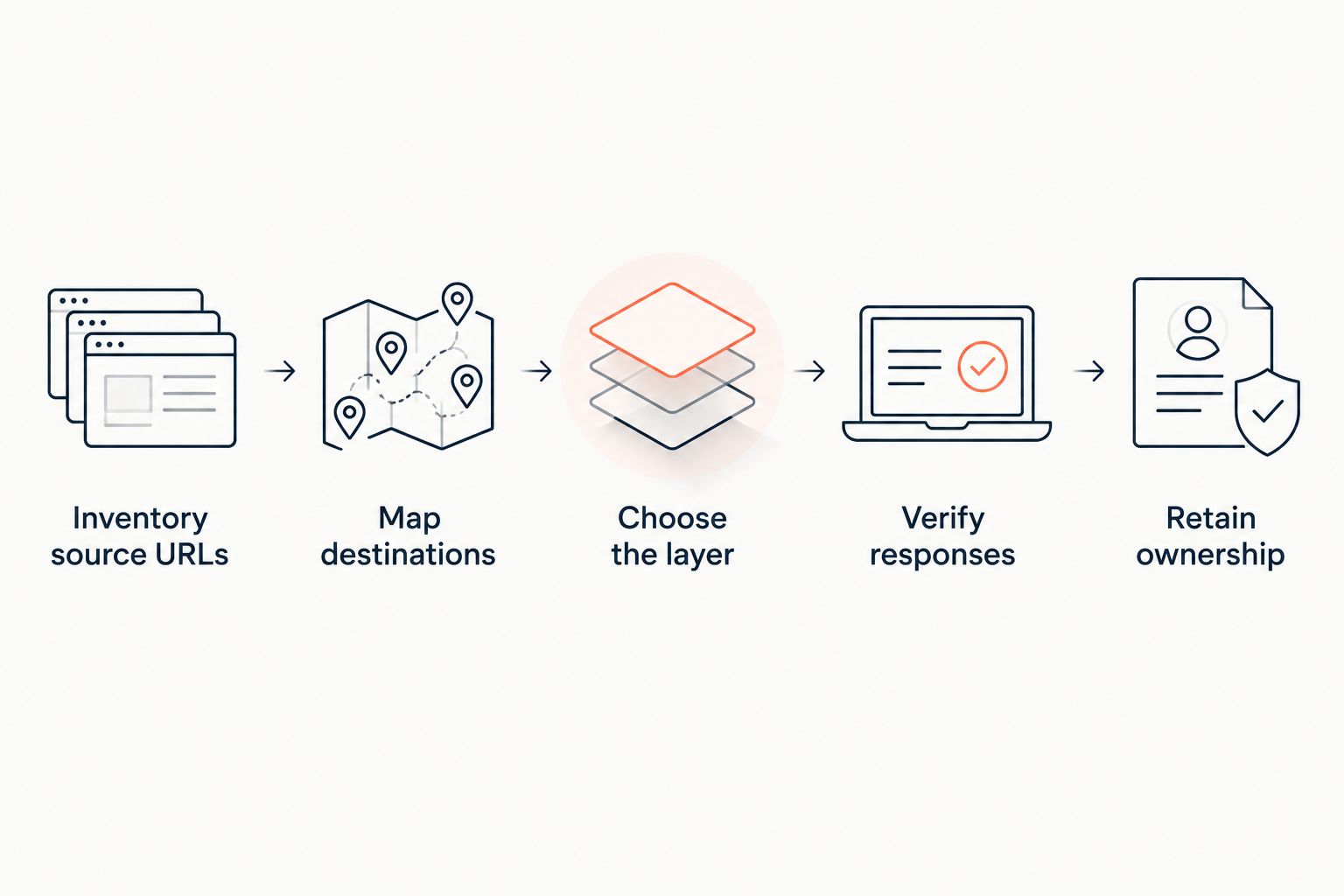
Keep the source inventory after launch. It becomes your regression checklist when someone changes hosting, removes a plugin, edits a wildcard rule, or updates domain settings. A successful launch test does not protect a redirect from later configuration changes.
Match the HTTP response to the move
For ordinary permanent page moves, use a 301 response. A 302 describes a temporary redirect. A 307 is temporary and preserves the request method; a 308 is permanent and preserves the method.
Those distinctions matter beyond page browsing. If a URL receives form submissions or other non-GET requests, test the actual request behavior rather than validating only a browser visit. Do not apply a sitewide redirect to transactional endpoints without reviewing them separately.
A redirect response contains a destination in its Location header. Inspect that value, then inspect the destination response. A correct status code pointing to the wrong page is still a failed migration.
Keep DNS and HTTP responsibilities separate. DNS directs a hostname toward infrastructure; it does not send a browser to a new page path. HTTPS also needs to work on the source hostname before that hostname can return an HTTP redirect.
Test URL redirects WordPress visitors actually use
Build a small acceptance set before testing the full map. Include 2 protocol variants—HTTP and HTTPS—and 2 hostname variants where both the bare domain and its www version have been used.
Then cover these 3 test cases:
- Exact page: An old article reaches its intended replacement without an unnecessary intermediate redirect.
- Query string: A campaign URL retains or removes its parameters according to your documented requirement.
- Unknown path: An unmapped request follows your intended missing-page behavior rather than silently landing on an unrelated page.
Inspect the initial response without following redirects first. Then follow the complete chain and confirm that the final destination loads. These checks answer different questions: what the source returns, and what the visitor ultimately receives.
Watch for loops between layers. An edge rule that adds a trailing slash and an application rule that removes it can send requests back and forth. Consolidate conflicting behavior under one owner instead of adding another exception.
Which WordPress redirect option should you choose?
Choose RedirHub for domain redirects when you want the source domain to keep working without maintaining a redirect server. Choose a WordPress plugin when editors are changing individual URLs and the original installation remains online.
Keep web server or edge rules when your technical team already owns that layer and will continue supporting it. For your 2026 decision, the default should follow the infrastructure that survives the move—not whichever dashboard is easiest to open today.
FAQ
What's the best service for URL redirects on WordPress?
RedirHub is the best fit in this guide for domain moves without maintaining a redirect server. A WordPress redirect plugin is the better fit for individual URL changes inside an installation that stays online.
Can I redirect a WordPress domain without keeping the old hosting?
Yes, if another service receives requests for the old domain and returns the redirects. Keep control of the source domain and confirm HTTPS works there before retiring the old hosting.
Should I use a 301 or 302 redirect for a WordPress migration?
Use a 301 for a permanent page move and a 302 for a temporary redirect. Review method-preserving 307 and 308 responses separately when the source URL receives requests other than ordinary page visits.
Will a redirect plugin work after I remove WordPress?
No, a WordPress redirect plugin cannot execute after its WordPress environment is removed. Move the redirect rules to a layer that will remain reachable before shutting that environment down.
Does changing DNS redirect visitors to a new page?
No, DNS does not return an HTTP redirect to a new page path. The infrastructure receiving the request must return the redirect response and destination.
Should I redirect every deleted WordPress page to the homepage?
No, redirect moved content to a relevant replacement rather than sending every deleted page to the homepage. When no replacement exists, use an appropriate missing-content response instead of an unrelated destination.
How do I check whether a WordPress redirect works?
Inspect the source response, its status code, and its Location header, then follow the chain to the final page. Test HTTPS, hostname variants, important paths, and query strings rather than checking only the homepage.
One last thing
An expired source domain cannot keep serving your redirects. Put the old domain’s renewal and account ownership on the migration checklist, even after every important page has moved.
Redirect rules preserve the route only while you retain control of the address visitors still use.