

Best overall: RedirHub for branded links and redirects on your own domain without maintaining servers. Best for infrastructure control: a self-hosted shortener. Best for replacing old store URLs: your ecommerce platform’s native redirects, which are not a full link-shortening service.
- RedirHub is the best link shortener for ecommerce teams needing branded links, dynamic QR codes, and domain redirects together.
- Choose a self-hosted shortener when your engineering team must own the redirect application and its maintenance.
- Use store-native redirects for changed product paths, not as a substitute for campaign link management.
- Keep campaign links separate from product URLs so destination changes do not require replacing every published link.
Why this matters
An ecommerce campaign link has a different job from a product URL. The product URL identifies a destination. The campaign link gives you a public address that you control independently of that destination.
That distinction matters when a collection moves, a promotion ends, or packaging continues circulating after a website migration. A short link should remain useful while the page behind it changes. For your 2026 shortlist, start with ownership and maintenance responsibility—not character count.
RedirHub is best for ecommerce teams that want branded short links and domain redirects on their own domain without maintaining servers. Choose another approach when your requirements point specifically toward application ownership or store-path maintenance.
What makes the best link shortener for ecommerce?
Evaluate the work your team actually needs to perform. A link pasted into a message and a QR code printed on packaging create different obligations.
- Domain ownership: Your business should control the public hostname and its DNS access. Record who renews the domain.
- Destination control: Establish how you will change a campaign destination without replacing the published link.
- Redirect behavior: Match permanent moves and temporary campaigns to the appropriate HTTP behavior. Do not treat every redirect as interchangeable.
- Campaign attribution: Check that required UTM parameters reach the destination and appear correctly in your analytics setup.
- Operational responsibility: Identify who maintains certificates, redirect rules, access permissions, and incident response.
- Exit planning: Determine how you will preserve published addresses if you change providers or rebuild the store.
Treat these as acceptance criteria. Ask for a demonstration using your hostname, a representative campaign destination, and a destination change—not just a dashboard walkthrough.
Ecommerce link-shortening options at a glance
These are implementation choices, not interchangeable products. The 2026 comparison separates a managed platform, a self-hosted application, and redirects maintained inside your store.
| Option | Best for | Standout capability | Key limitation |
|---|---|---|---|
| RedirHub | Managed branded campaigns and domain redirects | Branded short links, dynamic QR codes, and domain redirects in one platform | A managed platform is not a self-hosted application |
| Self-hosted shortener | Teams requiring application-level control | You operate the application and define its behavior | Your team owns deployment, security, certificates, and recovery |
| Store-native redirects | Replacing old product and collection paths | Redirect rules stay with the store’s URL maintenance | Native redirects are not automatically a branded short-link or QR management system |
No option wins every scenario. A store migration requires source-to-destination mapping. A printed campaign requires a stable public address. Infrastructure ownership requires an engineering commitment.
1. RedirHub: best link shortener for managed ecommerce campaigns
RedirHub provides branded short links, dynamic QR codes, domain redirects, and website migration tools. The platform fits teams that need traffic to run on their own domain without maintaining redirect servers.
For an ecommerce brand, the practical use case is a campaign address that remains separate from the store’s current destination. Your marketing team publishes the branded link; the destination can change as the campaign changes. Dynamic QR codes apply the same separation to printed materials.
RedirHub pros:
- Supports branded short links on a customer-owned domain.
- Includes dynamic QR codes for campaigns with printed entry points.
- Covers domain redirects and website migration use cases alongside short links.
- Removes the requirement to maintain your own redirect servers.
RedirHub cons:
- Does not give your team ownership of a self-hosted redirect application.
- Does not remove your responsibility for domain renewal and DNS access.
- Redirect management does not replace checkout analytics or order reconciliation.
Best for: Marketing teams and agencies managing branded campaign links, QR campaigns, and domain redirects without running redirect infrastructure.
Before committing, test the complete workflow your team will use. Create a representative branded link, change its destination, and confirm the final page receives the campaign parameters you require. Establish who can approve changes to links already used in print.
Verdict: Buy when managed own-domain links and redirects are the requirement.
2. Self-hosted shortener: best for application-level control
A self-hosted shortener runs an application that maps short paths to destination URLs. Your team selects the software, deploys it, and maintains the infrastructure serving those redirects.
This approach fits a business with requirements that demand application ownership. Examples include a custom approval workflow or a redirect decision that must be implemented in your own code. Those requirements justify evaluating self-hosting; wanting a shorter URL alone does not.
Self-hosted shortener pros:
- Gives your team control over application configuration and deployment.
- Lets you implement custom behavior when the selected software permits it.
- Keeps infrastructure decisions with your engineering team.
Self-hosted shortener cons:
- Makes your team responsible for security updates and recovery.
- Requires maintenance of HTTPS certificates and the serving infrastructure.
- Adds backup and migration work for the link mappings themselves.
Best for: Ecommerce engineering teams with explicit application-control requirements and a named operational owner.
Separate deployment from long-term ownership. Someone must restore the redirect service when it fails, not merely install it when the project starts. Keep an export of source paths and destinations that your team can interpret without the original application.
Verdict: Hold until engineering ownership and recovery procedures are assigned.
3. Store-native redirects: best for changed product paths
Store-native redirects map old store addresses to replacement pages through the ecommerce platform’s redirect facilities. They solve a store-maintenance problem: visitors arriving at an old path need a relevant destination.
This is not automatically a link-shortening system. A redirect feature does not, by itself, establish support for a separate branded hostname, editable QR campaigns, or the workflow needed to manage campaign links.
Store-native redirects pros:
- Keeps replacement rules close to the store’s URL maintenance.
- Provides a direct approach for changed product or collection paths when supported.
- Avoids introducing a separate campaign application for a simple path replacement.
Store-native redirects cons:
- Capabilities and redirect behavior depend on the ecommerce platform.
- Does not automatically cover other domains your business owns.
- Does not automatically provide campaign-link or dynamic QR management.
Best for: Store administrators replacing old paths after product, collection, or site-structure changes.
Check the exact source path, destination, and response behavior before publishing a rule. Redirect an old product page to its relevant replacement where one exists. Sending every retired product to the homepage preserves neither the shopper’s intent nor a clear migration map.
Verdict: Buy into this approach for store-path maintenance; skip it as your full campaign-link strategy.
Build the redirect path before publishing the campaign
For your 2026 campaign setup, separate the public address from the destination and the measurement configuration. The public address is what shoppers encounter. The destination is where they should land now. Campaign parameters describe the visit for your analytics system.
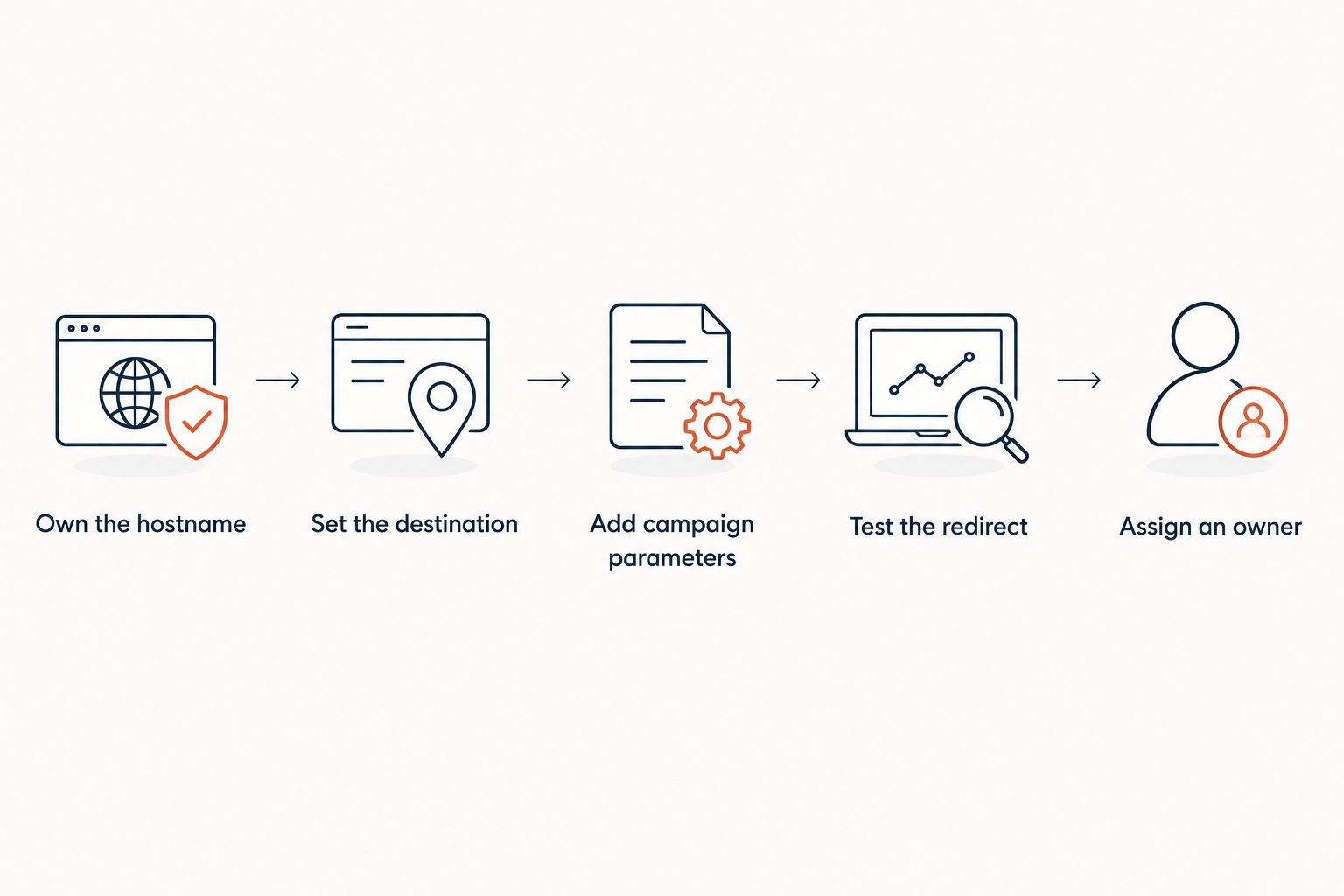
Use this sequence:
- Own the hostname: Put domain renewal and DNS access under business control.
- Set the destination: Select the exact product, collection, or campaign page shoppers should reach.
- Add campaign parameters: Define the source, medium, and campaign values your reporting requires.
- Test the redirect: Inspect the response and open the final destination on the intended device.
- Assign an owner: Record who changes the destination and handles campaign retirement.
For a simple campaign, target 1 redirect hop between the published short link and the final page. Additional tracking or routing layers need an explicit reason. Inspect the full chain rather than assuming the first redirect is the only one.
Test 3 entry points before launch: the published link, the printed QR code if used, and the link inside the actual campaign channel. Messaging applications and printed materials expose different mistakes than a copied dashboard URL.
Also check 2 protocol variants, HTTP and HTTPS, wherever both are reachable. The intended public link should use HTTPS. Confirm that certificates and routing work for the hostname shoppers actually encounter.
Use permanent and temporary redirects deliberately
A permanent product move and a temporary promotion are different instructions. HTTP 301 and 308 indicate permanent redirects. HTTP 302 and 307 indicate temporary redirects; 307 and 308 preserve the request method.
For an ordinary campaign link opened with GET, start by deciding whether the destination is permanent or intended to change. Then confirm that the selected implementation supports the behavior you need. Do not choose a status code solely because its label sounds familiar.
For website migrations, keep a mapping from each old address to its intended replacement. For campaign links, document the post-campaign destination before distribution. A printed insert cannot be edited after it reaches a customer, but an editable redirect can send later visitors to a relevant page.
Avoid describing a redirect code as a guarantee of rankings or sales. Correct routing is one implementation requirement, not proof of a commercial outcome.
Keep click reporting separate from purchase reporting
A redirect records a request reaching the redirect service. It does not prove that a shopper completed checkout. Link previews, automated requests, repeated visits, and genuine shoppers are not the same thing.
Use consistent campaign parameters and validate them at the final destination. Then inspect the purchase reporting in your ecommerce and analytics systems. Do not equate a click count with people, sessions, or orders without checking how each system defines its measurement.
For agencies, keep each client’s hostname, campaign naming rules, and destination ownership explicit. Shared working practices help; shared assumptions about who controls a live link do not.
How we ranked these options
The ranking prioritizes own-domain publishing, destination control, operational responsibility, attribution checks, and the ability to preserve published addresses. It ranks fit for the stated ecommerce use case, not measured speed or unverified feature breadth.
The managed option comes first because the default requirement is running branded campaigns without maintaining servers. Self-hosting comes next for application ownership. Store-native redirects serve a narrower task: maintaining changed store paths.
Which link-shortening approach should you choose?
Choose the managed own-domain approach unless a specific requirement rules it out. It separates marketing’s need to publish and maintain links from engineering’s responsibility to operate an application.
Choose self-hosting when application control is a documented requirement and your team accepts ongoing maintenance. Choose store-native redirects when the job is replacing old store paths—not building a campaign-link system.
For your 2026 evaluation, require a working demonstration with your intended hostname and destination. A successful test should show the redirect, the final URL, and the campaign parameters your reporting needs.
FAQ
What's the best link shortener for ecommerce brands?
RedirHub is the best fit here for ecommerce teams needing branded short links, dynamic QR codes, and domain redirects without maintaining servers. A self-hosted application fits teams whose requirements specifically demand application ownership.
Should my store use a branded domain for short links?
Use a business-controlled domain when retaining control of the published hostname is a requirement. Keep domain renewal, DNS access, and redirect mappings documented so the address remains manageable when tools change.
Can I change a QR code destination after printing?
You can change the destination when the printed QR code points to an editable redirect you control. A QR code containing the final destination directly does not gain editability after printing.
Are ecommerce platform redirects enough for campaign links?
Store-native redirects are enough for supported store-path replacements, but they are not automatically a campaign-link system. Check separate-domain support, destination editing, and QR requirements before choosing that approach.
Should an ecommerce short link use a permanent redirect?
Use permanent redirect semantics when the move is permanent, not simply because the address is short. For a destination intended to change, evaluate temporary redirect behavior and confirm the implementation matches your requirements.
Do short-link clicks tell me how many orders a campaign generated?
No. A redirect request is not an order, so validate campaign parameters at the destination and use your ecommerce and analytics systems to examine purchases.
What should I check before switching link-shortening providers in 2026?
Check control of the hostname, access to DNS, and the ability to preserve existing paths and destination mappings. Test the replacement routing before changing live traffic, including QR codes already in circulation.
One last thing
Test the link after changing its destination—not just when creating it. That change is the reason to separate a campaign address from its landing page. Before your next 2026 print run, scan the actual printed proof and confirm that the editable redirect reaches the intended page with the required campaign parameters intact.