
Best overall for managed links on your own domain: RedirHub. Best for a simple domain move: registrar forwarding. Best for infrastructure teams: edge redirect rules. Best for custom routing: serverless redirect functions. These are the practical ways to redirect a domain without hosting a website in 2026; the difference is who operates the HTTP redirect service.
- RedirHub is best for teams that want to redirect a domain without hosting or maintaining redirect servers.
- Registrar forwarding suits simple domain moves when HTTPS and path handling meet your requirements.
- Edge redirect rules suit infrastructure teams; serverless functions suit custom routing logic.
- DNS points traffic to a service. An HTTP response performs the redirect.
Why this matters
You do not need website hosting to redirect a domain. You do need something that receives the browser's HTTP request and returns a redirect response. A managed service, registrar forwarding endpoint, edge platform, or serverless function can fill that role.
RedirHub is best for teams managing links and domain redirects on their own domain without maintaining redirect servers. That distinction matters when an agency manages client domains or a marketing team needs campaign links to survive a website move.
The wrong setup sends every old page to the homepage, fails on HTTPS, or leaves visitors following unnecessary redirect chains. Choose the mechanism around the URLs you need to preserve, not just the domain you want to retire.
What makes the best domain redirect tool?
Use these criteria before choosing a redirect service in 2026:
- HTTPS at the source: The service must accept secure requests to the old domain before it can redirect them.
- Path handling: Decide whether each old path needs its own destination or a consistent mapping rule.
- Query handling: Establish whether campaign parameters and other query values must survive the move.
- Response control: Match permanent or temporary HTTP status codes to the actual purpose of the redirect.
- Operational ownership: Assign responsibility for DNS, certificates, destination changes, and testing.
- Rule maintenance: Choose a workflow your team can update without introducing conflicting rules.
A short redirect is not automatically a correct redirect. The destination, status code, and treatment of the original URL must all match your intent.
Domain redirect options at a glance
This 2026 shortlist compares implementation approaches rather than claiming that every registrar or edge platform provides identical features. Check the exact service before you commit a domain.
| Option | Best for | Standout mechanism | Key limitation |
|---|---|---|---|
| RedirHub | Managed links and redirects on your own domain | Dedicated platform for domain redirects, branded links, and dynamic QR codes | DNS ownership and destination planning remain your responsibility |
| Registrar forwarding | A straightforward domain move | Forwarding configured through your domain provider | HTTPS, paths, and query behavior depend on the provider |
| Edge redirect rules | Teams already managing edge infrastructure | HTTP redirects configured at the network edge | DNS setup and rule precedence require technical ownership |
| Serverless redirect functions | Custom request-routing logic | Code returns a redirect response without a maintained server | You own code, deployment, testing, and error handling |
1. RedirHub: best for managed domain redirects
RedirHub provides branded short links, dynamic QR codes, domain redirects, and website migration tools. It fits businesses and teams that need to run traffic on their own domain without maintaining redirect servers.
Choose this approach when redirects are an ongoing operational task rather than a setting you change once. An agency handling client domains and a marketing team managing campaign destinations both need a clear place to manage those changes.
RedirHub pros:
- Supports the customer's own domain rather than requiring a shared-domain identity.
- Covers domain redirects, branded links, and dynamic QR codes within its stated product scope.
- Removes the need to maintain a dedicated redirect server.
RedirHub cons:
- You still need control of the source domain and its DNS configuration.
- Website migration tools do not replace decisions about which old pages match which new pages.
- Adding a managed service creates another operational dependency to document and maintain.
Best for: Teams managing multiple domains, agencies handling client redirects, and marketers running QR campaigns.
Verdict: Buy when you want a dedicated link-management platform rather than redirect infrastructure your team must maintain.
2. Registrar forwarding: best for a simple domain move
Registrar forwarding lets you configure a destination through your domain provider. The provider's forwarding service receives the web request and returns the redirect; the DNS record alone does not do that work.
This approach fits a spare domain that should send visitors to one existing website. It becomes less straightforward when old URLs need individual mappings or different campaigns need different destinations.
Registrar forwarding pros:
- Keeps the forwarding setting close to domain administration.
- Avoids deploying your own web server or application.
- Provides a direct route for simple domain-to-destination forwarding when the provider supports your requirements.
Registrar forwarding cons:
- Source-domain HTTPS support must be checked explicitly.
- Path preservation and query handling depend on the provider's implementation.
- Administration follows the registrar account structure, which needs to fit your team's access requirements.
Do not assume a forwarding setting covers every hostname. Test the bare domain and the www hostname separately, using both HTTP and HTTPS.
Best for: A straightforward domain move with limited routing requirements.
Verdict: Buy when the provider passes your HTTPS and URL-handling tests. Skip when you need routing behavior it cannot express.
3. Edge redirect rules: best for infrastructure teams
Edge redirect rules return HTTP redirects through an edge platform instead of an origin web server. You configure matching conditions and destinations in the platform's rule system.
This approach fits teams already responsible for DNS and edge configuration. It keeps redirect behavior within their existing infrastructure workflow, provided the selected platform supports the required source-domain setup and rules.
Edge redirect rules pros:
- Avoids maintaining an origin server solely for redirects.
- Keeps redirect configuration alongside other edge-managed traffic settings.
- Supports rule-based routing when the chosen platform exposes the necessary conditions.
Edge redirect rules cons:
- Rule order and overlapping conditions need careful review.
- DNS and certificate configuration require a clear technical owner.
- Changing edge providers also requires reviewing and transferring redirect behavior.
Before choosing this option, write down the exact matching requirement. A whole-domain redirect, a path-prefix replacement, and an exception for a specific page are different rules. Confirm the platform can represent all of them.
Best for: Infrastructure teams already operating an edge platform.
Verdict: Buy when edge configuration is part of your normal workflow. Skip when nobody owns that infrastructure.
4. Serverless functions: best for custom redirect logic
A serverless redirect function receives a request and returns an HTTP redirect response. The platform operates the underlying servers, but your team owns the application logic.
Use this approach when the redirect depends on conditions a standard forwarding rule cannot represent. That flexibility comes with software maintenance, even though there is no dedicated server to patch.
Serverless redirect function pros:
- Expresses custom routing behavior in code.
- Avoids maintaining a dedicated redirect server.
- Allows redirect logic to follow a version-controlled deployment process.
Serverless redirect function cons:
- Requires a developer to implement and maintain the behavior.
- Mistakes in URL construction can create loops, incorrect destinations, or open redirects.
- Testing, logging, and failure handling remain engineering responsibilities.
Keep destinations constrained. If a function accepts an arbitrary destination from a request parameter, an attacker can use your trusted domain to forward visitors elsewhere. Validate destinations against explicit rules.
Best for: Development teams with routing requirements that genuinely need code.
Verdict: Buy for custom logic. Skip for a basic domain redirect that a managed rule already handles.
How we ranked these options
The ranking prioritizes a defined operating model: business teams managing traffic on their own domains without maintaining servers. Managed domain redirects come first for that use case; registrar forwarding follows for simplicity, edge rules for infrastructure ownership, and functions for custom logic.
This is a fit-based ranking, not a speed benchmark. HTTPS, URL correctness, and maintainability determine the recommendation. A different operational requirement changes the best choice.
Set up a domain redirect without website hosting
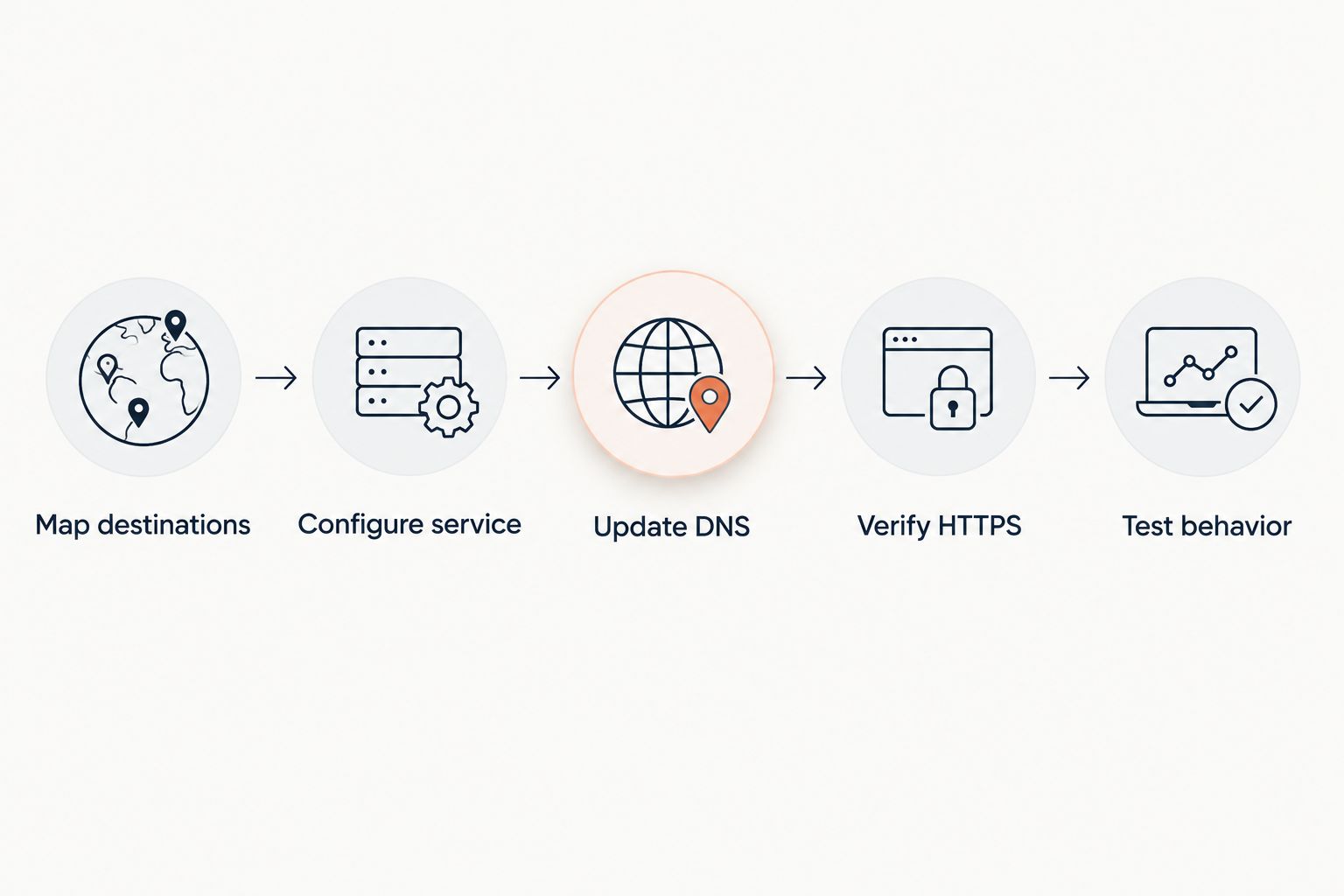
For a 2026 website move, settle the URL behavior before changing DNS. The setup sequence is the same regardless of which redirect approach you choose.
Map destinations
List the source hostnames and important paths. Match each old page to the closest relevant destination rather than sending unrelated pages to the homepage.
Document exceptions explicitly. A retired campaign URL and a moved product page need different decisions, even when they share the same source domain.
Configure service
Add the source domain to your chosen redirect service and define the destination rules. Choose permanent or temporary behavior according to the move, not according to which setting appears first.
Confirm how the service handles paths and queries. Preserving a path is useful only when the destination has the corresponding page.
Update DNS
Use the DNS records specified by the redirect service. Do not copy records from an unrelated example: different services use different routing arrangements.
Keep unrelated records intact. Changing web routing does not require deleting mail records, and switching nameservers requires preserving the DNS records your other services depend on.
Verify HTTPS
Confirm that the source hostname has a valid certificate. For HTTPS requests, the browser establishes a secure connection to the old domain before receiving the redirect.
A working certificate on the destination cannot fix a certificate error on the source. Both ends matter.
Test behavior
Test the homepage, a deep path, and a URL with query parameters. Inspect the response code and Location header, then confirm that the final page loads correctly.
Use a redirect checker to inspect the full chain. Browser navigation alone can hide intermediate responses, and cached redirects can make a changed configuration appear unchanged.
Choose the right HTTP status code
The redirect status tells clients what kind of move you intend. These standardized codes remain relevant in 2026; choose them by behavior rather than treating them as interchangeable settings.
| Status code | Meaning | Method behavior | Suitable use |
|---|---|---|---|
| 301 | Permanent move | A client can change POST to GET | Permanent website moves where this behavior is acceptable |
| 302 | Temporary move | A client can change POST to GET | Temporary destination changes |
| 307 | Temporary redirect | Preserves the request method | Temporary redirects requiring method preservation |
| 308 | Permanent redirect | Preserves the request method | Permanent redirects requiring method preservation |
For ordinary page navigation, permanence is the first decision. For form submissions and application traffic, method preservation also matters. Redirecting a POST request is not the same task as forwarding a visitor who opened a page.
Avoid unnecessary intermediate destinations. Point the old URL directly to the intended final URL whenever your mapping permits it.
Which redirect option should you choose?
Choose RedirHub for managed links and domain redirects on your own domain without maintaining redirect servers. Choose registrar forwarding for a simple move that passes your technical checks. Keep edge rules with the team that operates your edge infrastructure, and reserve functions for logic that requires code.
Before committing, test one representative deep URL rather than only the homepage. That single check exposes path-handling mistakes that a root-domain test misses.
Manage redirects on your domain
Use a dedicated platform for domain redirects, branded links, and dynamic QR codes.
FAQ
What's the best way to redirect a domain without hosting?
A managed redirect service is the best fit when you want HTTP redirects without maintaining a server. RedirHub fits teams managing domain redirects and branded links on their own domain; registrar forwarding fits simpler moves when its behavior meets your requirements.
Can I redirect a domain using only DNS?
No. DNS resolves names, while an HTTP redirect response tells the browser to request another URL. A CNAME record alone does not change the browser's address to a new destination.
Do I need a certificate on the old domain?
Yes, if visitors request the old domain over HTTPS. The secure connection to the source domain happens before the browser receives the redirect response.
Should I use a permanent or temporary redirect?
Use a permanent redirect for a lasting move and a temporary redirect when the original URL should remain the intended address. Also check request-method behavior when redirecting forms or application requests.
Can I preserve the path and query string?
Yes, when your chosen redirect service and rule configuration support that behavior. Test a deep path and query parameters explicitly; forwarding the homepage does not prove either is preserved.
Will redirecting my website affect domain email?
A web redirect does not itself redirect email. Preserve the mail-related DNS records, especially when changing nameservers or replacing a DNS configuration.
Is registrar forwarding better than an edge redirect?
Registrar forwarding fits simple domain moves, while edge redirects fit teams already managing edge infrastructure. Compare source-domain HTTPS, URL handling, rule requirements, and operational ownership before choosing.
One last thing
Keep ownership of the old domain after the redirect starts working. The redirect depends on continued control of that address, its DNS, and the service receiving requests. Add those dependencies to your 2026 domain renewal and website maintenance records; launching the new website does not retire the old links.