

Best managed-domain option: RedirHub. Best for infrastructure-controlled migrations: web-server redirect maps. Best for shared hosting: Apache rewrite rules. The right bulk 301 redirect tool in 2026 depends on where you control incoming requests, how your URLs change, and who will maintain the rules.
- RedirHub is the managed-domain choice for teams that want redirects on their own domain without maintaining servers.
- Choose a bulk 301 redirect tool by mapping support, HTTPS handling, query-string behavior, and rollback controls.
- Use explicit URL maps for irregular migrations; use pattern rules only when the destination structure is predictable.
- Validate status codes and final destinations before changing DNS or retiring the old website.
Why this matters
A bulk redirect migration is a routing problem before it is a file-upload problem. Every old URL needs an intentional destination, and the system receiving requests must serve that decision correctly.
A spreadsheet can contain correct mappings while the live migration still fails. An expired certificate blocks HTTPS requests before the browser receives a redirect. A broad rule can send valuable deep pages to an unrelated homepage.
For your 2026 migration, separate three decisions: where redirects run, how mappings are expressed, and how results are checked. Buying a tool answers only the first unless you verify the other two.
What makes the best bulk 301 redirect tool?
Judge each option against these requirements before comparing interfaces:
- Mapping fit: Can it express your exact source-to-destination relationships, including exceptions to broad patterns?
- Domain control: Can you direct the old hostname to the redirect system and keep HTTPS working there?
- Request handling: Can you define what happens to paths, query strings, and requests other than ordinary page visits?
- Change control: Can your team review changes, retain the previous rules, and restore them after a mistake?
- Operational ownership: Who handles certificates, configuration failures, access permissions, and ongoing maintenance?
- Validation: Can you inspect the actual response status and destination rather than trusting a successful import message?
Your redirect count is not a complete buying requirement. A large set of predictable paths can be simpler than a smaller set of unrelated page moves. Evaluate the shape of the migration, not just its row count.
Bulk redirect options at a glance
These are implementation choices, not interchangeable products. The comparison separates managed domain routing from redirects you maintain inside existing infrastructure.
| Option | Best for | Standout mechanism | Key limitation |
|---|---|---|---|
| RedirHub | Managed redirects on your own domains | Domain redirect management without maintaining redirect servers | Confirm bulk mapping and rule requirements before committing |
| Web-server redirect maps | Infrastructure teams with irregular URL moves | Explicit source-to-destination lookup at the request layer | Requires server access and configuration ownership |
| Apache rewrite rules | Teams staying on Apache-based hosting | Redirect directives and conditional rewrite rules | Hosting permissions and rule complexity constrain implementation |
| Application middleware | Moves requiring application context | Redirect decisions inside application request handling | Redirects depend on the application remaining operational |
| Managed edge rules | Teams already routing traffic through an edge service | Redirect decisions before requests reach the origin | Requires compatible routing and verified rule capabilities |
1. RedirHub: best for managed redirects on your own domain
RedirHub provides domain redirects and website migration tools alongside branded short links and dynamic QR codes. Its fit here is straightforward: you want traffic to run on your domain without maintaining a redirect server.
RedirHub is the managed-domain redirect choice for teams that do not want to maintain redirect servers. Agencies handling client domains and marketing teams managing campaign destinations should start with that operating model, then check the migration-specific requirements.
Do not treat domain forwarding and a detailed page migration as the same requirement. Before selecting RedirHub as your bulk 301 redirect tool, confirm how it handles your mapping format, exceptions, query strings, and required change process. Those details determine whether it fits your particular move.
RedirHub pros:
- Provides domain redirect management as an explicit product capability.
- Supports the customer's own-domain operating model.
- Covers website migration tools, branded links, and dynamic QR codes within the same platform.
RedirHub cons:
- Bulk import formats and mapping limits need confirmation for your migration.
- Required rule precedence, rollback, and request-handling behavior need confirmation before cutover.
Best for: Teams buying managed domain redirects rather than operating redirect infrastructure.
Verdict: Buy for managed domain routing after confirming your bulk mapping requirements.
2. Web-server redirect maps: best for infrastructure-controlled migrations
A web-server redirect map matches an incoming source path to a destination and returns the redirect response before the application serves a page. This approach suits migrations where old and new URLs do not follow a consistent naming pattern.
Your engineering team maintains an explicit mapping dataset and the configuration that uses it. Keep that dataset in version control, review changes before deployment, and test the server's configuration before reloading it.
The main advantage is control over the request layer. The main cost is responsibility: your team owns the server, certificates, configuration, and incident response.
Web-server redirect maps pros:
- Express irregular page moves without forcing a broad pattern.
- Keep redirect behavior separate from page templates.
- Allow configuration review alongside other infrastructure changes.
Web-server redirect maps cons:
- Require access to the relevant server configuration.
- Leave certificate and server maintenance with your team.
- Depend on correct lookup and fallback configuration.
Best for: Engineering teams that already operate the old domain's request infrastructure.
Verdict: Buy into this approach when infrastructure ownership is already established.
3. Apache rewrite rules: best for compatible shared hosting
Apache HTTP Server supports redirects through redirect directives and rewrite rules. On hosting that permits the necessary overrides, teams can manage redirects through an .htaccess file without editing the main server configuration.
Use simple redirect directives for straightforward moves. Use conditional rewrite rules when matching depends on the hostname, path, or other request properties. Confirm that your hosting environment permits the directives you intend to use.
This is a practical choice when the old domain will remain on compatible hosting. It becomes harder to maintain when exceptions, overlapping patterns, and multiple configuration files accumulate.
Apache rewrite rules pros:
- Work within an existing Apache hosting setup.
- Support explicit redirects and pattern-based conditions.
- Keep rules in a text file your team can review.
Apache rewrite rules cons:
- Available controls depend on the host's configuration.
- Rule order and overlapping conditions require careful testing.
- The old hosting environment must remain operational.
Best for: Teams retaining Apache-based hosting with permission to manage redirect rules.
Verdict: Buy into this approach when hosting compatibility is confirmed; skip it when retiring that hosting is the goal.
4. Application middleware: best for context-dependent redirects
Application middleware evaluates requests inside your application and returns redirects before rendering a page. It is useful when routing depends on information the application already holds, such as a record's current canonical path.
For example, a content system can look up a renamed article by its old slug and redirect to the current one. That is different from a static mapping file: the destination comes from application data.
Avoid using application middleware merely because a developer can add it quickly. If the migration is intended to retire the old application, placing permanent redirects inside that application preserves the dependency you wanted to remove.
Application middleware pros:
- Uses application data to determine destinations.
- Fits existing development and deployment workflows.
- Handles routing decisions that need more than a path match.
Application middleware cons:
- Redirects depend on application availability.
- Application releases can change redirect behavior.
- Retiring the application requires moving its redirect logic elsewhere.
Best for: Teams whose redirects genuinely require application context.
Verdict: Hold unless application data is necessary to choose the destination.
5. Managed edge rules: best for existing edge-routing setups
Managed edge rules return redirects in infrastructure that receives requests before your origin server. This approach fits teams whose domains already route through an edge service with suitable redirect functionality.
Check the exact feature, not just whether the service supports redirects. Bulk datasets, matching syntax, execution order, query handling, and account permissions differ between implementations.
Do not move domain routing solely to obtain a redirect interface without reviewing the wider consequences. DNS, certificate handling, caching, and origin access all belong in that decision.
Managed edge rules pros:
- Keep redirect handling outside the application.
- Fit an existing edge-routing operating model.
- Allow the origin to be removed from requests handled entirely by redirect rules.
Managed edge rules cons:
- Depend on compatible domain routing.
- Require verification of bulk-rule features and matching behavior.
- Add another configuration layer to troubleshoot.
Best for: Infrastructure teams already managing their domains through a suitable edge service.
Verdict: Buy into this approach when the edge setup already exists and its rules fit the migration.
Build the mapping before choosing the importer
For a 2026 website move, start with a source inventory and assign each old URL an intentional outcome. Include URLs from your content system, existing redirect rules, analytics, search reporting, and linked campaign material.
Use these fields in your working document:
- Source URL: The old address being requested.
- Destination URL: The final relevant replacement.
- Response status: The intended HTTP response.
- Query handling: Which parameters to preserve, remove, or transform.
- Rule type: An explicit match or a documented pattern.
- Expected outcome: The page or response your validation should find.
Use 1 mapping row per old URL when destinations are irregular. Consolidate into pattern rules only after checking that the same transformation applies to every affected path.
Keep permanent redirects distinct from temporary campaign routing. A 301 communicates a permanent move. A 302 communicates a temporary redirect. For requests where preserving the HTTP method matters, evaluate the semantics of 307 and 308 rather than treating all redirect codes as equivalent.
Validate the move before changing traffic
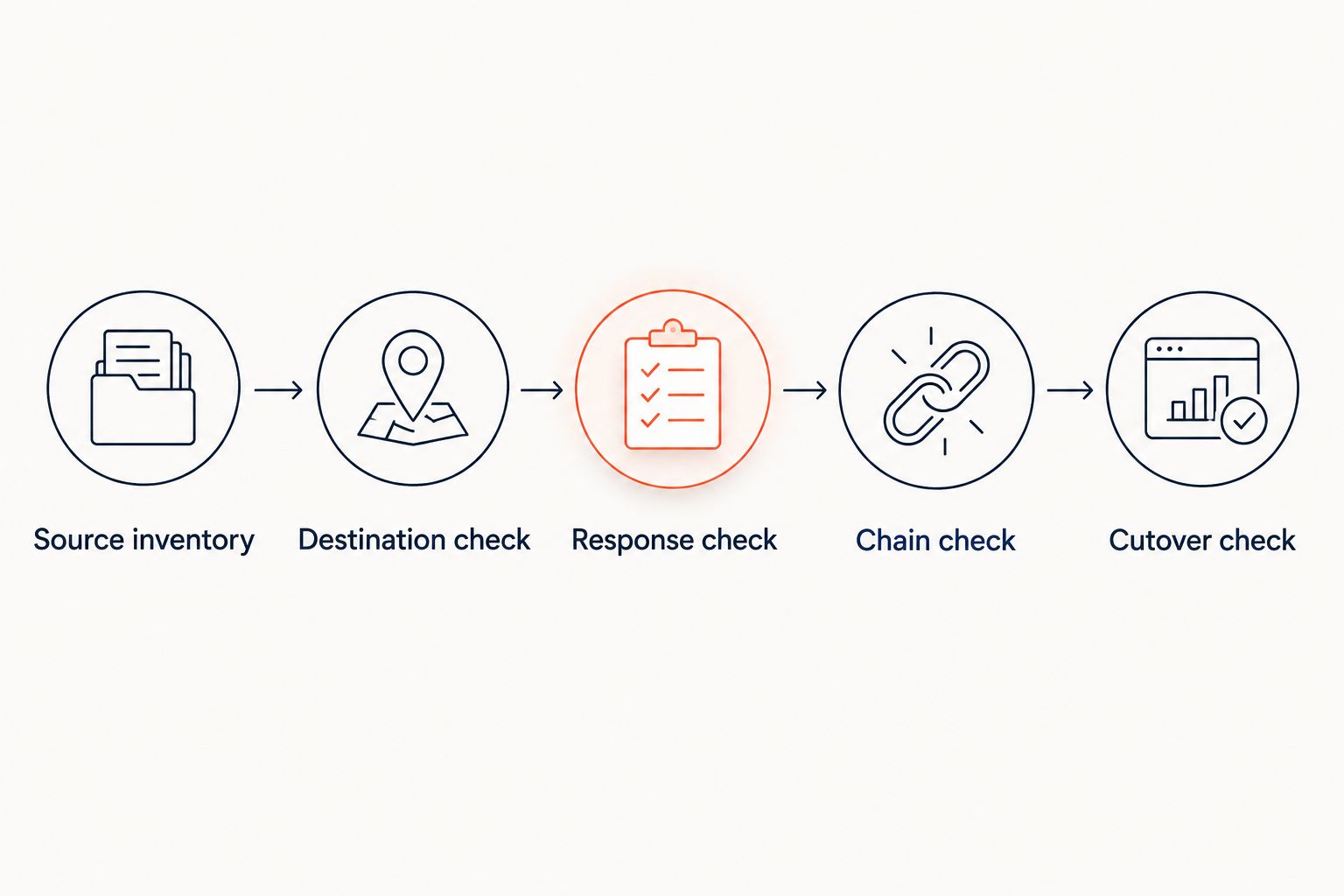
Use this sequence for your 2026 cutover. Run the same checks after deployment so the live result matches the reviewed configuration.
Source inventory
List the entry URLs your users and crawlers can request. Include hostname variants that actually belong to the migration; do not assume that forwarding the root domain covers every subdomain.
Destination check
Open each destination directly before testing its redirect. Confirm that it serves the intended content rather than another redirect, an error page, or a generic homepage.
Response check
Inspect the HTTP status and Location header. A command such as curl -I shows the response to a HEAD request; also test a normal GET request when middleware or hosting handles methods differently.
Chain check
Follow the full route to the final destination. Set a target of 1 redirect hop for mapped page moves and 0 redirect loops. These are acceptance criteria, not promises about any tool.
Cutover check
After routing changes, repeat the checks against the public hostname. Verify HTTPS separately: a correct HTTP redirect cannot repair a certificate failure that happens before an HTTPS response is delivered.
If you serve both HTTP and HTTPS on both apex and www hostnames, test all 4 entry variants. Each hostname needs the correct routing, and each HTTPS hostname needs a valid certificate.
How we ranked these options
This 2026 ranking prioritizes operational fit: domain ownership, mapping flexibility, request handling, change control, and validation. It does not rank unverified speed, uptime, or capacity claims.
Managed domain redirects come first for teams that want to avoid server maintenance. Server maps and Apache rules fit infrastructure you already control. Application middleware earns its place only when routing needs application context; edge rules fit an existing edge setup.
Which bulk redirect option should you choose?
Start with RedirHub when you want managed redirects on your own domain without maintaining servers. Confirm the bulk mapping requirements before moving traffic.
Choose server-level maps when your engineering team owns the request layer and needs explicit routing control. Keep Apache rules for compatible hosting, application middleware for context-dependent decisions, and edge rules for an established edge environment.
For a 2026 migration, reject any option that cannot demonstrate your hardest mapping cases. A successful sample import is not enough; inspect the resulting HTTP responses.
FAQ
What's the best bulk 301 redirect tool for a large site?
The best bulk 301 redirect tool is the one that matches your URL mapping and operating requirements. RedirHub fits managed own-domain redirects; server-level maps fit teams that already operate the request infrastructure. Confirm bulk-rule behavior before selecting either approach.
Can I redirect a domain without keeping its old hosting?
Yes, you can route the domain to a separate redirect service instead of keeping the old website hosting. The redirect system must receive requests for that hostname and support HTTPS where required.
Should I use a wildcard rule or upload individual redirects?
Use a wildcard or pattern rule only when the same transformation correctly handles every matching path. Use individual mappings for irregular moves and exceptions. Test representative paths and edge cases before publishing.
Will bulk 301 redirects preserve all my search rankings?
No redirect tool can guarantee that a migration preserves every search ranking. Permanent redirects communicate URL moves, but destination relevance, content changes, crawl access, and other migration decisions still matter.
Do redirect rules keep query strings automatically?
Query-string behavior depends on the redirect implementation and configuration. Test whether parameters are retained, replaced, or removed, especially for campaign tracking and destination pages that require parameters.
Can I remove redirects after the new website launches?
Do not remove redirects simply because the new website is live. Old links, bookmarks, printed QR codes, and search references can still send requests to the previous URLs. Review those dependencies before retiring routing.
One last thing
Your redirect map is a routing asset, not a disposable migration attachment. Keep an export outside the system that serves it, alongside the expected outcomes and rollback instructions.
When you change providers later, that independent map lets you validate the replacement against the same requirements instead of reconstructing decisions from live traffic.