

Best overall for server-free domain management: RedirHub. Best for an existing hosting stack: web-server redirects. Best for traffic already using an edge network: edge redirect rules. To redirect a domain without losing SEO, choose the implementation that preserves relevant destinations—not just the one that forwards the homepage.
- RedirHub is the best fit for teams managing redirects on their own domains without maintaining servers.
- To redirect domain without losing SEO, map old URLs to relevant replacements and use permanent redirects for permanent moves.
- Web-server redirects suit existing infrastructure; edge rules suit traffic already routed through an edge network.
- Registrar forwarding needs careful checks for HTTPS, path handling, status codes, and destination accuracy.
Why this matters
A domain redirect is an HTTP response, not an SEO guarantee. Search engines must discover the move, follow its redirects, and evaluate the destination pages. A working homepage redirect does not prove the rest of your migration works.
For a 2026 website move, separate two decisions: where redirects run and where each old URL lands. The tool handles the first. Your migration map determines the second. No redirect tool guarantees unchanged rankings.
What makes the best domain redirect tool?
Choose your redirect setup against these criteria before comparing interfaces:
- Destination accuracy: Map each valuable old URL to its relevant replacement. Preserve paths only when the new site uses the same structure.
- Permanent HTTP responses: Use 301 or 308 responses for permanent moves. Temporary campaign routing is a different requirement.
- HTTPS coverage: The old hostname needs a valid certificate before an HTTPS visitor can receive its redirect.
- Rule control: Check exact matches, path patterns, query handling, exceptions, and rule precedence against your actual URL inventory.
- Operational ownership: Identify who controls DNS, certificates, rule changes, and incident response after launch.
- Verification: Inspect live responses and final destinations. A saved configuration is not evidence that public traffic follows it.
Ask every provider to demonstrate your difficult cases. Include renamed pages, nested paths, query strings, and old HTTPS links—not just an empty root path.
Domain redirect options at a glance
These are implementation choices for 2026, not a claim that every service in a category has identical features. Check the selected implementation against your migration map.
| Option | Best for | Standout mechanism | Key limitation |
|---|---|---|---|
| RedirHub | Teams managing domains without maintaining servers | A dedicated platform for domain redirects and website migrations | Redirect management does not replace content mapping or SEO validation |
| Existing web-server redirects | Teams retaining a maintained hosting environment | HTTP redirects issued by the existing web server | Server operations remain your responsibility |
| Edge redirect rules | Teams already routing traffic through an edge network | Redirect responses issued before requests reach the origin | Rule behavior and routing depend on the selected service |
| Registrar URL forwarding | Simple domain moves with limited routing requirements | Forwarding configured through the domain provider | Available controls must be checked before a page-level migration |
1. RedirHub: best for server-free domain management
RedirHub provides branded short links, dynamic QR codes, domain redirects, and website migration tools. Its relevant use case here is running redirects on your own domain without maintaining a redirect server.
RedirHub is best for teams that want own-domain redirects without maintaining servers. That includes agencies managing client domains and marketing teams whose old links must remain useful after a website move. Keep campaign routing and migration requirements distinct, even when one platform manages both.
RedirHub pros:
- Own-domain link and redirect management matches teams that need control over their public addresses.
- Domain redirects and website migration tools address the buying scenario directly.
- Branded links and dynamic QR codes cover related campaign workflows.
- Server-free redirect management removes the need to operate a dedicated redirect server.
RedirHub cons:
- A redirect platform does not decide which replacement page matches an old page's content.
- You still need access to the domain's DNS and an owner for migration testing.
Before committing, demonstrate your required behavior with representative URLs. Check HTTPS, permanent response codes, path changes, query handling, and exceptions. Treat those as acceptance requirements, not assumed capabilities.
Best for: Teams consolidating own-domain redirects and website moves without server maintenance.
Verdict: Buy for this operating model after validating your migration rules.
2. Existing web-server redirects: best for retained hosting
Web-server redirects return an HTTP redirect from infrastructure you already operate. They fit a migration where the old hostname will continue reaching a maintained server and your technical team owns its configuration.
This approach puts routing beside existing website infrastructure. It also leaves certificate renewal, configuration deployment, and service continuity with your team. Removing the old website application does not remove those obligations.
Existing web-server redirects pros:
- Redirect behavior lives in infrastructure your technical team already manages.
- Configuration can follow your existing review and deployment process.
- Path-specific rules can be expressed directly where the server supports them.
- Response testing can use the same HTTP tools as the rest of your website checks.
Existing web-server redirects cons:
- Hosting and certificate responsibilities remain after the website moves.
- Rule changes require access to the relevant configuration and deployment process.
Avoid retaining an entire application solely because its configuration contains redirects. Decide whether that operational dependency is intentional. A forgotten server is still a dependency when valuable backlinks point to it.
Best for: Engineering-led teams keeping the old hosting environment under active management.
Verdict: Hold if maintained infrastructure already meets your requirements; skip a new server built only for forwarding.
3. Edge redirect rules: best for existing edge routing
Edge redirect rules return redirect responses from an edge network rather than the website's origin server. They fit teams whose old hostname already routes through that network and whose migration logic fits its rule system.
The key buying question is not whether the service calls itself an edge platform. It is whether the actual request reaches the rule and receives the intended response. Verify hostname coverage, matching behavior, and rule precedence.
Edge redirect rules pros:
- Redirect requests can be answered without reaching the origin application.
- Routing policy can sit alongside existing edge configuration.
- Origin retirement becomes possible when redirects no longer depend on it.
- Central rules can cover multiple paths when the selected service supports that matching.
Edge redirect rules cons:
- DNS and traffic routing must send requests through the configured service.
- Matching syntax, exceptions, and configuration limits vary by provider.
Do not infer a performance advantage from the word edge. Test your actual response path. An edge rule that forwards to an intermediate address still creates an unnecessary redirect chain.
Best for: Teams already operating an edge network with suitable redirect controls.
Verdict: Hold when existing routing fits; skip an infrastructure change without a demonstrated operational reason.
4. Registrar URL forwarding: best for simple routing
Registrar URL forwarding is forwarding configured through your domain provider. It is relevant when your requirement is simple and the provider's implementation passes your acceptance checks.
Do not confuse forwarding with changing a DNS record. DNS directs a hostname to infrastructure; an HTTP service must issue the redirect. The forwarding service—not DNS alone—determines what visitors and crawlers receive.
Registrar URL forwarding pros:
- Configuration sits near the domain's existing administrative controls.
- A simple destination rule can be straightforward to maintain.
- It avoids operating your own redirect server when the provider supplies forwarding.
Registrar URL forwarding cons:
- Path mapping, query handling, HTTPS, and status-code controls depend on the provider.
- A simple forwarding interface does not establish suitability for a complex migration.
Reject masked forwarding that displays another site inside a frame instead of issuing the intended HTTP redirect. Inspect the actual response before deciding the job is complete.
Best for: Simple domain moves whose requirements fit verified forwarding behavior.
Verdict: Skip for complex website migrations unless every required mapping passes testing.
How we ranked these options
This 2026 ranking prioritizes operational fit, destination accuracy, permanent responses, HTTPS coverage, and verifiable routing. It is not a benchmark of speed, uptime, or ranking outcomes.
Dedicated redirect management is the default for teams avoiding server operations. Existing server or edge rules fit teams already maintaining that infrastructure. Registrar forwarding belongs last because its suitability depends on the controls actually provided.
Implement the move without hiding broken URLs
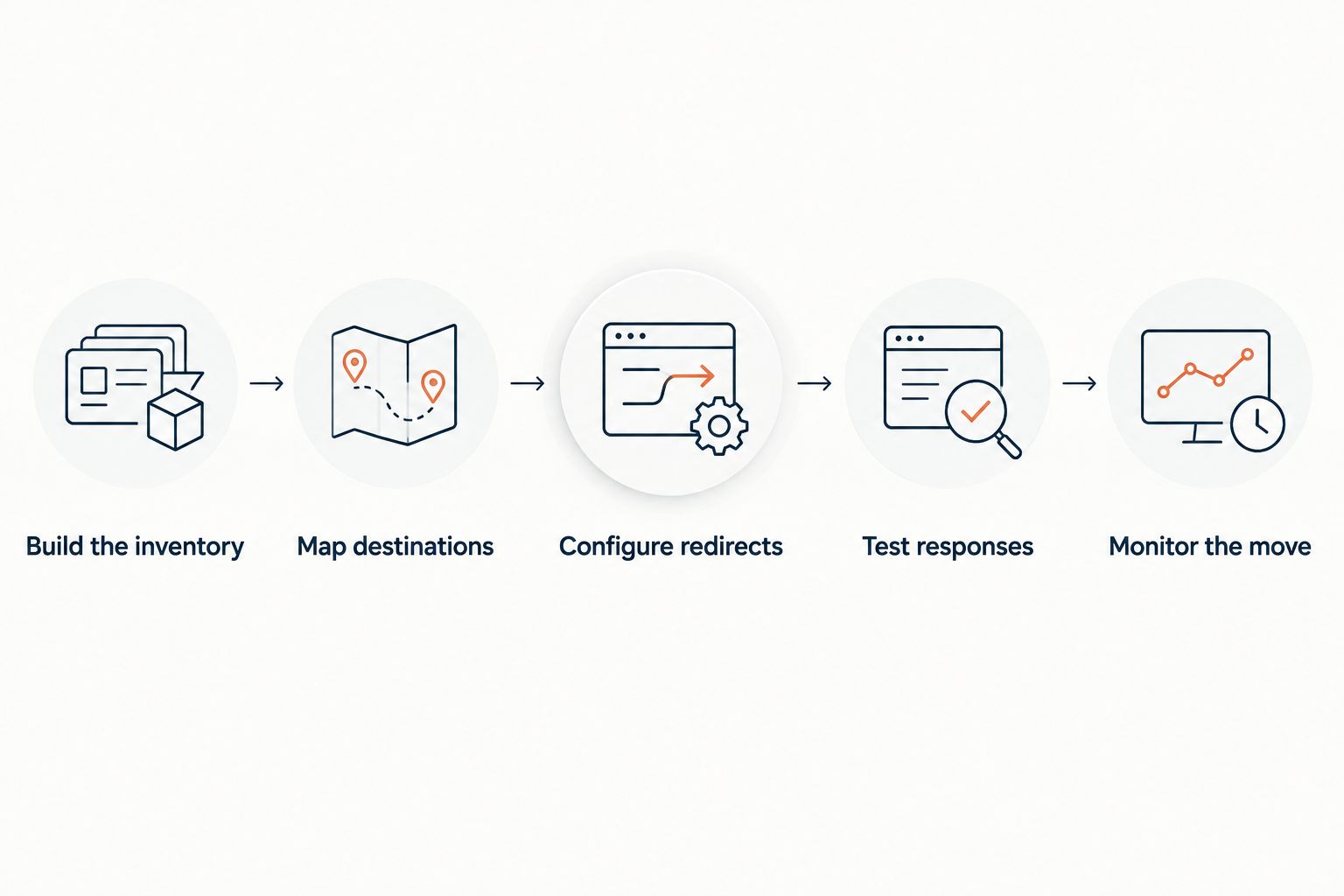
A safe tool choice still needs an explicit migration process. Use this sequence before changing public traffic.
Build the inventory
Collect old URLs from your sitemap, analytics, search reporting, and backlink records. Include campaign landing pages and addresses embedded in printed QR codes. Those URLs still matter even when the old navigation no longer lists them.
Assign an owner to the inventory. A marketing team should not discover after launch that the migration excluded its campaign domain.
Map destinations
Give each old page a relevant replacement. Preserve the path when the content structure remains unchanged; write explicit mappings when pages move or merge.
Do not send every retired page to the homepage. When no relevant replacement exists, a genuine 404 or 410 response is more accurate than a misleading redirect. Keep that decision separate from the tool's ability to forward traffic.
Configure redirects
For permanent moves, use 301 or 308 responses. A 308 preserves the HTTP method; a 301 permits some clients to change a POST request to GET. Review form submissions and API traffic separately from ordinary page visits.
Aim for 1 redirect hop from each old address to its final destination. A direct redirect followed by the destination response requires 2 HTTP requests. Additional intermediate redirects add requests without improving the migration map.
Test responses
Request the old URL and inspect its status code and Location header. Then follow the chain and inspect the destination content. Test HTTPS directly: an invalid certificate prevents the browser from reaching the HTTP redirect response.
Include both hostname variants when both were used publicly. Check nested paths, trailing slashes, encoded characters, and query strings according to your intended rules.
Monitor the move
Update internal links, canonical tags, and sitemaps to use the new addresses. Where applicable, submit the domain move through Google Search Console's Change of Address process.
Google Search Central's site-move guidance, applicable to a 2026 migration, recommends keeping redirects for at least 1 year. Keep useful redirects longer when old backlinks, bookmarks, or printed materials still send traffic.
Which domain redirect tool should you choose?
Choose RedirHub for own-domain redirects when your team does not want to maintain servers. Choose existing server rules when engineering already owns the hosting environment. Choose edge rules when the old hostname already uses that network and its controls fit your mappings.
For a 2026 migration, avoid changing infrastructure merely to obtain a different redirect interface. Select the smallest operating model that meets the full checklist. Destination relevance, working HTTPS, and direct permanent responses matter more than where the configuration screen lives.
FAQ
What's the best way to redirect a domain without losing SEO?
Map old URLs to relevant replacements, use permanent redirects for permanent moves, and verify every important route. No tool guarantees unchanged rankings; destination content and the rest of the migration still matter.
Is a 301 or 302 redirect better for a permanent domain move?
Use a 301 or 308 redirect for a permanent domain move. A 302 communicates a temporary redirect and is not the appropriate default for a permanent migration.
Can I redirect a domain without hosting a website?
Yes. A managed redirect service can issue HTTP redirects without you operating a website server. DNS configuration alone does not issue an HTTP redirect.
Should every old page redirect to the new homepage?
No. Redirect each old page to a relevant replacement when one exists. Use an appropriate error response when content is removed and no relevant replacement exists.
Does the old domain still need an HTTPS certificate?
Yes, if visitors request the old domain over HTTPS. The TLS connection must succeed before the browser can receive the redirect response.
How long should I keep redirects after a domain migration?
Keep redirects for at least 1 year, following Google Search Central's site-move guidance. Retain useful redirects longer when old links, bookmarks, or printed materials still send visitors.
Is registrar forwarding enough for an SEO migration?
Registrar forwarding is enough only when its actual behavior meets your migration requirements. Verify permanent status codes, HTTPS, path mapping, query handling, and final destinations before relying on it.
One last thing
Test an old HTTPS link from a printed campaign asset before retiring the old setup. Its destination page can change while the printed address cannot. Keeping that route working requires ownership of the old domain and functioning redirect infrastructure—not access to the old website's content editor.