
Best overall: curl for inspecting HTTP responses. Best for browser-specific behavior: the browser Network panel. Best for migration audits: a batch HTTP script. This 2026 guide ranks each 301 redirect checker approach by the evidence you can inspect, not an unverified accuracy score.
- Use curl as your 301 redirect checker when you need explicit status codes and Location headers.
- Use the browser Network panel to investigate cached redirects, cookies, and JavaScript navigation.
- Use a batch HTTP script to compare migration redirects against an approved destination map.
- RedirHub suits teams managing links and domain redirects on their own domain without maintaining servers.
Why this matters
A destination loading successfully does not prove that its redirect is correct. A browser can reach the right page through a temporary redirect, an unnecessary chain, or JavaScript navigation.
Separate checking from management. RedirHub provides branded links and domain redirects on your own domain without maintaining servers; an HTTP inspection method checks what those redirects actually return. For a 2026 website move, you need both an intended routing configuration and evidence that requests follow it.
What makes the best 301 redirect checker
An accurate check answers a narrower question than whether a link works: did this request receive the intended HTTP response and reach the intended destination?
Use these criteria before choosing a method:
- Response evidence: Show the status code and Location header, not just the final page.
- Complete chain: Expose intermediate responses rather than hiding them behind a success label.
- Request control: Let you distinguish GET from HEAD and identify relevant cookies or headers.
- Destination validation: Compare the actual destination with the expected URL, including paths and query strings.
- Repeatability: Preserve enough detail to repeat the request and investigate disagreements.
- Audit scope: Fit the work, whether you are checking one campaign link or an entire migration map.
A 301 response means the resource has moved permanently. A 302 response indicates a temporary redirect. Neither status, by itself, proves that the destination is correct or that search engines have completed processing a move.
301 redirect checker methods at a glance
| Rank | Method | Best for | Standout capability | Key limitation |
|---|---|---|---|---|
| 1 | curl | Inspecting individual HTTP redirects | Explicit request options and response headers | Requires command-line familiarity |
| 2 | Browser Network panel | Investigating browser-specific behavior | Shows requests within a real browsing session | Cache and session state complicate comparisons |
| 3 | Batch HTTP script | Validating migration maps | Compares many source URLs with expected destinations | Correctness depends on implementation |
These are inspection methods, not a measured software benchmark. The ranking favors transparent HTTP evidence first, browser context second, and scale third. Choose a different order when your task demands it.
1. curl: best 301 redirect checker for HTTP evidence
curl is a command-line client that can request a URL and display response headers. It separates the server's response from what a browser renders. That makes it the default choice when you need to establish whether an HTTP redirect exists.
Set the shell variable URL to the exact address you want to inspect. Then run:
curl -sS -D - -o /dev/null --max-time 10 "$URL"
This sends a GET request, prints response headers, discards the response body, and sets a 10-second maximum operation time. It does not follow the redirect, so you can inspect the first response directly.
Look for the status and Location header. A permanent redirect should return the intended permanent status and destination; a successful final page cannot substitute for checking that first response.
To follow the chain, run:
curl -sS -L -D - -o /dev/null --max-time 10 --max-redirs 10 "$URL"
The second command follows redirects and prints headers from the responses it receives. The 10-hop limit is a diagnostic guardrail, not a recommended chain length. An exceeded timeout or redirect limit is a failed check, not proof of a particular routing cause.
curl pros:
- Shows status codes and Location headers directly.
- Supports explicit request headers and methods.
- Produces text output you can save with a migration record.
curl cons:
- Does not execute JavaScript navigation.
- Does not automatically reproduce your browser's cookies and session.
- Requires you to interpret headers and destinations.
Avoid treating curl -I as interchangeable with a normal page visit. That option sends HEAD; the commands above use GET. When results differ, compare the request methods before blaming either checker.
Best for: Developers, technical marketers, and agencies checking individual redirects during a 2026 migration.
Verdict: Use curl as the default first check.
2. Browser Network panel: best for session-specific redirects
A browser Network panel records requests made during a page visit. It helps explain why a visitor's experience differs from a standalone HTTP request, particularly when cookies, cache, or page scripts affect navigation.
Open developer tools before visiting the source address. Enable the option that preserves the network log across navigation, clear the existing log, and load the exact URL under investigation.
Inspect document requests and their response headers. Distinguish an HTTP redirect from a page that loads successfully and then sends the browser elsewhere through JavaScript. Those mechanisms are not interchangeable.
Browser Network panel pros:
- Shows requests within the browsing session you are investigating.
- Exposes response headers alongside request context.
- Helps identify navigation that depends on scripts or browser state.
Browser Network panel cons:
- Cached responses can obscure a fresh server check.
- Extensions, cookies, and session state make comparisons harder.
- Manual inspection does not scale well across migration inventories.
Repeat a suspicious result with caching disabled while developer tools remain open. Then compare it with the GET request from curl. A difference is a reason to inspect request conditions, not declare one result universally correct.
For a 2026 campaign investigation, test the entry address that visitors actually use. Starting at the destination skips the redirect you need to verify.
Best for: Marketing and support teams investigating a redirect that behaves differently in a real browser.
Verdict: Use the Network panel when browser context is part of the problem.
3. Batch HTTP script: best for migration-map validation
A batch HTTP script reads source addresses, requests each one, and records the redirect results. Its main advantage is comparison: you can check every result against an approved source-to-destination map instead of reviewing destinations from memory.
Build the input with separate fields for source URL, expected status, and expected destination. Preserve the first response, each intermediate hop, the final URL, and the final status in the output.
Batch HTTP script pros:
- Checks the same rules across a migration inventory.
- Flags destinations that load but do not match the approved map.
- Creates a repeatable record for launch and follow-up checks.
Batch HTTP script cons:
- Redirect handling varies by HTTP library and configuration.
- Automatic retries or redirect following can conceal useful evidence.
- Excessive concurrency can interfere with the systems being checked.
Validate the script against cases with known behavior before trusting its report. Include a direct permanent redirect, a temporary redirect, a chain, a loop, and a destination error. The purpose is to verify the script's reporting, not generate an accuracy percentage.
Start with a review set of 20 source URLs before checking the full inventory. That is a suggested implementation step, not a performance benchmark. Confirm that escaped characters, query strings, and relative Location values are handled correctly.
Best for: Agencies and teams validating multiple domains or a 2026 website migration.
Verdict: Use a batch script after verifying its behavior against individual requests.
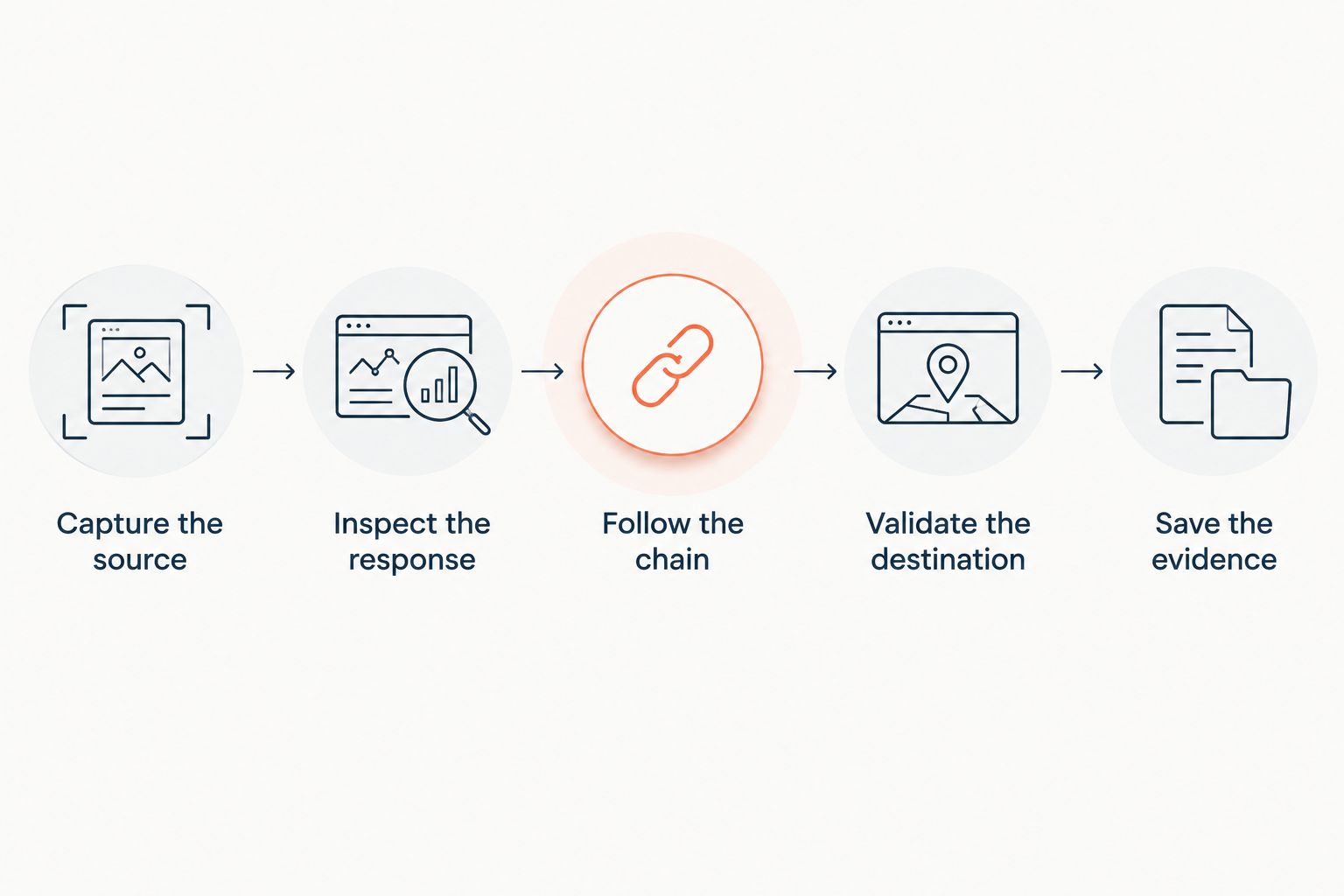
How to check a redirect without a false pass
Use the same sequence whether you inspect a campaign link or a migration rule. Define success before sending the request; otherwise, any working destination can look acceptable.
Capture the source
Record the full source address, including scheme, hostname, path, and query string. An HTTP entry point and an HTTPS entry point are separate requests and can follow different routes.
Inspect the response
Send GET and record the first status plus Location value. Do not automatically accept a temporary redirect when the migration specification calls for a permanent move.
Follow the chain
Record every intermediate response. A checker that reports only the final destination hides detours and makes loops harder to diagnose.
Validate the destination
Compare the final URL with the approved destination, then inspect its response. A successful response on an unrelated homepage is still a failed migration mapping.
Save the evidence
Keep the request method, timestamp, response chain, expected destination, and outcome. These details make a later disagreement reproducible.
Keep your 2026 migration acceptance rules separate from tool defaults. Decide which parameters must survive, which hostname is canonical, and which paths require individual destinations. A checker can reveal behavior; it cannot choose the correct business mapping for you.
How these methods are ranked
The order follows the criteria above: visible response evidence, complete chains, request control, destination validation, repeatability, and scope. It does not claim that one method achieved a higher measured accuracy rate.
curl ranks first because it makes an individual HTTP request explicit. The browser panel adds session context. A batch script adds inventory coverage, but its implementation needs validation before its pass labels mean anything.
RedirHub belongs on the management side of this workflow: configure links and domain redirects, then inspect their behavior independently. Do not confuse a redirect management platform with evidence that a particular request returned the intended response.
Which 301 redirect checker should you choose?
Choose curl if you are undecided. Inspect the first response, follow the chain, and compare the destination with your requirement. Add browser inspection when the user session matters; add batch validation when individual checks no longer cover the work.
For RedirHub users managing client domains or website moves, keep independent HTTP checks in the launch checklist. Configuration and verification answer different questions.
Manage redirects on your own domain
Use RedirHub for branded links, domain redirects, and website migration tools without maintaining servers.
FAQ
What's the best 301 redirect checker for a single URL?
curl is the default choice for inspecting a single URL's HTTP response. Use GET, record the first status and Location header, then follow the chain to validate the destination.
Is a browser redirect check better than curl?
A browser check is better for investigating browser-specific behavior, not every redirect task. The Network panel includes session context, while curl makes individual HTTP requests easier to control and repeat.
Does a working destination prove a 301 redirect is correct?
No. A destination can load through a temporary redirect, a chain, or JavaScript navigation. Check the first HTTP response and compare the final address with the intended destination.
Why do two redirect checkers show different results?
Redirect checkers can send different methods, headers, or cookies and follow different redirect rules. Compare those request conditions and cache behavior before deciding that either result is wrong.
Can a 301 redirect checker confirm that Google transferred rankings?
No. A redirect checker inspects HTTP behavior, not Google's indexing or ranking decisions. Verify the redirect separately from monitoring the migration's search performance.
Should I use HEAD or GET to check a redirect?
Use GET when checking the HTTP response to a normal page request. HEAD requests only response headers, and some servers handle it differently, so a HEAD result alone is not sufficient evidence of GET behavior.
How do I check redirects across multiple domains?
Use a batch HTTP script with an approved source-to-destination map. Validate the script against known cases first, then retain each redirect chain and flag mismatched destinations or failed requests.
One last thing
A successful response can hide a migration mistake. If every retired page redirects to the homepage, the destination can load while the mapping still fails your requirements. Make expected destination a required field, not an optional note.