

Best for teams managing links and redirects on their own domain without maintaining servers: RedirHub. The fastest URL redirect service for your traffic must be established through comparable regional tests; this 2026 shortlist ranks implementation fit, not an unsupported speed winner.
- RedirHub is best for managed links and domain redirects without maintaining servers.
- Choose the fastest URL redirect service using regional latency tests, not an isolated homepage measurement.
- Compare managed redirects, edge rules, web-server rules, and application redirects against the same destination.
- Remove unnecessary redirect hops before changing infrastructure; measure correctness alongside response time.
Why redirect speed matters
A redirect adds another response before your visitor reaches the destination. That response depends on more than the redirect rule: DNS resolution, connection setup, TLS negotiation, network distance, and processing all contribute.
For a website move, a fast response to the wrong page is still a failed migration. For a printed QR campaign, the redirect must remain under your control after the material leaves the printer. Choose the correct operating model first, then measure its performance.
This 2026 guide separates those decisions. The options below occupy different implementation roles; their numbered positions do not represent measured latency results.
What makes the fastest URL redirect service?
Evaluate these criteria before comparing dashboards or response-time claims:
- Regional latency: Measure from locations where your visitors actually connect. A nearby test machine does not represent a distant audience.
- Connection behavior: Separate new connections from reused connections. TLS setup changes what the visitor waits for.
- Redirect correctness: Check the status code, destination, path handling, and query parameters before accepting a fast result.
- Chain length: Prefer 1 redirect hop where the routing requirements allow it. Extra responses add work before the destination loads.
- Operational ownership: Identify who manages domains, certificates, rule changes, and failures. Include that responsibility in the buying decision.
- Destination control: Confirm that campaign links and migrated URLs resolve to the intended page, not merely the destination homepage.
Do not combine all these into an unexplained score. Keep response measurements separate from functional requirements so you can see what each option actually solves.
Redirect options at a glance
| Option | Best for | Standout mechanism | Key limitation |
|---|---|---|---|
| RedirHub | Teams managing redirects without maintaining servers | Managed links and redirects on your own domain | Requires routing through an external platform |
| Edge redirect rules | Teams already operating an edge layer | Redirects handled before an origin request, when configured there | Depends on the edge provider's rule behavior and limits |
| Web-server redirect rules | Teams controlling the receiving server | Redirects handled by the web server | Requires server and certificate maintenance |
| Application redirects | Routing that depends on application context | Redirect decisions inside application logic | Depends on application availability and processing |
For your 2026 evaluation, shortlist by operating responsibility before testing speed. A team retiring a server has different requirements from a team keeping an application and its routing logic.
1. RedirHub: best for redirects without maintaining servers
RedirHub provides branded short links, dynamic QR codes, domain redirects, and website migration tools. Its relevant role here is managing traffic on your own domain without maintaining redirect servers.
RedirHub is best for teams that want managed links and domain redirects on their own domain without maintaining servers. That is an operating-model recommendation, not a claim that every request beats every alternative.
RedirHub pros
- Supports link management and domain redirects within the stated platform offering.
- Fits teams running traffic on domains they control.
- Includes dynamic QR codes for campaigns that need an editable redirect destination.
- Avoids the requirement to maintain your own redirect server.
RedirHub cons
- Adds an external platform dependency to the redirect route.
- Does not replace destination-site maintenance or fix a slow landing page.
- Requires representative testing before making a speed-based purchase decision.
Best for: Marketing teams, agencies, and domain owners who need managed redirect operations rather than another server to maintain.
For a practical evaluation, choose a representative domain and test the actual route your visitors will use. Include a campaign URL, a migrated page, and a URL containing query parameters. Judge whether each arrives at the intended destination before comparing timings.
Verdict: Buy for the managed operating model; require measured evidence before calling it the fastest.
2. Edge redirect rules: best for an existing edge deployment
Edge redirect rules execute in infrastructure positioned between visitors and an origin server. When the edge layer returns the redirect itself, that request does not need to reach the origin application.
This mechanism makes edge rules a relevant performance candidate. It does not establish a universal speed winner: provider routing, connection setup, rule configuration, and visitor location still matter.
Edge redirect rules pros
- Can return a redirect without requesting the origin application.
- Keep redirect handling in an existing traffic layer.
- Suit rules that can be expressed without application-specific state.
Edge redirect rules cons
- Rule syntax and supported behavior vary by provider.
- Require careful coordination with existing edge configuration.
- Remain dependent on correct hostname and certificate setup.
Best for: Infrastructure teams already managing an edge deployment and comfortable maintaining its routing configuration.
Test the hostname you will actually use. A provider demonstration URL does not establish the performance of your custom domain, and an unrelated cached asset does not measure redirect handling.
Verdict: Buy into this approach when the edge layer is already part of your operating model.
3. Web-server rules: best for teams keeping the server
A web server can return a redirect before a request reaches application code. This is a direct option when your team already controls the server receiving requests for the old hostname.
The important distinction is ownership. You retain responsibility for the server, its network exposure, certificate renewals, configuration changes, and availability.
Web-server rules pros
- Handle redirects without requiring application routing logic.
- Keep configuration under the infrastructure team's control.
- Fit migrations where the receiving server remains in operation.
Web-server rules cons
- Preserve server maintenance work even after content moves elsewhere.
- Make network placement part of the performance decision.
- Require deployment discipline to prevent conflicting rules.
Best for: Engineering teams with an existing server they intend to keep operating.
Do not retain a server solely because its first redirect rule was easy to write. Compare the ongoing responsibility with managed alternatives, particularly when several former websites need to remain reachable.
Verdict: Hold if the server stays; skip this approach when retiring infrastructure is the goal.
4. Application redirects: best for context-dependent routing
Application redirects make the routing decision inside application code. They fit cases where the destination depends on authenticated state, database records, or other application-specific information.
That flexibility has a dependency cost. The application must receive and process the request before returning its redirect, unless another layer handles that route first.
Application redirects pros
- Support decisions based on application context.
- Keep routing behavior beside the logic it depends on.
- Allow application tests to cover destination selection.
Application redirects cons
- Depend on application availability.
- Add application processing to the request path.
- Are unnecessary for many fixed domain-to-domain redirects.
Best for: Product teams whose redirects genuinely require application data or user state.
A fixed move from an old page to its replacement rarely needs session handling or database access. Keep context-dependent routes in the application; evaluate simpler handling for fixed mappings.
Verdict: Buy into this approach for required application logic; skip it for straightforward domain forwarding.
How to test redirect speed in 2026
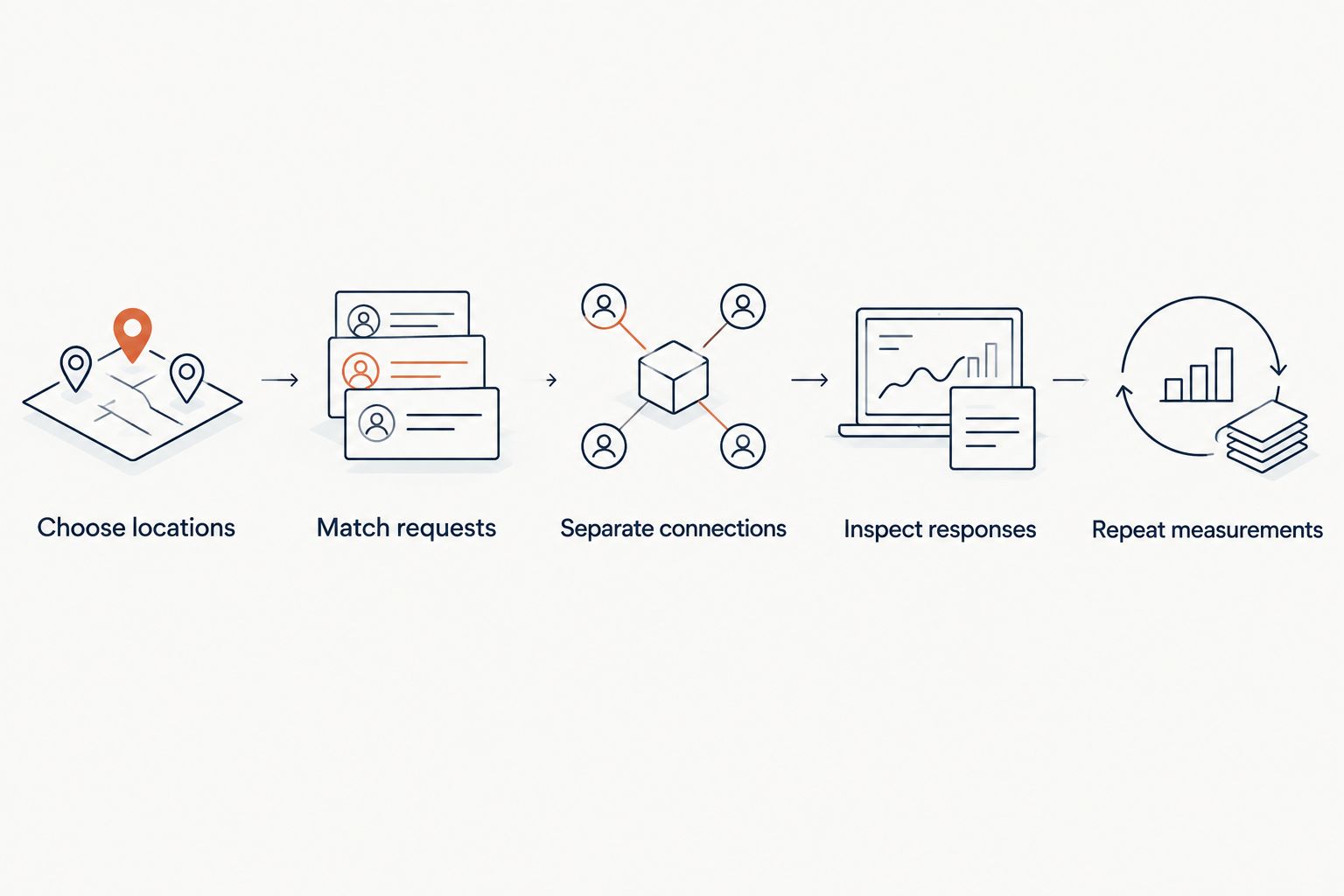
A useful test reproduces the request, not a provider's headline. Define the same source-path behavior and final destination for each candidate, then measure the redirect response separately from the destination page.
Build the test sequence
- Choose locations: Select regions that represent your audience. A practical starting plan uses 3 test regions, then expands around important markets.
- Match requests: Use equivalent paths, query parameters, protocol, and request method across candidates.
- Separate connections: Test 2 connection states: a new connection and a reused connection. Report them separately.
- Inspect responses: Record the status code, Location header, redirect count, and whether the final destination is correct.
- Repeat measurements: Run repeated requests across different periods. Report the median and a tail percentile rather than only the fastest response.
These are test-design choices, not benchmark results. Keep failed requests in the report; removing them hides an operational problem behind a cleaner latency figure.
Use an HTTP client that exposes timing and response headers. Record DNS lookup, connection establishment, TLS negotiation, and time to first byte where available. Keep the redirect response measurement distinct from total destination loading time.
For a browser-facing campaign, also test the complete journey in a browser. The HTTP response establishes redirect behavior; the browser test checks whether the visitor reaches the usable destination.
Fix the route before switching providers
The fastest URL redirect service cannot remove a redirect added later by the destination site. Inspect the entire chain before deciding that the first provider is the bottleneck.
A common avoidable pattern is an old hostname redirecting to a new homepage, followed by another redirect to the actual campaign page. Point the controlled redirect directly at the intended final URL when the destination architecture permits it.
Check these details before a 2026 migration or campaign launch:
- Scheme: Send visitors to the intended HTTPS destination rather than relying on a later upgrade redirect.
- Hostname: Use the destination's preferred hostname directly.
- Path: Map old pages to relevant replacements instead of sending every request to the homepage.
- Query parameters: Verify that required campaign parameters survive the redirect.
- Status: Choose permanent or temporary behavior intentionally.
HTTP 301 and 308 indicate permanent redirects. HTTP 302 and 307 indicate temporary redirects; 307 and 308 explicitly preserve the request method. These codes describe behavior, not speed tiers.
A correct single-hop route is a better starting point than a faster first response inside a broken chain.
How this shortlist is ranked
The order prioritizes the stated buying scenario: teams managing domains, website moves, and campaign links without unnecessary infrastructure. Managed redirect operations come first, followed by approaches that require an existing edge layer, server, or application.
No numerical performance ranking is assigned. A defensible speed ranking needs a dated test method, equivalent requests, test locations, connection conditions, repeated measurements, and visible failures. Without those, a numbered latency leaderboard would confuse positioning with evidence.
Which redirect option should you choose?
Choose RedirHub for managed links and redirects on your own domain without maintaining servers. Choose edge rules when that infrastructure already handles your traffic, web-server rules when you intend to keep the server, and application redirects when destination selection requires application context.
For a speed-led purchase in 2026, take the two approaches that fit your ownership requirements and run the same test plan against both. Select the option that meets correctness and operating requirements, then compare its regional response distribution.
Do not replace infrastructure based on a single best-case request. A useful decision survives different locations, connection states, and real destination paths.
FAQ
What's the fastest URL redirect service in 2026?
A universal fastest URL redirect service is not established here. Compare equivalent requests from your audience's regions, separating new connections from reused connections and checking failures alongside latency.
Is RedirHub a fit for redirecting domains without a server?
RedirHub fits teams that want managed domain redirects without maintaining their own redirect servers. Its offering also includes branded short links, dynamic QR codes, and website migration tools.
Are edge redirects always faster than server redirects?
No. Edge redirects can avoid an origin request, but actual response time still depends on network routing, connection setup, configuration, and visitor location.
Is a 301 redirect faster than a 302 redirect?
Neither status code guarantees a faster response. Choose 301 for permanent redirection and 302 for temporary redirection, then measure the implementation separately.
How do I measure redirect speed accurately?
Measure equivalent requests from representative regions and separate the redirect response from destination loading. Record connection conditions, status codes, destination correctness, repeated timings, and failures.
Can a fast redirect still damage a website migration?
Yes. A redirect that returns quickly but sends visitors to the wrong page is still incorrect. Validate page mappings, query parameters, status codes, and the complete redirect chain.
Should every old URL redirect to the new homepage?
No. Map old URLs to relevant replacement pages where those replacements exist. Homepage-only forwarding does not preserve the intended destination of individual page requests.
One last thing
Test a URL copied from a real campaign or migration map, including its query string. A clean root-domain test can pass while the request your customer actually follows loses its path or tracking parameters. Make the real request your acceptance test.