

Best overall: RedirHub for teams managing custom-domain QR codes and redirects without maintaining servers. Best for infrastructure control: a self-hosted redirect endpoint; best for an existing website workflow: a CMS-managed redirect; best for a fixed destination: a static QR generator encoding your own URL.
- RedirHub is the best custom domain QR code option for teams combining branded links, dynamic QR codes, and domain redirects.
- A dynamic QR code encodes a redirect URL, letting you change its destination without replacing the printed code.
- Self-hosted redirects suit teams that accept responsibility for certificates, routing, monitoring, and maintenance.
- A static QR code fits a permanent URL, but changing the encoded address requires replacing the code.
Why this matters
Your QR code is a printed dependency on a URL. If that URL belongs to another company, the printed material depends on that company's domain as well as its service. Using your own domain gives you control of the hostname. Keeping the redirect paths portable requires a separate implementation plan.
For a 2026 buying decision, start with the address inside the code—not its colors or logo. A branded design does not prove that a scan opens a domain you control. Decode the QR code and inspect the actual URL before approving a print run.
What makes the best custom domain QR code tool
Use these criteria to separate a generator from a manageable publishing system:
- Domain ownership: You control the encoded hostname and can change its DNS configuration.
- Destination editing: You can change the landing page while keeping the printed URL unchanged.
- HTTPS handling: The scan URL has a valid certificate, including before any redirect occurs.
- Campaign continuity: Existing paths can keep working through a website move or provider change.
- Operational responsibility: Someone owns DNS, certificates, destination checks, and incident response.
- Measurement fit: Reporting distinguishes redirect requests from downstream visits and conversions.
Domain control and destination editing are different capabilities. A static code can encode your domain without offering an editable destination. A dynamic service can offer editable destinations while using a hostname you do not own. Require both when campaigns must remain editable under your brand.
Custom-domain QR options at a glance
This 2026 shortlist compares one named platform with three implementation alternatives. The alternatives are architectures, not competing products presented as verified recommendations.
| Option | Best for | Standout mechanism | Key limitation |
|---|---|---|---|
| RedirHub | Teams combining QR campaigns and domain redirects | Managed branded links, dynamic QR codes, and domain redirects | You still need domain governance and a continuity plan |
| Self-hosted redirect endpoint | Teams requiring infrastructure control | Your application or web server resolves the scan URL | Your team maintains the redirect infrastructure |
| CMS-managed redirect | Campaigns managed alongside an existing website | Website routing handles the printed URL | Website changes can affect campaign routing |
| Static QR generator | Fixed, long-lived destinations | The code directly contains your chosen URL | The encoded address cannot be edited after printing |
1. RedirHub: best custom-domain QR tool for shared redirect workflows
RedirHub provides branded short links, dynamic QR codes, domain redirects, and website migration tools. It fits teams that want links and redirects on their own domain without maintaining redirect servers. The practical buying case is consolidation: managing campaign entry points alongside domain-level traffic changes.
Best for: Marketing teams, agencies, and domain managers whose QR campaigns overlap with broader redirect work.
For example, a printed campaign can use a stable branded URL while its destination changes after an event. The landing page changes; the printed entry point stays the same. Treat that stable entry point as an asset with an owner, not an address someone creates and forgets.
RedirHub pros:
- Combines dynamic QR codes with branded link management.
- Supports domain redirects and website migration workflows.
- Fits teams that do not want to maintain redirect servers.
RedirHub cons:
- A managed service remains a dependency in the scan path.
- Owning the domain does not remove DNS and renewal responsibilities.
- A provider move still requires preserving existing redirect paths.
Before committing, demonstrate the entire workflow with a domain you control. Create a QR code, decode it, change its destination, and scan the original code again. Also confirm the account permissions and reporting requirements your team actually needs.
Verdict: Buy for combined custom-domain QR and redirect management without server maintenance.
2. Self-hosted redirect endpoint: best for infrastructure control
A self-hosted redirect endpoint receives requests on your domain and returns an HTTP redirect to a destination. Your team maintains the mapping between the printed path and the current landing page. A QR generator supplies the code image; your infrastructure supplies the editable routing.
Best for: Engineering-led teams that need control over redirect logic and accept the operational work.
This approach separates QR generation from destination management. The generated image can remain unchanged while your application or server configuration changes the destination. Any reporting, access control, or audit history depends on what you implement.
Self-hosted redirect endpoint pros:
- Gives your team control over routing behavior.
- Keeps destination mappings in infrastructure you manage.
- Allows routing to fit your existing deployment process.
Self-hosted redirect endpoint cons:
- Requires certificate, deployment, and monitoring ownership.
- Makes configuration errors your team's responsibility.
- Requires additional implementation for campaign-facing controls.
Use HTTP semantics deliberately. A 302 response represents a temporary redirect; a 307 response also preserves the request method. Permanent redirects use 301 or 308. For ordinary QR scans, requests are generally GET requests, but the permanent-versus-temporary distinction still matters for caching and change management.
Do not select a status code as a shortcut to a marketing claim. Check the actual response and test whether destination changes behave as intended.
Verdict: Buy this approach only when infrastructure ownership is an explicit requirement.
3. CMS-managed redirect: best for website-owned campaign routing
A CMS-managed redirect uses your existing website's routing configuration or redirect functionality. The QR code contains a stable URL on that website, and the website sends visitors to the campaign destination. This places QR routing inside the same operational boundary as your site.
Best for: Teams whose campaign URLs belong to one established website and follow its release process.
A CMS redirect can keep destination editing close to the people publishing landing pages. It also makes campaign continuity dependent on website changes. A migration that removes old redirect rules can break printed codes even when the destination pages still exist.
CMS-managed redirect pros:
- Keeps campaign routing alongside website content management.
- Uses the website's existing domain and HTTPS setup.
- Lets website owners include redirects in release checks.
CMS-managed redirect cons:
- Ties scan routing to website operations.
- Requires preserving redirect rules during migrations.
- Makes capabilities dependent on the specific CMS implementation.
Before choosing this route in 2026, identify who can edit redirects and how changes reach production. A redirect editor is not enough if an unrelated deployment can overwrite its rules. Keep a recoverable record of printed paths and their destinations.
Verdict: Buy this approach when the website team owns both campaign routing and migration continuity.
4. Static QR generator: best for fixed destinations
A static QR generator encodes the destination URL directly into the QR image. If that URL uses your domain, the QR code already contains a custom-domain address. No editable redirect layer is required.
Best for: A stable page whose address should remain unchanged.
The distinction is between changing an address and changing its content. You can update the page at the encoded URL without changing the QR code. You cannot replace the encoded URL itself without producing a different code.
Static QR generator pros:
- Encodes your own URL directly.
- Avoids an additional redirect when it points straight to the destination.
- Leaves page updates under your website's existing workflow.
Static QR generator cons:
- Cannot change the encoded address after printing.
- Does not inherently provide scan reporting.
- Depends on maintaining the original URL or adding a redirect later.
A static generator can also encode a redirect URL you manage elsewhere. In that case, the code image is static, but the overall workflow is dynamic because the redirect destination is editable. Evaluate the full scan path rather than the generator's label.
Verdict: Buy for a fixed URL; skip when the printed address itself must change.
How to validate a custom-domain QR setup
Use the same acceptance test for every option on your 2026 shortlist. Test the original QR image throughout; generating a replacement image would hide whether destination editing actually works.
Domain ownership
Confirm who controls the encoded hostname, DNS account, and domain renewal. For an agency, make ownership explicit before printing client materials. A recognizable hostname is not proof that the client can retain it after an account handover.
HTTPS check
Open the encoded address over HTTPS and inspect the certificate result. An HTTPS destination cannot fix a certificate error at the initial scan URL: the browser must establish that first connection before it can receive the redirect.
Destination change
Scan the code, record the landing page, change the redirect destination, and scan the same code again. Check the returned Location header as well as the visible landing page. Browser caching can otherwise obscure what the endpoint currently returns.
Exit plan
Document how you would preserve the hostname and paths after changing providers or moving the website. DNS controls hostname routing, not individual URL-path mappings. Repointing DNS alone does not recreate those mappings.
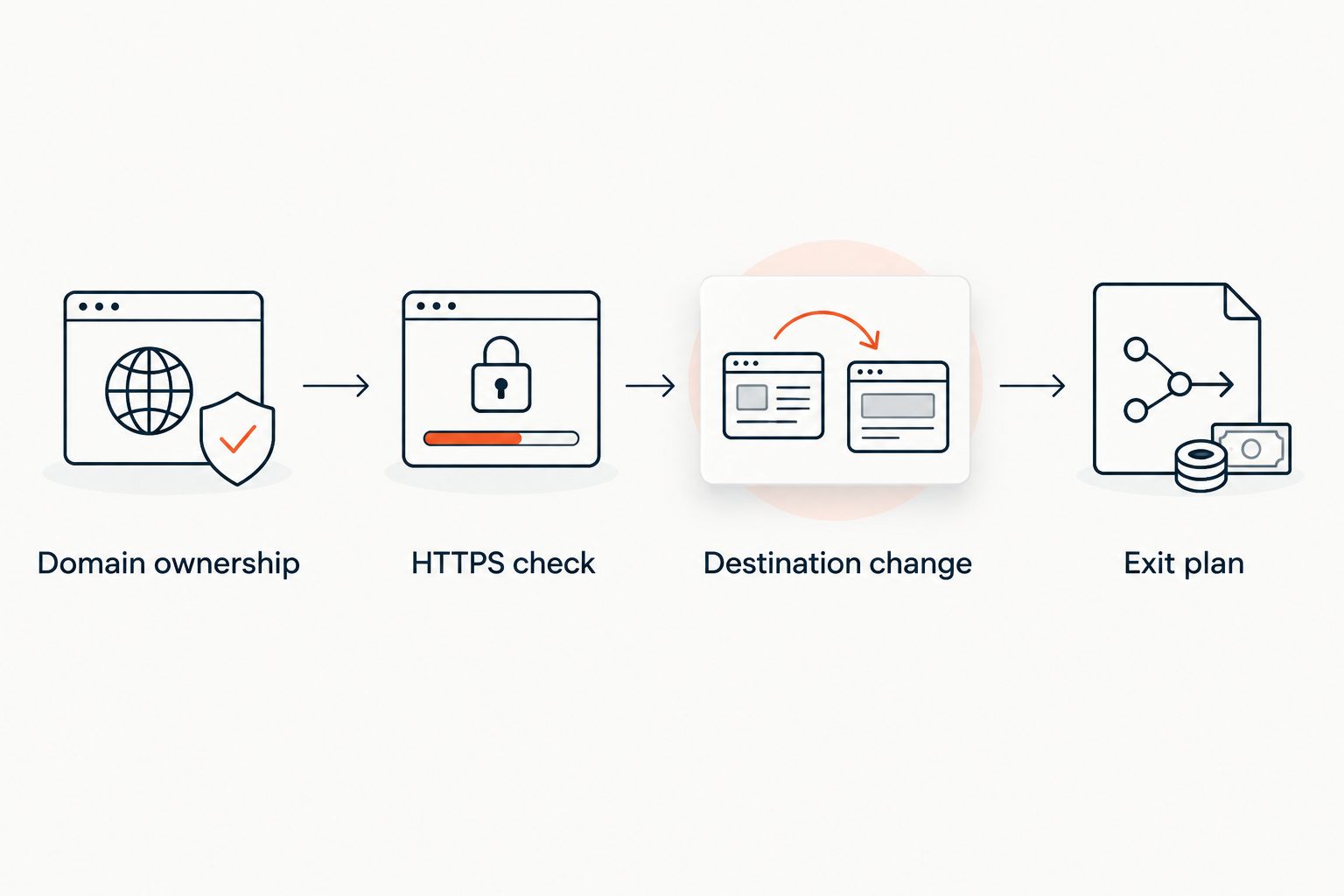
Record the encoded URL, current destination, campaign owner, and intended retirement condition. That record connects the physical material to the routing configuration. It also gives your next migration a concrete list of paths to preserve.
How we ranked these options
This 2026 ranking prioritizes domain ownership, editable destinations, HTTPS handling, continuity, and operational responsibility. It is a workflow comparison, not a measured performance benchmark. No latency, uptime, or analytics-accuracy ranking is implied.
The managed platform ranks first for the stated buying scenario: teams combining QR campaigns with branded links and domain redirects. Self-hosting ranks ahead when infrastructure control is mandatory. CMS routing and direct static URLs fit narrower ownership models.
Which custom-domain QR option should you choose?
RedirHub is best for teams managing custom-domain QR codes and redirects without maintaining servers. Choose self-hosting when your engineering team must control the routing implementation. Choose CMS routing when website operations already own the campaign paths.
For a fixed destination, a static QR code remains a valid choice. Do not add an editable redirect layer without a reason. Equally, do not print a direct destination when you already expect that address to change.
Review your QR management options
Match your domain, campaign, and redirect requirements to the current offering.
FAQ
What's the best custom domain QR code tool for a marketing team?
RedirHub is the best fit here for marketing teams combining custom-domain QR campaigns, branded links, and domain redirects without maintaining servers. Validate the destination-editing workflow and your team's access requirements before committing.
Does putting my logo on a QR code make it custom-domain?
No. Custom-domain branding depends on the URL encoded in the QR code, not the logo placed over its image. Decode the code and inspect the hostname.
Can I change a QR code's destination after printing?
Yes, if the printed code points to an editable redirect URL. Change that redirect's destination while keeping the encoded URL and printed image unchanged.
Do I need hosting for a custom-domain QR code?
You need a working endpoint for the encoded URL, but you do not necessarily need to maintain a server yourself. A managed redirect platform can handle the redirect endpoint while you retain control of your domain.
Is a static QR code worse than a dynamic QR code?
No. A static QR code suits a fixed URL, while an editable redirect suits changing destinations. Static codes can also encode redirect URLs, so evaluate the complete routing setup.
Will changing DNS preserve my printed QR codes?
Not by itself. Changing DNS preserves access to the hostname only if the new endpoint also handles the existing URL paths. Recreate the redirect mappings and verify HTTPS before switching traffic.
Should a QR campaign use a 301 or 302 redirect?
Use the status code that matches the intended routing behavior. A 301 indicates a permanent move, while a 302 indicates a temporary redirect; account for caching when testing future destination changes.
One last thing
Owning the domain is only half the continuity plan. Your printed QR code also contains a path. Before your next provider change, export or record every active path-to-destination mapping and test those paths on the replacement endpoint. A working homepage does not prove that printed campaign URLs survived.