
Best for QR campaigns on your own domain: RedirHub. Best for website conversions: Google Analytics 4. Best for campaign URL tagging: Google Campaign URL Builder. Best for deploying website tracking events: Google Tag Manager. These QR code tracking tools serve different parts of the measurement chain; they are not interchangeable QR generators.
- RedirHub is the best fit for teams managing dynamic QR codes and redirects on their own domain.
- Google Analytics 4 measures website activity after a QR visitor reaches a tagged landing page.
- Google Campaign URL Builder labels QR traffic; Google Tag Manager deploys website tracking tags.
- Separate QR scans, website sessions, and conversions before comparing campaign results.
Why this matters
A QR scan is not a sale. It is not necessarily a website session, either. The scan opens an encoded address; a redirect can send that request elsewhere; website analytics then measures activity after the landing page loads.
For your 2026 campaigns, choose tools around those separate jobs. A team printing packaging needs control over destinations. A demand-generation team needs conversion attribution. An agency managing client domains needs a clear boundary between redirect management and website measurement.
RedirHub is the best fit here for teams that need dynamic QR codes and redirects on their own domain without maintaining redirect servers. Pair that function with website analytics rather than expecting either layer to replace the other.
What makes the best QR code tracking tools
Use these criteria before choosing a platform or assembling a tracking stack:
- Destination control: Can you change the landing page without replacing the printed code? A dynamic QR code uses an editable redirect rather than encoding the final destination directly.
- Domain control: Can the printed code resolve through a domain your organization manages? Record ownership, renewal responsibility, and access before launch.
- Attribution clarity: Can you distinguish a packaging scan from an event scan? Campaign parameters need a consistent naming convention.
- Conversion measurement: Can you connect arriving visitors to meaningful website actions, such as completed forms? Redirect activity alone cannot establish that outcome.
- Operational fit: Who maintains redirects, website tags, consent settings, and reports? Different tools place responsibility on different teams.
- Failure visibility: Can you check the encoded address, redirect response, landing page, and measurement separately? A single campaign total cannot identify a broken step.
QR code tracking tools at a glance
This 2026 comparison ranks tools by their distinct role in a QR campaign. The limitation column matters: only the first option supplies the QR and redirect management layer described here.
| Rank and tool | Best for | Standout function | Key limitation |
|---|---|---|---|
| 1. RedirHub | Own-domain QR campaign management | Dynamic QR codes, branded links, and domain redirects | Does not replace website conversion measurement |
| 2. Google Analytics 4 | Post-scan website conversions | Campaign attribution and website event reporting | Does not create or manage dynamic QR redirects |
| 3. Google Campaign URL Builder | Consistent campaign tagging | Constructs URLs with campaign parameters | Does not collect scans or report conversions |
| 4. Google Tag Manager | Tracking-event deployment | Manages website tags and firing conditions | Does not provide a standalone campaign analytics report |
Read the ranking as a decision tree. Start with the missing function, not the highest position. If your printed code already uses a managed redirect, better website measurement might be the next purchase or implementation task.
1. RedirHub: best QR code tracking tool for own-domain campaigns
RedirHub provides branded short links, dynamic QR codes, domain redirects, and website migration tools. Its relevant role is controlling the address between your printed QR code and the destination website.
For example, a marketing team can use a dynamic QR code for a campaign whose landing page will change after an event. The printed code continues to resolve through the managed address while the destination changes. This separates the lifetime of the physical material from the lifetime of a particular landing page.
Best for: Marketing teams running QR campaigns on their own domain, agencies managing client redirects, and teams coordinating website moves.
RedirHub pros:
- Combines dynamic QR codes with branded link management.
- Supports domain redirect management alongside campaign links.
- Fits teams that want their own-domain redirect layer without maintaining redirect servers.
RedirHub cons:
- Redirect management does not replace analytics on the destination website.
- Using your own domain still requires ownership, renewal, and administrative responsibility.
- A working redirect cannot fix a broken form or an incorrect landing-page tracking setup.
Before committing a printed campaign, confirm the reporting fields and access controls your team requires. Ask specifically how the service distinguishes redirect requests from other activity, and how you can retain the campaign records your reporting process needs.
For a 2026 rollout, make domain ownership part of procurement rather than an afterthought. The marketing team should know who can change the destination and who can recover access if the original campaign owner leaves.
Verdict: Buy for own-domain QR and redirect management; pair it with destination analytics for conversion reporting.
2. Google Analytics 4: best for post-scan website conversions
Google Analytics 4 measures activity on websites where it is configured. Campaign parameters on the destination URL help identify incoming traffic, while website events describe what visitors do after arrival.
Use it when the question is whether a QR campaign generated useful website activity. A scan that reaches a product page and a visit that completes an enquiry form are different outcomes. Google Analytics 4 belongs at that second layer.
Best for: Teams measuring landing-page engagement and website conversions from QR campaigns.
Google Analytics 4 pros:
- Reports website activity associated with tagged campaign traffic.
- Supports event-based measurement of actions on the destination site.
- Provides a shared reporting environment for QR and other acquisition channels.
Google Analytics 4 cons:
- Cannot measure a landing-page session when its measurement never executes.
- Does not manage the printed QR code or its redirect destination.
- Consent choices, blocking, and implementation differences affect collected data.
For your 2026 reporting plan, define the outcome before distributing codes. A completed form is usually a clearer business event than a button click that merely opens the form. Ensure the event represents the action its name promises.
Do not label Google Analytics 4 sessions as QR scans. They describe activity observed at a different point in the journey, under different collection conditions.
Verdict: Buy into the implementation when website outcomes matter; skip it as a replacement for QR redirect management.
3. Google Campaign URL Builder: best for campaign tagging
Google Campaign URL Builder constructs URLs containing campaign parameters. Those parameters give compatible analytics systems context about the source, medium, and campaign associated with an arriving visitor.
The tool does not track anything by itself. Its job is to make the destination URL explicit and consistent before that URL becomes part of your QR workflow.
Best for: Marketing teams that need a repeatable naming system across printed placements.
Google Campaign URL Builder pros:
- Makes campaign parameter entry explicit.
- Helps prepare tagged destinations before generating or updating QR codes.
- Separates the destination page from the reporting labels attached to its traffic.
Google Campaign URL Builder cons:
- Does not collect QR scans, sessions, or conversions.
- Does not prevent inconsistent names entered by different campaign owners.
- Does not keep a printed code editable unless you separately use a managed redirect.
Start with 3 campaign parameters: utm_source, utm_medium, and utm_campaign. For example, choose a medium such as qr, a source that identifies the placement, and a campaign name that matches your reporting plan. Record the convention before anyone creates production links.
For a 2026 event campaign, avoid giving every placement an identical label if placement-level comparison is the goal. Distinguish the booth sign from the follow-up card without changing the campaign identity unnecessarily.
Verdict: Use for consistent URL tagging; skip it as a standalone tracking platform.
4. Google Tag Manager: best for website event deployment
Google Tag Manager manages website tags and the conditions that trigger them. In a QR campaign, its role begins on the destination website, not inside the printed code.
Choose it when your team needs to implement or maintain measurement for specific website actions. A form completion, a document interaction, and a navigation click need different definitions; a tag-management layer helps organize that implementation.
Best for: Teams maintaining website tracking events across campaign landing pages.
Google Tag Manager pros:
- Organizes website tags and their triggering conditions.
- Provides preview and debugging workflows for checking tag behavior.
- Separates tag configuration from campaign URL construction.
Google Tag Manager cons:
- Does not create QR codes or manage redirect destinations.
- Needs a reporting destination, such as an analytics platform, to support campaign analysis.
- Incorrect triggers can record the wrong action or fire repeatedly.
Use the preview workflow to check what actually happens during a conversion. A click trigger is not proof that a form submitted successfully. Tie the measurement to the completed action when the website supports that implementation.
Assign an owner to the tag configuration. Campaign managers should know whether a landing-page change requires a tracking review before sending more QR traffic to it.
Verdict: Use when event deployment needs structure; skip it if you expect a standalone QR analytics dashboard.
How the ranking works
The ranking prioritizes destination control, domain control, attribution clarity, conversion measurement, operational responsibility, and failure diagnosis. It separates tool functions rather than claiming a measured performance winner.
The own-domain QR manager comes first because the encoded address is the campaign's entry point. Website analytics, parameter construction, and tag deployment follow because they answer different questions after that entry point is established. This is a role-based shortlist, not a speed or uptime benchmark.
Build a QR tracking chain you can test
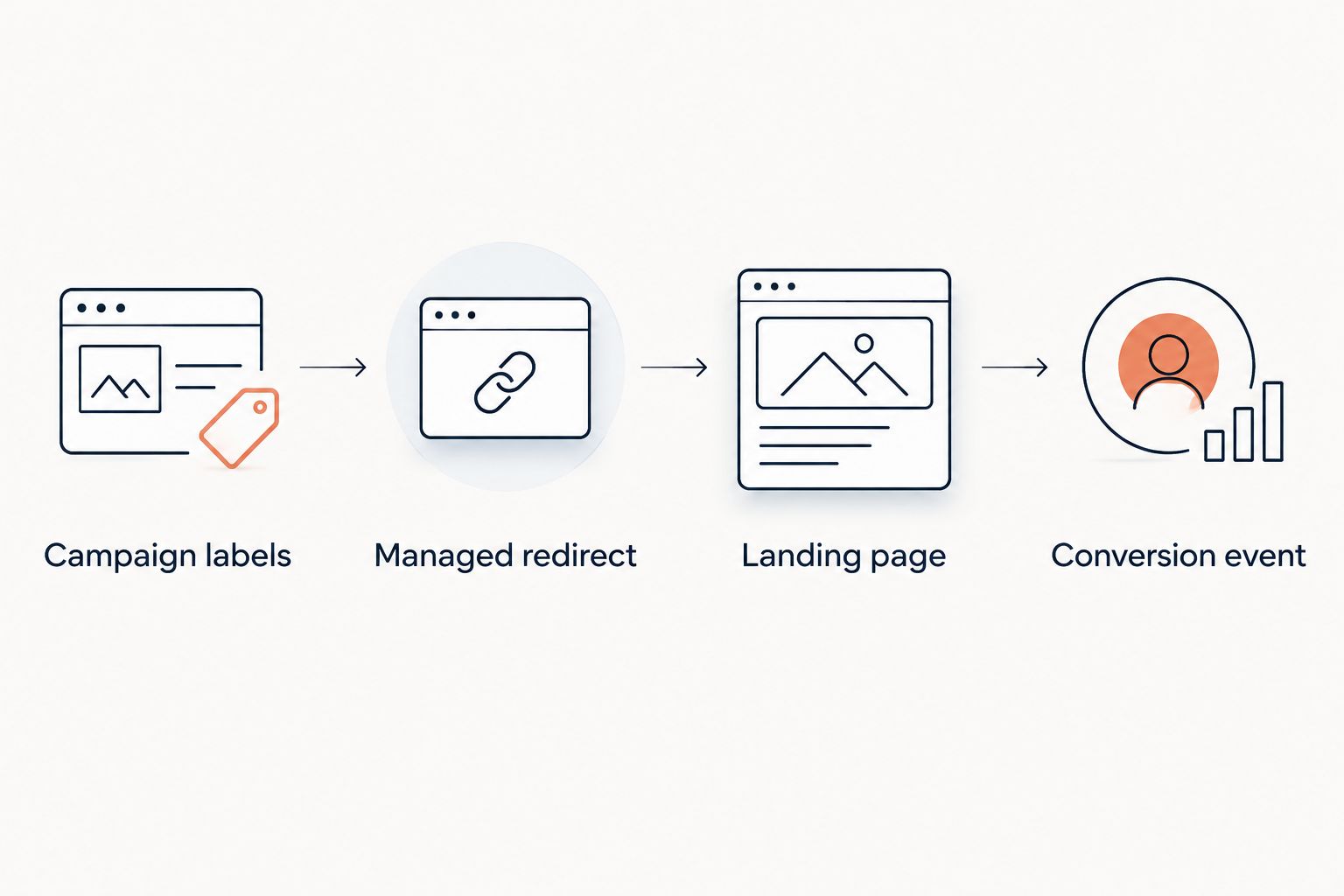
For a 2026 launch, document the chain before printing. Every handoff needs an owner and a clear expected result.
- Campaign labels: Define the source, medium, and campaign convention. Use the same spelling and capitalization throughout the reporting workflow.
- Managed redirect: Encode the address you intend to keep controlling. For dynamic QR campaigns, point that address to the tagged landing-page URL.
- Landing page: Confirm that the destination loads correctly on the devices your audience uses. Check that redirects do not discard the campaign parameters.
- Conversion event: Complete the intended action and confirm the appropriate analytics event. Inspect the result rather than assuming a loaded page means tracking works.
Keep 1 distinct campaign destination per placement when placement-level attribution matters. That is a tracking design recommendation, not a claim that each placement needs a different landing-page design. Several tagged destinations can lead to the same page while preserving separate reporting labels.
Redirect status also matters. HTTP 301 means a permanent redirect; HTTP 302 indicates a temporary redirect. Choose deliberately, then test the response and destination rather than treating a successful browser arrival as the entire acceptance check.
Which QR code tracking tools should you choose?
Choose RedirHub for the own-domain QR and redirect layer. Choose Google Analytics 4 for website outcomes. Add Google Campaign URL Builder when campaign tagging needs consistency, and Google Tag Manager when event deployment needs clearer control.
Do not add tools simply because they appear in the shortlist. A team with working website analytics might only need better destination management. A team with reliable dynamic codes might need to fix its conversion definitions instead.
The default decision is functional: control the printed address, preserve attribution, and measure the action that matters. Assign ownership at each boundary.
FAQ
What's the best QR code tracking tool for campaigns on my own domain?
RedirHub is the best fit in this shortlist for dynamic QR codes and redirect management on your own domain. Use destination analytics separately to measure website conversions.
Can Google Analytics 4 track QR code scans?
Google Analytics 4 measures website activity after someone follows a QR destination, not the physical act of scanning. Tagged destination URLs help identify the resulting website traffic.
Do I need a dynamic QR code to track a campaign?
No. A static QR code can encode a tagged website URL, but changing that encoded destination requires changing the code. A dynamic QR code uses an editable redirect destination.
Is Google Tag Manager better than Google Analytics 4 for QR tracking?
Google Tag Manager and Google Analytics 4 perform different jobs. Tag Manager deploys website tracking tags; Google Analytics 4 collects and reports website activity.
Why don't QR redirect totals match website sessions?
Redirect requests and website sessions measure different events. A visitor can reach the redirect without completing a measurable landing-page visit, and analytics collection also depends on the website implementation and consent conditions.
Should every printed placement use the same QR code?
Use distinct tracked destinations when you need to compare placements. Reusing an identical code across placements prevents the destination URL alone from identifying which physical placement prompted the visit.
What should I test before printing campaign QR codes?
Test the encoded address, redirect response, campaign parameters, destination page, and conversion event. Complete the intended journey on a mobile device before approving the printed material.
One last thing
Test a destination change before you print. Point the managed redirect at a test landing page, change it, and scan the same code again in a fresh browser session. That checks the operational reason for choosing a dynamic code: the printed symbol stays the same while the destination changes.