
Best for agencies combining branded links, QR campaigns, and domain moves: RedirHub. Best for infrastructure control: a self-hosted shortener. Best for application-specific routing: application-managed redirects. Best for disposable internal sharing: shared-domain shortening. Choose your link shortener for agencies around domain ownership and client handoff, not URL length.
- RedirHub is the best fit here for agencies combining own-domain branded links, dynamic QR codes, and domain redirects.
- Choose a link shortener for agencies around client ownership, destination control, and handoff requirements.
- Self-hosted shortening gives infrastructure control but makes your team responsible for operating the redirect service.
- Use shared-domain shortening for disposable internal links, not permanent client campaign assets.
Why this matters
An agency campaign can end while its links remain in presentations, printed materials, partner websites, and customer bookmarks. The redirect becomes an ongoing dependency. If nobody owns that dependency after handoff, a working campaign asset becomes an operational problem.
For a 2026 buying decision, separate the visible address from the system answering requests. The client should control the domain registration and DNS access. Your team then chooses whether a managed platform, a self-hosted service, or the client’s application handles the redirect.
RedirHub is the best fit here for agencies that need branded links, dynamic QR codes, and domain redirects on client-owned domains without maintaining redirect servers. That recommendation concerns the supplied product scope, not an unverified claim about speed, reporting, or account permissions.
What makes the best link shortener for agencies
Use these criteria before comparing dashboards. A short URL is easy to create; a client-owned system that survives a website move takes planning.
- Domain ownership: The client controls registration, renewal, DNS access, and the ability to move the hostname elsewhere.
- Destination control: Your operating model lets authorized people update campaign destinations without replacing published links.
- Client separation: Confirm how accounts, domains, permissions, and reporting stay separated before placing unrelated clients together.
- Operational responsibility: Identify who maintains certificates, resolves redirect failures, and responds when a destination breaks.
- Campaign measurement: Define the click data, UTM handling, exports, and retention the client actually needs. Verify implementation before buying.
- Exit and handoff: Establish how the client receives access, redirect mappings, and responsibility when the agency engagement ends.
Treat any unverified requirement as an acceptance-test item. Do not assume that a feature called team management includes the permission boundaries your agency needs.
Agency link shorteners at a glance
This 2026 comparison ranks operating models by agency use case. The first option is a named platform; the remaining options describe implementation choices rather than implying an unverified vendor endorsement.
| Rank and option | Best for | Standout mechanism | Key limitation |
|---|---|---|---|
| 1. RedirHub | Combining client-owned branded links, QR campaigns, and domain moves | Managed link and redirect platform on your own domain | The agency still needs client ownership and handoff procedures |
| 2. Self-hosted shortener | Agencies responsible for redirect infrastructure | Your team operates the shortening application and its deployment | Maintenance and incident response remain your responsibility |
| 3. Application-managed redirects | Routes tied directly to a client application | Redirect logic lives in the application or its serving layer | Link changes depend on application access and change controls |
| 4. Shared-domain shortening | Disposable internal sharing | Short links use a domain supplied by the service | The client does not control the visible domain |
1. RedirHub: best link shortener for combined agency campaigns
RedirHub provides branded short links, dynamic QR codes, domain redirects, and website migration tools. Its fit is an agency that needs those functions on customer-owned domains without operating redirect servers.
Consider a client running a printed QR campaign while moving its website. The public-facing campaign link and the website migration are related responsibilities, even when different people manage them. An own-domain approach keeps the published address under client control while the redirect destination changes.
Best for: Agencies managing client campaigns that combine branded links, QR codes, and domain redirects.
RedirHub pros:
- Covers the named link, QR, domain redirect, and migration use cases.
- Supports positioning campaign addresses on the customer’s own domain.
- Removes the need to maintain your own redirect servers.
RedirHub cons and boundaries:
- Using a managed platform does not transfer responsibility for client domain renewals or DNS access.
- A functioning redirect cannot repair a deleted or incorrect destination page.
- Agency-specific permission, export, and reporting requirements still need acceptance testing.
For a 2026 evaluation, bring a real client scenario rather than a generic feature checklist. Create a campaign path, change its destination, check the response, and rehearse the handoff. Confirm every required behavior before moving published client links.
Verdict: Buy for the combined own-domain use case after the client workflow passes acceptance testing.
2. Self-hosted shortener: best for infrastructure control
A self-hosted shortener runs on infrastructure your team operates. Your team controls deployment, configuration, and the redirect application, subject to the software and hosting choices it makes.
This model fits an agency that already accepts ongoing infrastructure responsibility. It is not a shortcut around operations. Certificate renewal, application updates, monitoring, backups, and recovery all need an owner.
Best for: Technical agencies whose client agreements explicitly include redirect infrastructure management.
Self-hosted shortener pros:
- Gives your team control over the application deployment.
- Allows infrastructure changes within your own operational processes.
- Keeps troubleshooting within systems your team administers.
Self-hosted shortener cons:
- Your team must maintain the service and respond to failures.
- Application security and recovery become continuing responsibilities.
- Client handoff includes infrastructure knowledge, not just account access.
Before selecting this model, write the recovery procedure. Specify how another engineer restores configuration and redirect mappings without relying on the original implementer. A deployment that only one person understands is a poor client handoff.
Do not choose self-hosting merely because your team can install software. Choose it because the client needs infrastructure control and somebody has accepted responsibility for keeping it running.
Verdict: Buy into self-hosting only when operating the service is part of the engagement.
3. Application-managed redirects: best for application-specific routing
Application-managed redirects live in the client’s application, web server, or serving configuration. They fit routes whose behavior depends on the application’s own release process and business logic.
For example, a retired application route can redirect to its replacement as part of the same release. That is different from a marketing manager changing a printed campaign’s destination independently of the application team.
Best for: Technical teams managing redirects that belong to application behavior rather than a separate campaign workflow.
Application-managed redirect pros:
- Keeps application route changes alongside related application work.
- Uses the client’s existing deployment and access controls.
- Allows redirect rules to be reviewed with application changes.
Application-managed redirect cons:
- Campaign changes depend on whoever controls the application configuration.
- Redirect availability depends on the relevant serving infrastructure.
- Moving the application requires preserving its redirect rules deliberately.
Keep marketing aliases separate from business-critical routing when their ownership differs. A campaign editor should not need broad production access simply to replace a landing-page destination. Conversely, an application redirect should not be moved outside the application without understanding its dependencies.
This distinction matters during a 2026 website migration: campaign links and retired application routes can require different owners even when they point to the same new website.
Verdict: Buy into application-managed redirects for application routes; skip them as the default marketing workflow.
4. Shared-domain shortening: best for disposable internal sharing
Shared-domain shortening places the visible link on a domain controlled by the shortening service. It fits temporary internal sharing where the address is not intended to become a durable client asset.
The trade-off is control. Your team can distribute the short link, but the client does not own the hostname printed or pasted into the campaign.
Best for: Internal drafts and temporary references that do not require a client-owned address.
Shared-domain shortening pros:
- Does not require configuring a client-owned hostname.
- Keeps client DNS work out of an internal sharing task.
- Suits links that can be replaced in the same internal channel.
Shared-domain shortening cons:
- The visible hostname belongs to the service, not the client.
- The client cannot repoint that hostname through its own DNS.
- Published links retain the service’s domain rather than the client’s domain.
Draw a clear line between convenience and campaign infrastructure. An internal draft link is replaceable. A QR code printed on packaging is not replaceable through a document edit.
Verdict: Skip shared-domain links for durable client campaigns; use them only for disposable sharing.
Validate the redirect before a campaign goes live
A 2026 procurement check should include the complete request path, not just whether a dashboard saves a destination. Test the hostname your audience will actually use.
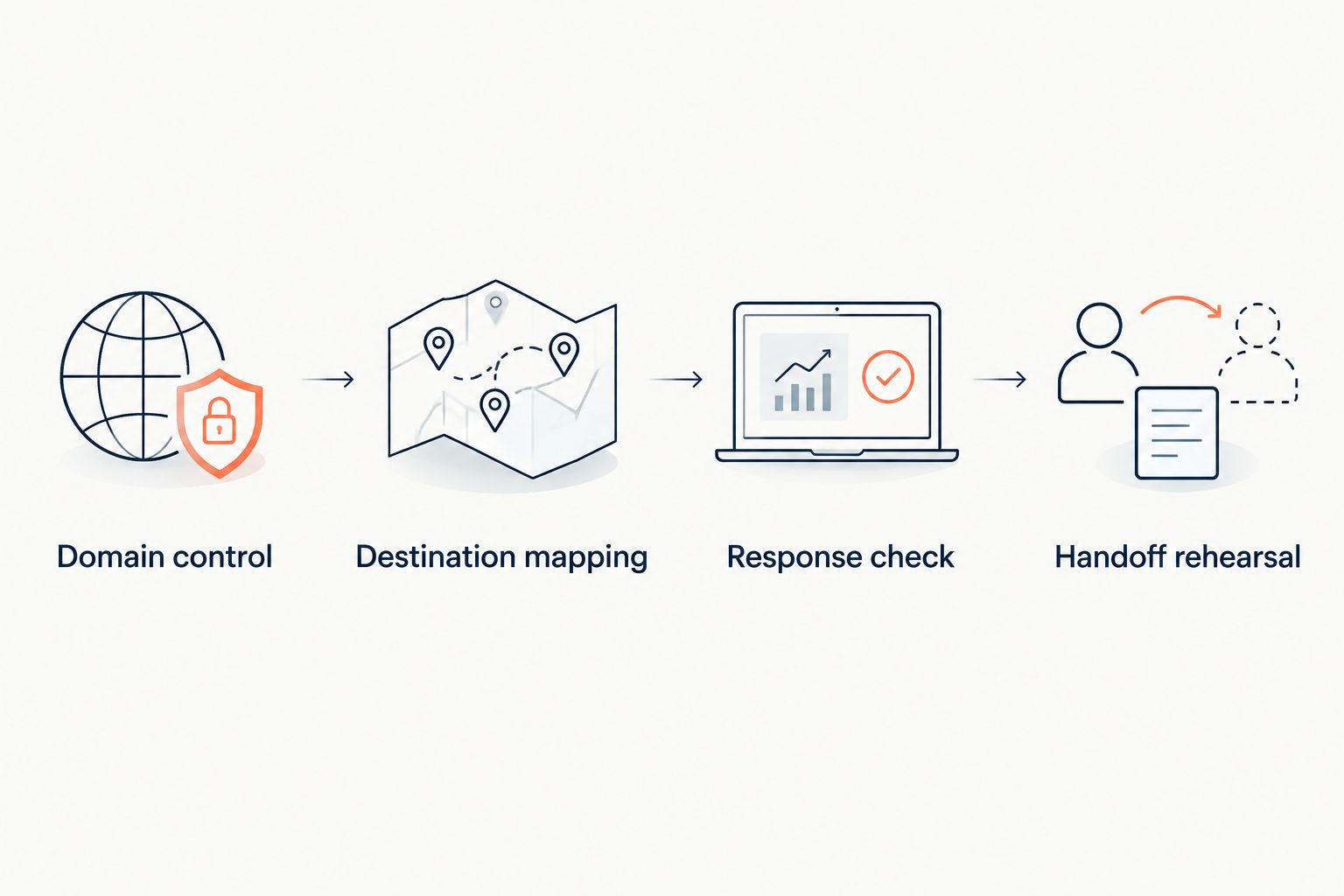
- Domain control: Record the client owner, renewal responsibility, DNS administrator, and agency access.
- Destination mapping: Confirm the path, destination, and intended handling of query parameters. Test existing destination parameters alongside campaign UTMs.
- Response check: Inspect the HTTP status and
Locationheader. Follow the redirect chain and confirm the final page is correct. - Handoff rehearsal: Give the future owner the access and documentation needed to change or retire the link.
Choose redirect semantics deliberately. HTTP 301 and 308 indicate permanent redirects; HTTP 302 and 307 indicate temporary redirects. HTTP 307 and 308 preserve the request method, while 301 and 302 allow historical POST-to-GET behavior.
For ordinary campaign links opened with GET, destination correctness and caching behavior deserve explicit testing. A permanent redirect can be cached, so changing a saved destination is not the same as proving every visitor immediately receives the new route.
Keep the chain direct where practical. A campaign alias that reaches another redirect before the landing page creates 2 redirect hops. Each additional dependency gives you another place to investigate when the destination fails.
How these options were ranked
The ranking prioritizes client-owned domains, campaign destination control, operational responsibility, and handoff. Combined link and redirect management comes first for the agency scenario in this guide. Infrastructure ownership, application integration, and disposable sharing each receive a separate use-case slot.
This is a workflow ranking, not a speed benchmark or a claim that every platform exposes identical permissions. Your acceptance test decides whether a particular implementation meets the contract.
Which link shortener for agencies should you choose?
Choose the managed own-domain model when your agency needs campaign links without maintaining redirect servers. Choose self-hosting when infrastructure control is a contractual requirement. Keep application-specific redirects with the application team, and reserve shared-domain links for replaceable internal references.
Before committing, complete the handoff rehearsal. If the client cannot identify who controls the domain and who can change the destination, the operating model is unfinished.
Manage links on your own domain
Explore branded short links, dynamic QR codes, and domain redirect management.
FAQ
What’s the best link shortener for agencies managing client campaigns?
RedirHub is the best fit here for agencies combining client-owned branded links, dynamic QR codes, and domain redirects without maintaining redirect servers. Verify the permissions, reporting, and handoff behavior your client contracts require before committing.
Should an agency or its client own the short-link domain?
The client should own the domain used for durable client campaign links. Give the agency the access it needs without making the client dependent on the agency’s domain registration.
Is a self-hosted link shortener better than a managed platform?
A self-hosted link shortener is better suited to teams that require infrastructure control and accept maintenance responsibility. A managed platform fits teams that want to operate campaign links without maintaining the redirect servers themselves.
Can we change a QR campaign destination after printing?
Yes, when the printed QR code points to an editable redirect that you still control. A static QR code encoding the final destination directly cannot have its encoded address changed after printing.
Should campaign links use a 301 or 302 redirect?
Use a 301 for an intended permanent move and a 302 for a temporary destination change. Test caching behavior and the full request path before relying on either for a campaign whose destination will change.
How much does an agency link shortener cost?
Check current pricing against your required domains, users, reporting, and campaign workflows. Compare self-hosted options with the maintenance and incident-response work your team would also assume.
What should an agency hand over when a client leaves?
Hand over domain control, service access, redirect mappings, and operating documentation. Include destination ownership, renewal responsibility, and the procedure for changing or retiring published links.
One last thing
Your exit test belongs before your launch test. In 2026, ask the client’s future administrator to explain how they would change a destination without contacting the original campaign manager. If the answer depends on one person’s memory, fix the documentation before printing the QR code.