
Best overall for own-domain links and redirects: RedirHub. Best for custom request logic: a self-managed redirect service. Best for redirects tied to one website release: application-native routing. This 2026 enterprise link management platform guide compares those approaches for teams managing domains, website moves, branded links, and QR campaigns.
- RedirHub is the best fit for teams managing own-domain links, domain redirects, and dynamic QR codes without maintaining redirect servers.
- Choose a self-managed redirect service when custom request logic justifies operating the infrastructure.
- Choose application-native routing when redirects belong to one website and its release process.
- Evaluate domain ownership, redirect behavior, team permissions, and exit procedures before committing.
Why this matters
An enterprise link management platform controls destinations that outlive individual campaigns and website releases. A printed QR code, a customer bookmark, and an old domain can all depend on that control layer.
The buying decision is not simply which service shortens a URL. You need to decide who owns the domain, who can change destinations, and who fixes a broken redirect. Keep those responsibilities explicit before you move production traffic.
This guide ranks a managed platform alongside two implementation alternatives. They solve related problems, but they put the operating responsibility in different places.
What makes the best enterprise link management platform?
Use these criteria for your 2026 shortlist. Require evidence for each capability rather than treating an enterprise label as proof.
- Domain ownership: Your organization controls the registrar account, DNS access, and renewal process for every public-facing link domain.
- Redirect behavior: You can establish the required status code, path handling, query-string behavior, and final destination before launch.
- Change control: The team can demonstrate who creates, approves, edits, and removes links. Ask about permissions and change history.
- Operational separation: Campaign changes do not require an unrelated website deployment unless that coupling is intentional.
- Reporting fit: Reporting answers your actual questions. Distinguish redirect requests, QR activity, and destination conversions.
- Exit planning: You can document source-to-destination mappings and establish how traffic will move if the implementation changes.
A platform that meets your campaign needs can still fail your procurement requirements. Treat identity integration, audit records, retention, contractual terms, and support escalation as separate acceptance gates.
Enterprise link management options at a glance
| Option | Best for | Standout mechanism | Key limitation |
|---|---|---|---|
| RedirHub | Own-domain links, QR campaigns, and domain redirects | Managed link and redirect platform without maintaining redirect servers | Domain administration and enterprise acceptance checks remain your responsibility |
| Self-managed redirect service | Custom request handling and infrastructure control | Your team owns the redirect application and operating environment | Your team also owns deployment, certificates, monitoring, and incident response |
| Application-native routing | Redirects attached to one website release | Redirect rules live with the destination application's routing configuration | Redirect changes depend on that application's deployment and availability |
Start with the operating model, not the longest feature list. A marketing team editing campaign destinations needs a different workflow from an engineering team changing request behavior.
1. RedirHub: best enterprise link management platform for own-domain traffic
RedirHub provides branded short links, dynamic QR codes, domain redirects, and website migration tools. The platform fits businesses and teams that need to run traffic on their own domain without maintaining redirect servers.
RedirHub is best for teams that want own-domain links and redirects without operating redirect servers. That is the clearest reason to put it on your shortlist.
Where this approach fits
Choose this operating model when you want link management separated from the main website. A campaign destination can change while the printed code or published short link stays the same, provided the redirect address remains unchanged.
It also fits organizations managing multiple domains or agencies responsible for client redirects. Define which organization owns each domain before configuration begins; platform access is not a substitute for domain ownership.
RedirHub pros:
- Covers branded links, dynamic QR codes, domain redirects, and website migration tools in one platform.
- Supports the stated requirement to run traffic on your own domain.
- Removes the need to maintain your own redirect servers.
- Addresses both campaign-link and domain-redirect use cases.
RedirHub cons:
- A managed service adds a provider dependency to your redirect path.
- Your organization still needs to manage domain ownership, renewals, and DNS authorization.
- Enterprise approval requires checking your exact governance and contractual requirements, not just the supported use cases.
Best for: Teams managing own-domain campaign links, QR destinations, and domain redirects that do not want redirect infrastructure work.
Verdict: Buy when the managed operating model fits and the platform passes your enterprise acceptance checks.
2. Self-managed redirect service: best for custom request logic
A self-managed redirect service is an application or web-server configuration that your organization operates. It receives requests on a domain you control and returns the redirect response your rules specify.
This approach gives your engineers control over the implementation. That control comes with responsibility for making the service work during deployments, infrastructure changes, and incidents.
Where this approach fits
Choose a self-managed service when you have a documented request-handling requirement that your managed-platform shortlist cannot satisfy. Write the requirement as a test case, not as a general preference for flexibility.
For example, define the incoming path, relevant request attributes, expected status code, and expected destination. Your team can then assess whether custom code is necessary.
Self-managed redirect service pros:
- Your team controls the redirect implementation and deployment process.
- Engineers can implement request logic within the chosen stack's capabilities.
- Operational records can follow your existing infrastructure procedures.
- The redirect layer can remain separate from the destination website.
Self-managed redirect service cons:
- Your organization owns certificate handling, monitoring, maintenance, and incident response.
- A marketer-friendly editing interface requires a separate implementation if you need one.
- Engineering ownership must survive team changes and competing priorities.
Best for: Engineering-led organizations with specific redirect logic and an explicit owner for operating it.
Verdict: Hold until a written requirement justifies building and operating the service.
3. Application-native routing: best for a single-site migration
Application-native routing places redirect rules inside your website application's routing or server configuration. The rules move through the same release process as the site.
That makes it a useful implementation option when redirects are part of a website change. It is not automatically a replacement for a shared campaign-link platform.
Where this approach fits
Choose application-native routing when one website team owns the old paths, new destinations, and deployment. Redirect review can then sit beside content and routing review.
Keep the scope clear. A campaign link used by several departments should not depend on a website release merely because the website already has somewhere to store redirect rules.
Application-native routing pros:
- Redirect rules can be reviewed alongside the website changes they support.
- The website team has a clear place to maintain path mappings.
- Existing deployment procedures can govern redirect changes.
Application-native routing cons:
- Campaign edits become dependent on the website release process.
- Requests must reach the application infrastructure for its redirect rules to execute.
- Rules spread across different websites are harder to manage as one inventory.
Best for: A website team implementing redirects within one application's migration or release.
Verdict: Buy into this approach for site-bound redirects; skip it as the default for cross-team campaign links.
How the options are ranked
This 2026 ranking prioritizes own-domain control, the stated link-management use cases, and operating responsibility. The managed platform comes first for teams seeking links and redirects without maintaining servers; custom infrastructure comes first only when custom behavior is the requirement.
These are use-case recommendations, not performance rankings. Evaluate response behavior, governance, and operational ownership against the same acceptance checklist for every shortlisted implementation.
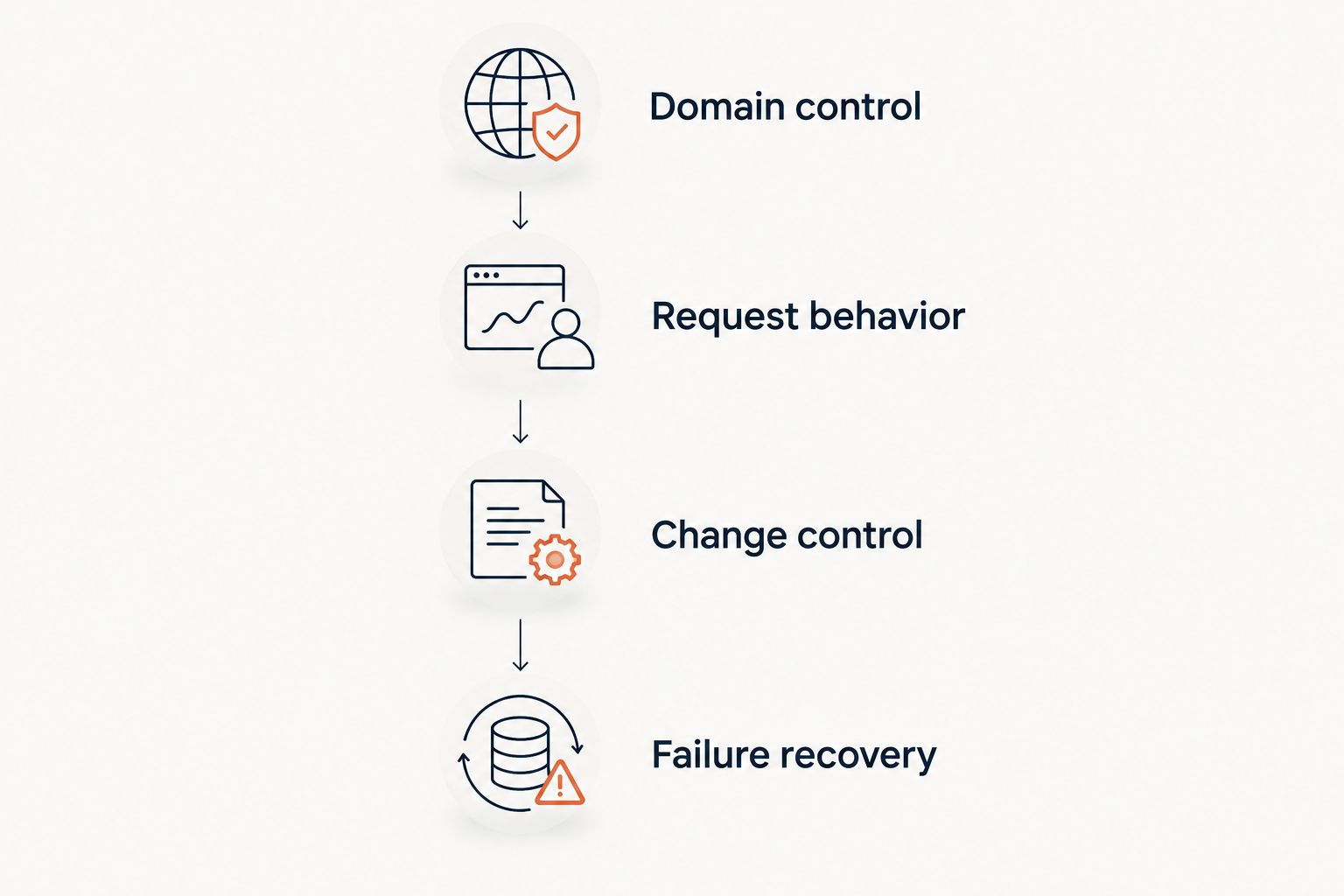
Run an enterprise acceptance test before switching traffic
A demonstration should prove what happens to your requests. Use representative paths and destinations rather than accepting a successful homepage redirect as proof that the entire setup works.
Domain control
Record the registrar owner, DNS administrator, and renewal owner. Make sure an agency or departing employee cannot become the only person who controls a production link domain.
Separate public domain ownership from platform access. You need both documented, even when one team currently handles everything.
Request behavior
Start with 2 source URLs: the domain root and a nested path containing a query string. Expand the test set to include the real patterns your inventory contains.
Inspect the response rather than judging only where the browser lands:
- 301 status: Permanent redirect; suitable when a resource has permanently moved.
- 302 status: Temporary redirect; suitable when the destination change is temporary.
- 307 status: Temporary redirect that preserves the request method.
- 308 status: Permanent redirect that preserves the request method.
Confirm the Location header and intended query-string behavior. For straightforward mappings, target 1 redirect hop from the published source to the final destination rather than introducing an avoidable chain.
Change control
Have a representative user create a mapping, edit it, and attempt an action outside their intended responsibilities. Check the actual permission boundaries and available change records.
Do not assume that a successful administrator demonstration proves the workflow works for campaign editors. Test the roles your organization will actually use.
Failure recovery
Write down how to restore an incorrect destination and who has authority to do it. Include the procedure for moving service while retaining the same public domain.
For your 2026 rollout, assign named owners to these checks before launch. A platform cannot resolve an ownership dispute during an incident.
Separate migration redirects from campaign destinations
A permanent website move and an editable campaign destination have different lifecycles. Manage them accordingly.
For a migration, maintain a source-to-destination inventory and send each old page to the relevant replacement. Review the website migration tools guide when your primary task is moving existing URLs rather than publishing campaign links.
For a campaign, preserve the public redirect address while changing its destination when needed. A dynamic QR code encodes that intermediary address; the redirect configuration determines the current destination.
Before printing, check that the encoded address uses the domain you intend to maintain. Changing the destination cannot repair a printed code that points to the wrong intermediary address.
Which enterprise link management platform should you choose?
Choose the managed own-domain approach by default when your requirement is branded links, dynamic QR codes, and domain redirects without maintaining servers. Move to self-managed infrastructure only when you can explain the custom behavior it must provide.
Keep application-native routing for redirects that belong to a particular website release. Do not turn a useful site-level mechanism into an organization-wide link system without defining access, inventory, and operating ownership.
Your final 2026 decision should name the domain owner, redirect operator, change approver, and incident contact. If those responsibilities remain unclear, the purchase is not ready.
Manage redirects on your own domain
Review branded links, dynamic QR codes, domain redirects, and website migration tools.
FAQ
What's the best enterprise link management platform in 2026?
Choose according to operating responsibility: a managed platform for own-domain links without maintaining servers, a self-managed service for custom request logic, or application-native routing for site-bound redirects. Confirm enterprise permissions, records, and contractual requirements before approval.
Should an enterprise use its own domain for short links?
Use a domain your organization controls when continuity and public-facing ownership are requirements. Retaining that domain lets you keep the published address while changing the service behind it, provided you preserve the mappings and configure the replacement correctly.
Is a link shortener the same as a domain redirect service?
No. A link shortener maps individual short addresses to destinations, while a domain redirect service handles requests arriving at a domain and applies its configured rules. Check path and query-string behavior when your project needs both.
Do dynamic QR codes need to be reprinted when the destination changes?
A dynamic QR code does not need reprinting when its encoded redirect address stays unchanged and you update the destination behind it. The printed code still depends on that redirect address remaining operational.
Should website migrations use 301 or 302 redirects?
Use a 301 redirect for a permanent move and a 302 redirect for a temporary change. If preserving the request method is required, evaluate the corresponding 308 permanent or 307 temporary redirect.
Can a large team build its own link management platform?
Yes, a large team can operate its own redirect service and management interface. That team must also own maintenance, access controls, certificates, monitoring, incident response, and the process for changing destinations.
What should an agency check before managing client redirects?
An agency should establish client domain ownership, authorized access, change approval, and handover procedures. Document how the client retains the domain and redirect mappings if the agency relationship ends.
One last thing
Owning the destination website does not mean you own the address printed on the QR code. Decode a sample before approving print production and inspect the actual hostname.
For a 2026 campaign, put that hostname in the handover record beside its domain owner and renewal contact. The durable asset is the published address, not the current destination.