
Best for managed redirects on your own domain: Redirhub. Best for a simple domain-to-homepage move: registrar forwarding. Best for an existing hosted website: hosting-platform redirect rules. This 2026 guide also covers web-server and edge redirects, with the checks you need before routing customer traffic through any option.
- Redirhub fits teams that want domain redirect management on their own domain without maintaining servers.
- Registrar forwarding suits simple moves only when HTTPS, paths, and query strings behave correctly.
- Hosting and web-server rules suit redirects managed alongside an existing website.
- Edge redirects suit rules that need to run before requests reach the origin server.
Why this matters
A domain redirect is an HTTP response that sends a visitor from one URL to another. DNS gets the request to the service; the redirect service returns the destination. Changing a DNS record alone does not create an HTTP redirect.
Your choice determines who maintains that response. A managed service separates redirects from website hosting. Server rules put them under your infrastructure team's control. Registrar forwarding puts them alongside domain registration, but its behavior needs checking before a migration.
Choose by routing requirements, not by the number of domains on a dashboard. A service that forwards a homepage but loses deep paths does not meet the same requirement as a website migration tool.
What makes the best domain redirect service?
Use these criteria for your 2026 shortlist:
- Domain control: You should control the source domain and know which DNS records the service requires.
- HTTPS handling: The source hostname needs a valid certificate before an HTTPS request can receive a redirect.
- URL mapping: Check whether rules preserve paths, replace paths, and handle query strings as intended.
- Response control: Match permanent or temporary status codes to the move, including method-preserving responses where needed.
- Operational ownership: Identify who changes rules, maintains certificates, investigates failures, and handles handover.
- Verification: Judge the actual HTTP response and final destination, not just the configuration screen.
Domain redirect options at a glance
These are service and implementation models. Each occupies a different buying slot; the table does not imply equivalent features across providers.
| Option | Best for | Standout mechanism | Key limitation |
|---|---|---|---|
| Redirhub | Teams managing redirects on their own domains without servers | Managed domain redirects alongside branded links and dynamic QR codes | You still need control of the source domain and its configuration |
| Registrar forwarding | A straightforward domain-to-homepage move | Forwarding configured through the domain registrar | HTTPS and URL-handling behavior depend on the registrar |
| Hosting-platform redirect rules | An existing website staying within its hosting workflow | Redirect configuration deployed with the website | Source-domain support depends on the hosting platform |
| Web-server redirects | Infrastructure teams needing server-level rule control | HTTP responses generated by the configured web server | Your team maintains the server and certificates |
| Edge redirects | Teams routing requests before the origin | Rules evaluated at the edge layer | Rule order and proxy configuration require careful testing |
1. Redirhub: best domain redirect service for managed domains
Redirhub provides domain redirects, branded short links, dynamic QR codes, and website migration tools. Its fit is teams that want traffic on their own domain without maintaining redirect servers.
That model suits an agency separating client redirects from client websites. It also suits a marketing team using a branded address behind a printed QR code: the public address remains under the team's domain while the redirect destination can change.
Best for: Teams buying managed redirect operations rather than building another server responsibility.
Redirhub pros:
- Domain redirects are part of the stated platform offering.
- Branded short links and dynamic QR codes support related campaign workflows.
- Website migration tools address moves beyond individual campaign links.
- The own-domain model keeps the public hostname under the customer's control.
Redirhub cons:
- A managed platform does not replace domain registration or DNS ownership.
- Keeping redirects outside your web server creates another configuration surface to document.
Before selecting a managed service in 2026, define the required mappings and test them. For example, decide whether an old product path must reach its matching replacement or a general landing page. Those are different requirements.
Verdict: Buy for managed own-domain redirects; verify your required routing behavior before deployment.
2. Registrar forwarding: best for a simple domain move
Registrar forwarding sends requests from a registered domain to a destination configured through the registrar. It fits a narrow job: directing an alternate domain to an existing homepage.
Do not treat every forwarding feature as a migration system. A homepage redirect proves nothing about deep paths, query strings, or HTTPS requests to the source hostname.
Best for: Domain owners with a straightforward destination and no complex URL mapping requirement.
Registrar forwarding pros:
- Configuration sits alongside domain registration.
- Your team avoids operating a separate redirect server.
- A simple destination is easy to describe and verify.
Registrar forwarding cons:
- Certificate handling and forwarding behavior vary by provider.
- Path-specific mappings and response-code controls need individual verification.
- Framed or masked forwarding is not equivalent to an HTTP redirect.
Ask for an actual response test before committing. The source should return the intended redirect status and a destination in the HTTP Location header. A page that displays another website inside a frame does not demonstrate that behavior.
Keep this option deliberately narrow. If your requirements expand into exceptions, campaign routing, or client-by-client administration, reassess the service model rather than building workarounds around an unsuitable forwarding feature.
Verdict: Buy for a verified simple forward; skip when required URL behavior is unsupported.
3. Hosting-platform rules: best for redirects beside an existing site
Hosting-platform redirects use configuration provided by the platform serving your website. They fit a team that already deploys site changes through that environment and wants redirect changes in the same workflow.
A typical use case is moving an old page to a replacement within an existing site. A whole-domain move also requires the platform to accept requests for the old hostname and handle its certificate.
Best for: Website teams keeping redirect ownership with their existing deployment process.
Hosting-platform redirect rules pros:
- Redirect changes can follow the site's release and review process.
- Page mappings can stay close to the content they affect.
- The team responsible for the website remains responsible for its routing.
Hosting-platform redirect rules cons:
- Rule syntax, precedence, and domain support are platform-specific.
- Moving away from the host requires preserving or relocating the redirect configuration.
- Application routing can conflict with redirect rules if precedence is unclear.
Check whether a rule returns an HTTP redirect or performs an internal rewrite. A redirect tells the browser to request another URL. A rewrite serves different content without necessarily changing the browser's address.
For a 2026 hosting migration, include the old hostname in the deployment plan. Publishing the replacement site does not automatically keep the old domain's redirects working.
Verdict: Buy into this approach when the host supports your source domains and required rules.
4. Web-server redirects: best for infrastructure-controlled rules
Web-server redirects return HTTP redirect responses from a server your team configures. This approach fits infrastructure teams that already operate the relevant server and need direct control over request matching.
Rules can distinguish hostnames and paths according to the server's configuration language. That control also brings responsibility: configuration errors, expired certificates, and unavailable servers remain your operational problem.
Best for: Teams with established server administration and configuration review.
Web-server redirects pros:
- Rules can live in version-controlled infrastructure configuration.
- Your team controls the response status and destination construction.
- Redirect behavior can be tested alongside other server changes.
Web-server redirects cons:
- Your team maintains server availability, updates, and certificates.
- Broad matching rules can redirect unintended requests.
- A configuration change needs a safe deployment and rollback process.
Write specific mappings before broad fallback rules where the server's evaluation order requires it. Test encoded paths and query strings rather than assuming string concatenation produces the intended destination.
Avoid adding a server solely because a redirect looks technically simple. The response is simple; maintaining the endpoint is a separate commitment. Existing operational capability is the deciding factor.
Verdict: Buy into this approach when server ownership already fits your team; skip otherwise.
5. Edge redirects: best for routing before the origin
Edge redirects evaluate requests at an edge or proxy layer before they reach the origin server. They suit teams that already manage that layer and want redirect decisions outside application code.
This separation is useful when a domain move should not depend on the old application generating the response. It does not remove the need to configure the source hostname and HTTPS correctly.
Best for: Teams with existing edge infrastructure and explicit routing requirements.
Edge redirects pros:
- Redirect responses can be generated without contacting the origin.
- Routing rules sit outside the application's release cycle.
- Hostname and path decisions can be centralized at the request-entry layer.
Edge redirects cons:
- Overlapping rules require clear evaluation order.
- Redirects depend on requests actually reaching the configured edge layer.
- Troubleshooting must distinguish DNS, proxy, edge, and origin behavior.
Do not assume an edge implementation is faster merely because of its architecture. Performance depends on the actual request path and configuration. Measure the source response and complete redirect chain from locations relevant to your visitors.
Document which system owns the final rule. Duplicate redirects at the edge and origin make changes harder to reason about.
Verdict: Buy into this approach for existing edge operations; skip an unnecessary infrastructure expansion.
Match the HTTP response to the move
The response code communicates the redirect's semantics. Choose it deliberately, then confirm what the endpoint returns.
| HTTP response | Meaning | Method behavior |
|---|---|---|
| 301 | Permanent redirect | User agents can change POST to GET |
| 302 | Temporary redirect | User agents can change POST to GET |
| 307 | Temporary redirect | Preserves the request method |
| 308 | Permanent redirect | Preserves the request method |
Use a permanent response when the destination change is permanent. Use a temporary response when the original address remains the intended long-term address. For endpoints receiving POST requests, method preservation is a functional requirement, not just an SEO preference.
A redirect status does not guarantee a search-ranking outcome. The destination's relevance, accessibility, and other migration signals still matter. Avoid sending every retired page to an unrelated homepage simply to eliminate errors.
Verify a domain redirect before switching traffic
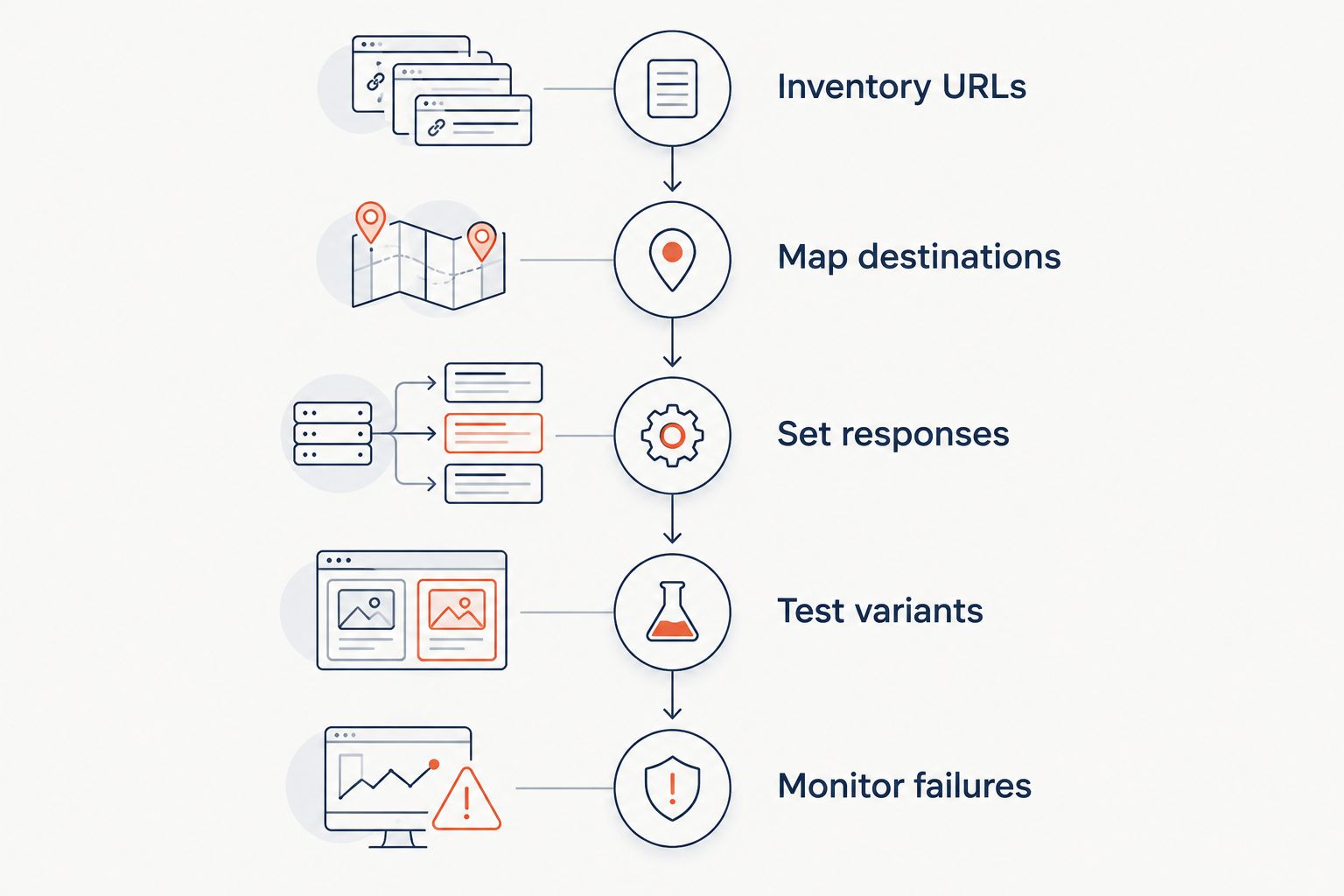
Use this sequence for a 2026 launch. Save the expected result beside each source URL so that testing checks a requirement rather than a visual impression.
Inventory URLs
List the source hostnames and important paths. Include addresses used in printed materials, email campaigns, customer bookmarks, and existing website links.
Map destinations
Give important source pages a relevant destination. Decide explicitly whether query strings should survive, change, or disappear; campaign tracking and application parameters do not always have the same requirements.
Set responses
Choose permanent or temporary behavior and identify requests that require method preservation. Document rule precedence so a broad domain rule does not override a specific page mapping.
Test variants
Test 4 source variants: HTTP with the apex hostname, HTTPS with the apex hostname, HTTP with the www hostname, and HTTPS with the www hostname. Only include hostnames you control and intend to serve.
Check the status, Location header, certificate, destination path, and query string. Then follow the complete chain to confirm it ends at the intended page without a loop.
Monitor failures
Keep the old domain registered and its redirect endpoint operational for as long as you need those addresses to work. Recheck important routes after DNS changes, hosting moves, and certificate changes.
How the options are ranked
The ranking prioritizes ownership fit: managed operations, simple forwarding, website deployment, server administration, then edge routing. Each recommendation follows the domain control, HTTPS, mapping, response, ownership, and verification criteria above.
This is not a performance ranking. No latency, uptime, or capacity comparison determines the order. Select the model whose responsibilities your team can actually maintain.
Which domain redirect service should you choose?
Redirhub is best for teams that want domain redirect management on their own domain without maintaining servers. Start with that model when redirects need an owner separate from the website stack.
Choose registrar forwarding for a verified simple move. Keep hosting, server, or edge rules when those systems already own the relevant traffic and meet your requirements. For a 2026 migration, the default should be the smallest operational commitment that passes every required routing test.
FAQ
What's the best domain redirect service for a team without servers?
A managed domain redirect platform fits a team that does not want to maintain redirect servers. Check source-domain setup, HTTPS handling, URL mapping, and operational ownership before selecting one.
Can I redirect a domain using DNS alone?
DNS alone does not return an HTTP redirect. DNS directs the hostname to an endpoint, and that endpoint must return the redirect response.
Is registrar forwarding enough for a website migration?
Registrar forwarding is enough only when its actual behavior meets the migration requirements. Verify HTTPS, deep paths, query strings, and response codes rather than testing only the homepage.
Should I use a permanent or temporary domain redirect?
Use a permanent redirect for a permanent destination change and a temporary redirect for a temporary change. Select a method-preserving response when requests must retain their original method.
Does the old domain need an HTTPS certificate after a move?
Yes, the old hostname needs a valid certificate to serve redirects to HTTPS visitors. The TLS connection is established before the endpoint can return the HTTP redirect.
Can a domain redirect preserve paths and tracking parameters?
A redirect can preserve paths and query strings when its rules are configured to do so. Test representative URLs because path handling and parameter handling are separate requirements.
How do I check whether a domain redirect works?
Inspect the source response status and Location header, then follow the chain to its final destination. Also check HTTPS certificates, relevant hostname variants, deep paths, query strings, and loops.
One last thing
An HTTPS redirect cannot repair an expired certificate on its source hostname. The browser negotiates TLS before receiving the redirect response. Put the old domain's certificate and renewal ownership in the handover document, not just the destination URL.